Understand Pigsty’s core concepts, architecture design, and principles. Master high availability, backup recovery, security compliance, and other key capabilities.
Pigsty is a portable, extensible open-source PostgreSQL distribution for building production-grade database services in local environments with declarative configuration and automation. It has a vast ecosystem providing a complete set of tools, scripts, and best practices to bring PostgreSQL to enterprise-grade RDS service levels.
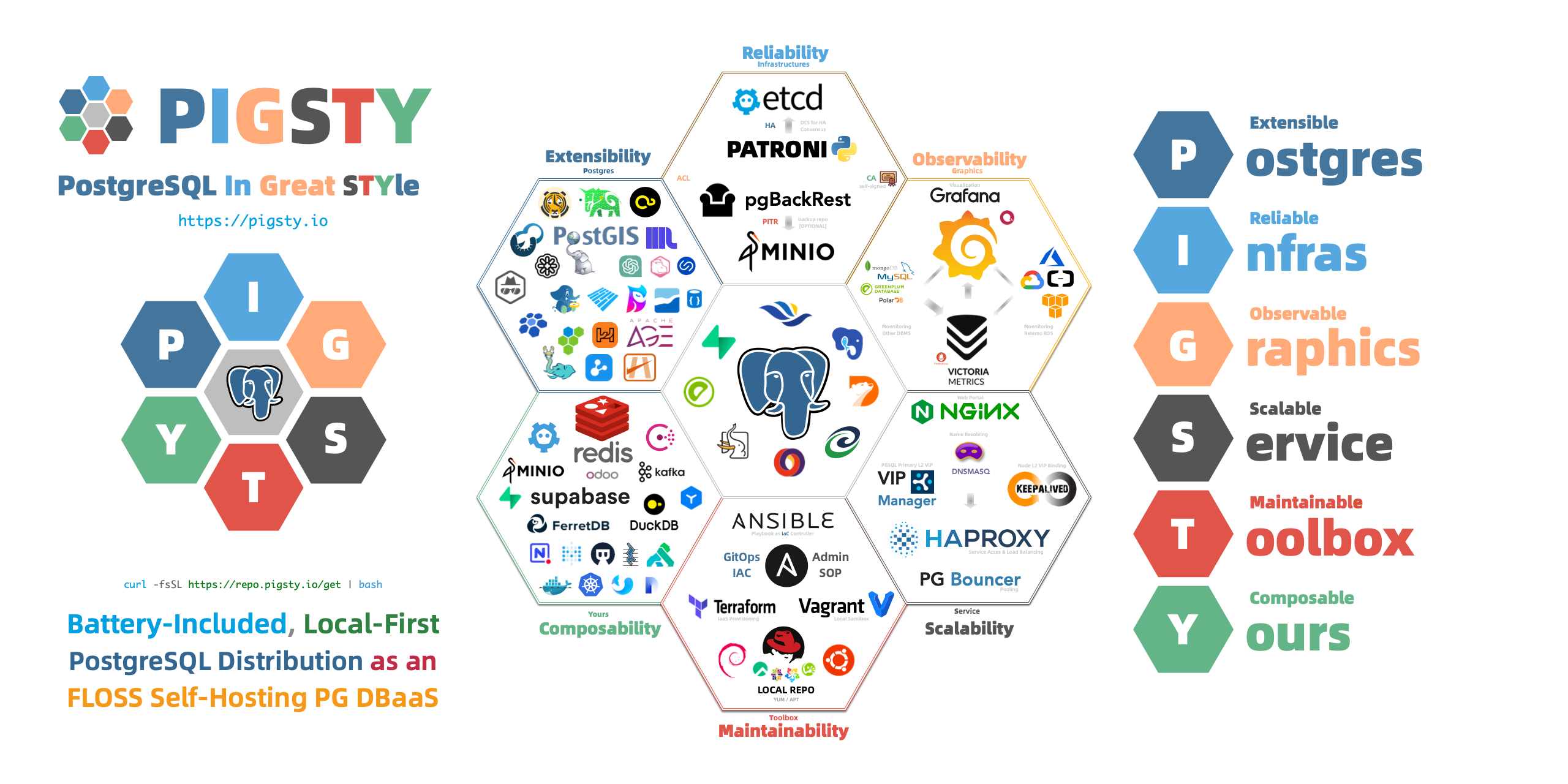
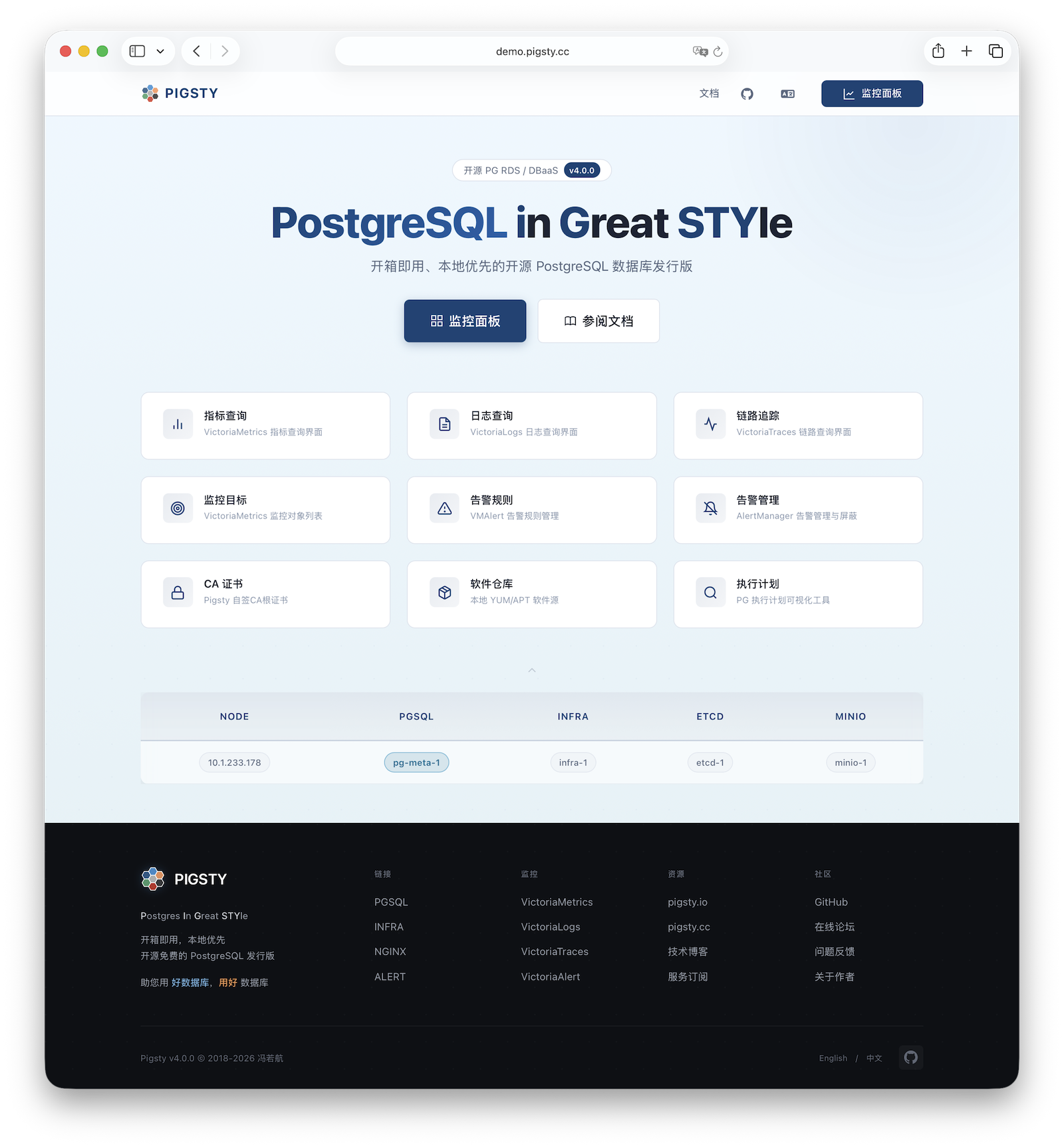
Pigsty’s name comes from PostgreSQL In Great STYle, also understood as Postgres, Infras, Graphics, Service, Toolbox, it’s all Yours—a self-hosted PostgreSQL solution with graphical monitoring that’s all yours. You can find the source code on GitHub, visit the official documentation for more information, or experience the Web UI in the online demo.
Why Pigsty? What Can It Do?
PostgreSQL is a sufficiently perfect database kernel, but it needs more tools and systems to become a truly excellent database service. In production environments, you need to manage every aspect of your database: high availability, backup recovery, monitoring alerts, access control, parameter tuning, extension installation, connection pooling, load balancing…
Wouldn’t it be easier if all this complex operational work could be automated? This is precisely why Pigsty was created.
Pigsty provides:
Out-of-the-Box PostgreSQL Distribution
Pigsty deeply integrates 440+ extensions from the PostgreSQL ecosystem, providing out-of-the-box distributed, time-series, geographic, spatial, graph, vector, search, and other multi-modal database capabilities. From kernel to RDS distribution, providing production-grade database services for versions 13-18 on EL/Debian/Ubuntu.
Self-Healing High Availability Architecture
A high availability architecture built on Patroni, Etcd, and HAProxy enables automatic failover for hardware failures with seamless traffic handoff. Primary failure recovery time RTO < 30s, data recovery point RPO ≈ 0. You can perform rolling maintenance and upgrades on the entire cluster without application coordination.
Complete Point-in-Time Recovery Capability
Based on pgBackRest and optional MinIO cluster, providing out-of-the-box PITR point-in-time recovery capability. Giving you the ability to quickly return to any point in time, protecting against software defects and accidental data deletion.
Flexible Service Access and Traffic Management
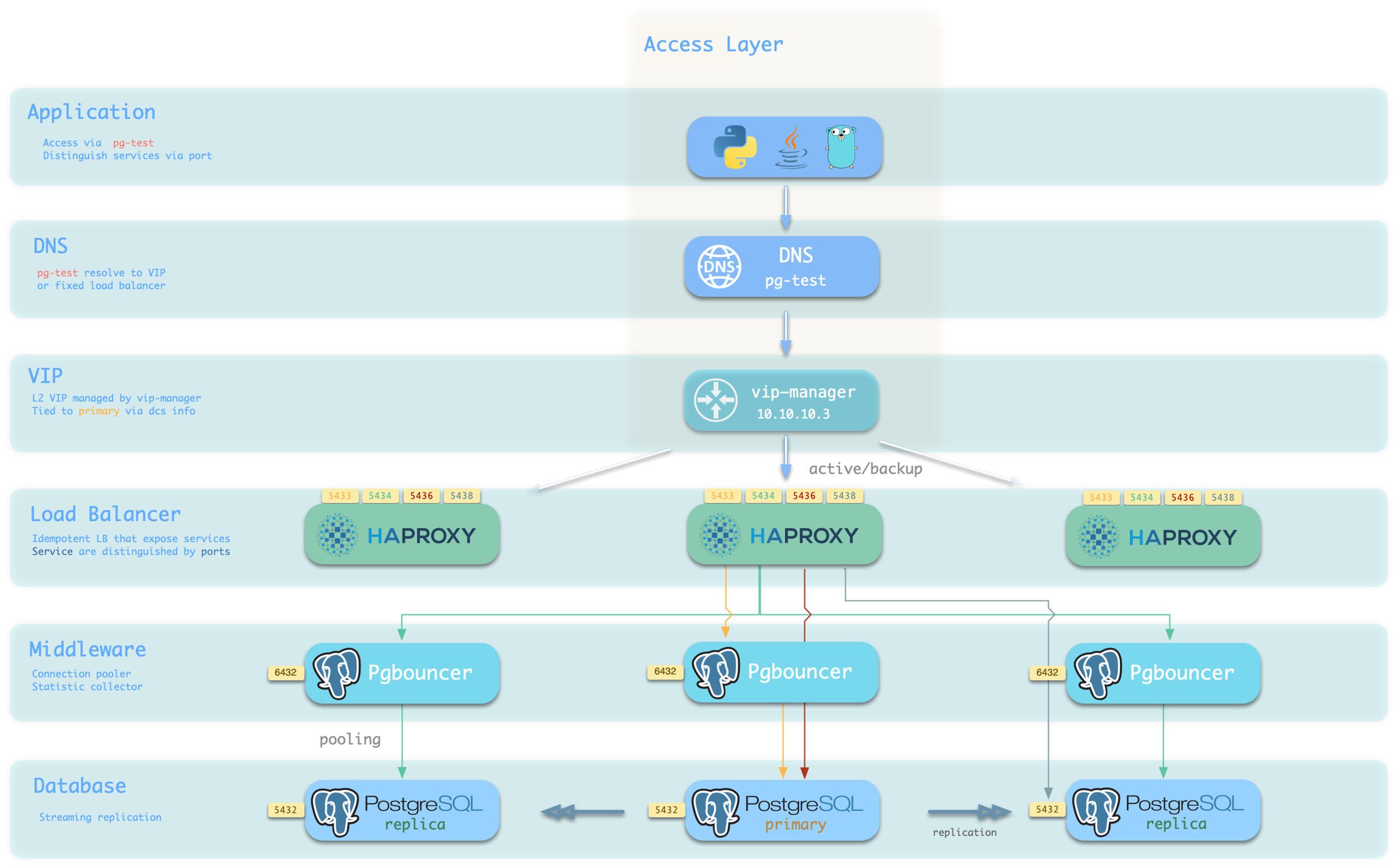
Through HAProxy, Pgbouncer, and VIP, providing flexible service access patterns for read-write separation, connection pooling, and automatic routing. Delivering stable, reliable, auto-routing, transaction-pooled high-performance database services.
Stunning Observability
A modern observability stack based on Prometheus and Grafana provides unparalleled monitoring best practices. Over three thousand types of monitoring metrics describe every aspect of the system, from global dashboards to CRUD operations on individual objects.
Declarative Configuration Management
Following the Infrastructure as Code philosophy, using declarative configuration to describe the entire environment. You just tell Pigsty “what kind of database cluster you want” without worrying about how to implement it—the system automatically adjusts to the desired state.
Modular Architecture Design
A modular architecture design that can be freely combined to suit different scenarios. Beyond the core PostgreSQL module, it also provides optional modules for Redis, MinIO, Etcd, FerretDB, and support for various PG-compatible kernels.
Solid Security Best Practices
Industry-leading security best practices: self-signed CA certificate encryption, AES encrypted backups, scram-sha-256 encrypted passwords, out-of-the-box ACL model, HBA rule sets following the principle of least privilege, ensuring data security.
Simple and Easy Deployment
All dependencies are pre-packaged for one-click installation in environments without internet access. Local sandbox environments can run on micro VMs with 1 core and 2GB RAM, providing functionality identical to production environments. Provides Vagrant-based local sandboxes and Terraform-based cloud deployments.
What Pigsty Is Not
Pigsty is not a traditional, all-encompassing PaaS (Platform as a Service) system.
Pigsty doesn’t provide basic hardware resources. It runs on nodes you provide, whether bare metal, VMs, or cloud instances, but it doesn’t create or manage these resources itself (though it provides Terraform templates to simplify cloud resource preparation).
Pigsty is not a container orchestration system. It runs directly on the operating system, not requiring Kubernetes or Docker as infrastructure. Of course, it can coexist with these systems and provides a Docker module for running stateless applications.
Pigsty is not a general database management tool. It focuses on PostgreSQL and its ecosystem. While it also supports peripheral components like Redis, Etcd, and MinIO, the core is always built around PostgreSQL.
Pigsty won’t lock you in. It’s built on open-source components, doesn’t modify the PostgreSQL kernel, and introduces no proprietary protocols. You can continue using your well-managed PostgreSQL clusters anytime without Pigsty.
Pigsty doesn’t restrict how you should or shouldn’t build your database services. For example:
Pigsty provides good parameter defaults and configuration templates, but you can override any parameter.
Pigsty provides a declarative API, but you can still use underlying tools (Ansible, Patroni, pgBackRest, etc.) for manual management.
Pigsty can manage the complete lifecycle, or you can use only its monitoring system to observe existing database instances or RDS.
Pigsty provides a different level of abstraction than the hardware layer—it works at the database service layer, focusing on how to deliver PostgreSQL at its best, rather than reinventing the wheel.
Evolution of PostgreSQL Deployment
To understand Pigsty’s value, let’s review the evolution of PostgreSQL deployment approaches.
Manual Deployment Era
In traditional deployment, DBAs needed to manually install and configure PostgreSQL, manually set up replication, manually configure monitoring, and manually handle failures. The problems with this approach are obvious:
Low efficiency: Each instance requires repeating many manual operations, prone to errors.
Lack of standardization: Databases configured by different DBAs can vary greatly, making maintenance difficult.
Poor reliability: Failure handling depends on manual intervention, with long recovery times and susceptibility to human error.
Weak observability: Lack of unified monitoring, making problem discovery and diagnosis difficult.
Managed Database Era
To solve these problems, cloud providers offer managed database services (RDS). Cloud RDS does solve some operational issues, but also brings new challenges:
High cost: Managed services typically charge multiples to dozens of times hardware cost as “service fees.”
Vendor lock-in: Migration is difficult, tied to specific cloud platforms.
Limited functionality: Cannot use certain advanced features, extensions are restricted, parameter tuning is limited.
Data sovereignty: Data stored in the cloud, reducing autonomy and control.
Local RDS Era
Pigsty represents a third approach: building database services in local environments that match or exceed cloud RDS.
Pigsty combines the advantages of both approaches:
High automation: One-click deployment, automatic configuration, self-healing failures—as convenient as cloud RDS.
Complete autonomy: Runs on your own infrastructure, data completely in your own hands.
Extremely low cost: Run enterprise-grade database services at near-pure-hardware costs.
Complete functionality: Unlimited use of PostgreSQL’s full capabilities and ecosystem extensions.
Open architecture: Based on open-source components, no vendor lock-in, free to migrate anytime.
This approach is particularly suitable for:
Private and hybrid clouds: Enterprises needing to run databases in local environments.
Cost-sensitive users: Organizations looking to reduce database TCO.
High-security scenarios: Critical data requiring complete autonomy and control.
PostgreSQL power users: Scenarios requiring advanced features and rich extensions.
Development and testing: Quickly setting up databases locally that match production environments.
What’s Next
Now that you understand Pigsty’s basic concepts, you can:
ETCD: Distributed key-value store as DCS for HA Postgres clusters: consensus leader election/config management/service discovery.
REDIS: Redis servers supporting standalone primary-replica, sentinel, and cluster modes with full monitoring.
MINIO: S3-compatible simple object storage that can serve as an optional backup destination for PG databases.
You can declaratively compose them freely. If you only want host monitoring, installing the INFRA module on infrastructure nodes and the NODE module on managed nodes is sufficient.
The ETCD and PGSQL modules are used to build HA PG clusters—installing these modules on multiple nodes automatically forms a high-availability database cluster.
You can reuse Pigsty infrastructure and develop your own modules; REDIS and MINIO can serve as examples. More modules will be added—preliminary support for Mongo and MySQL is already on the roadmap.
Note that all modules depend strongly on the NODE module: in Pigsty, nodes must first have the NODE module installed to be managed before deploying other modules.
When nodes (by default) use the local software repo for installation, the NODE module has a weak dependency on the INFRA module. Therefore, the admin/infrastructure nodes with the INFRA module complete the bootstrap process in the deploy.yml playbook, resolving the circular dependency.
Standalone Installation
By default, Pigsty installs on a single node (physical/virtual machine). The deploy.yml playbook installs INFRA, ETCD, PGSQL, and optionally MINIO modules on the current node,
giving you a fully-featured observability stack (Prometheus, Grafana, Loki, AlertManager, PushGateway, BlackboxExporter, etc.), plus a built-in PostgreSQL standalone instance as a CMDB, ready to use out of the box (cluster name pg-meta, database name meta).
This node now has a complete self-monitoring system, visualization tools, and a Postgres database with PITR auto-configured (HA unavailable since you only have one node). You can use this node as a devbox, for testing, running demos, and data visualization/analysis. Or, use this node as an admin node to deploy and manage more nodes!
Monitoring
The installed standalone meta node can serve as an admin node and monitoring center to bring more nodes and database servers under its supervision and control.
Pigsty’s monitoring system can be used independently. If you want to install the Prometheus/Grafana observability stack, Pigsty provides best practices!
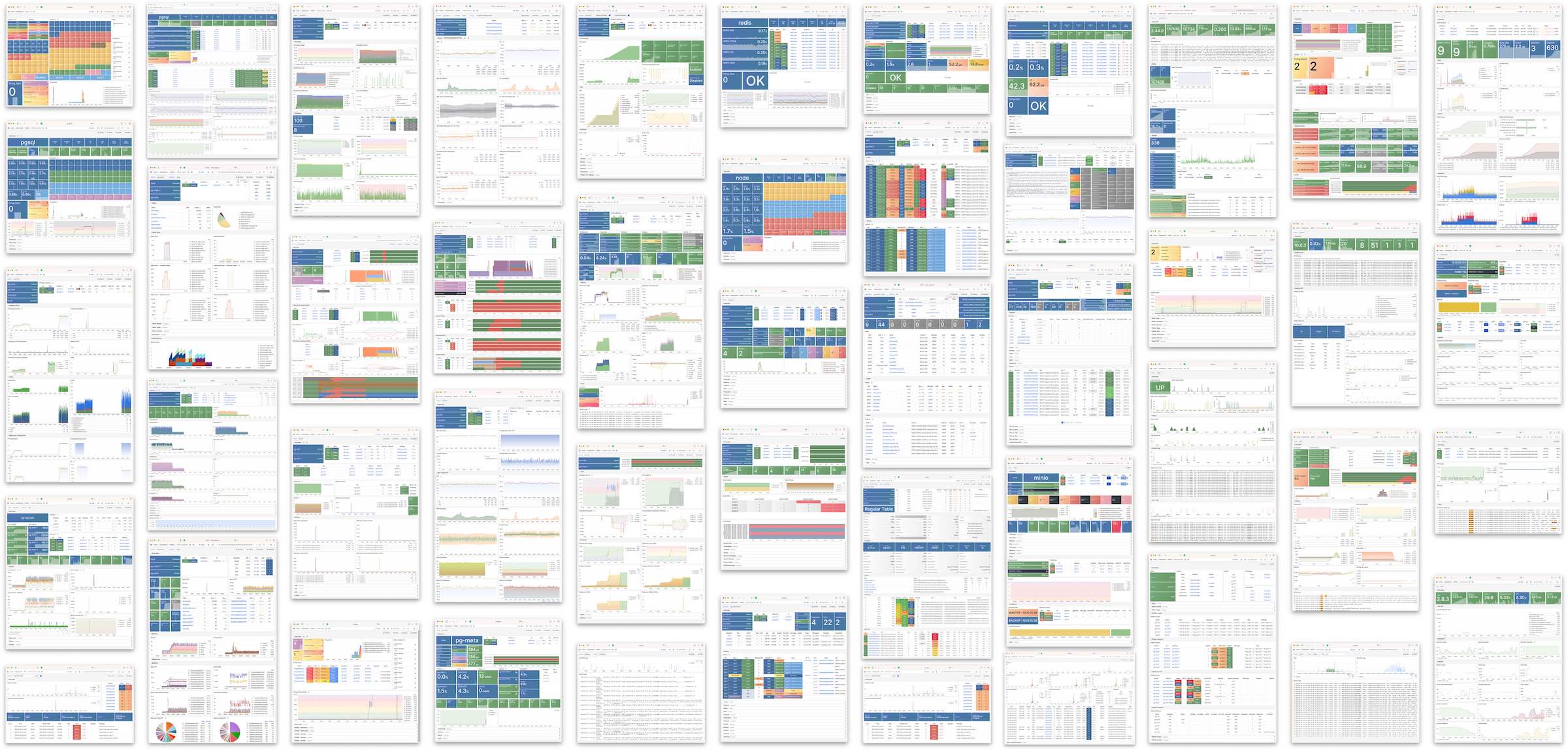
It offers rich dashboards for host nodes and PostgreSQL databases.
Whether or not these nodes or PostgreSQL servers are managed by Pigsty, with simple configuration, you immediately have a production-grade monitoring and alerting system, bringing existing hosts and PostgreSQL under management.
HA PostgreSQL Clusters
Pigsty helps you own your own production-grade HA PostgreSQL RDS service anywhere.
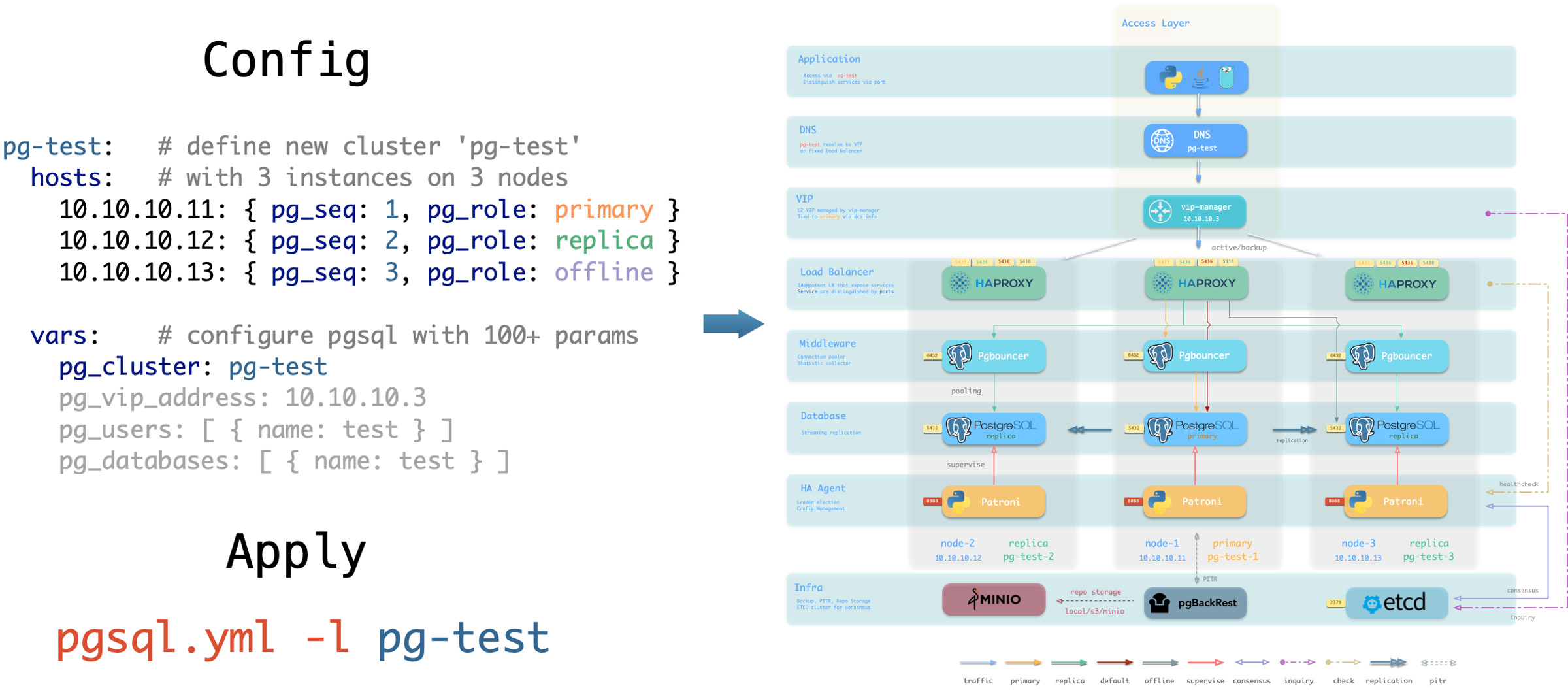
To create such an HA PostgreSQL cluster/RDS service, you simply describe it with a short config and run the playbook to create it:
In less than 10 minutes, you’ll have a PostgreSQL database cluster with service access, monitoring, backup PITR, and HA fully configured.
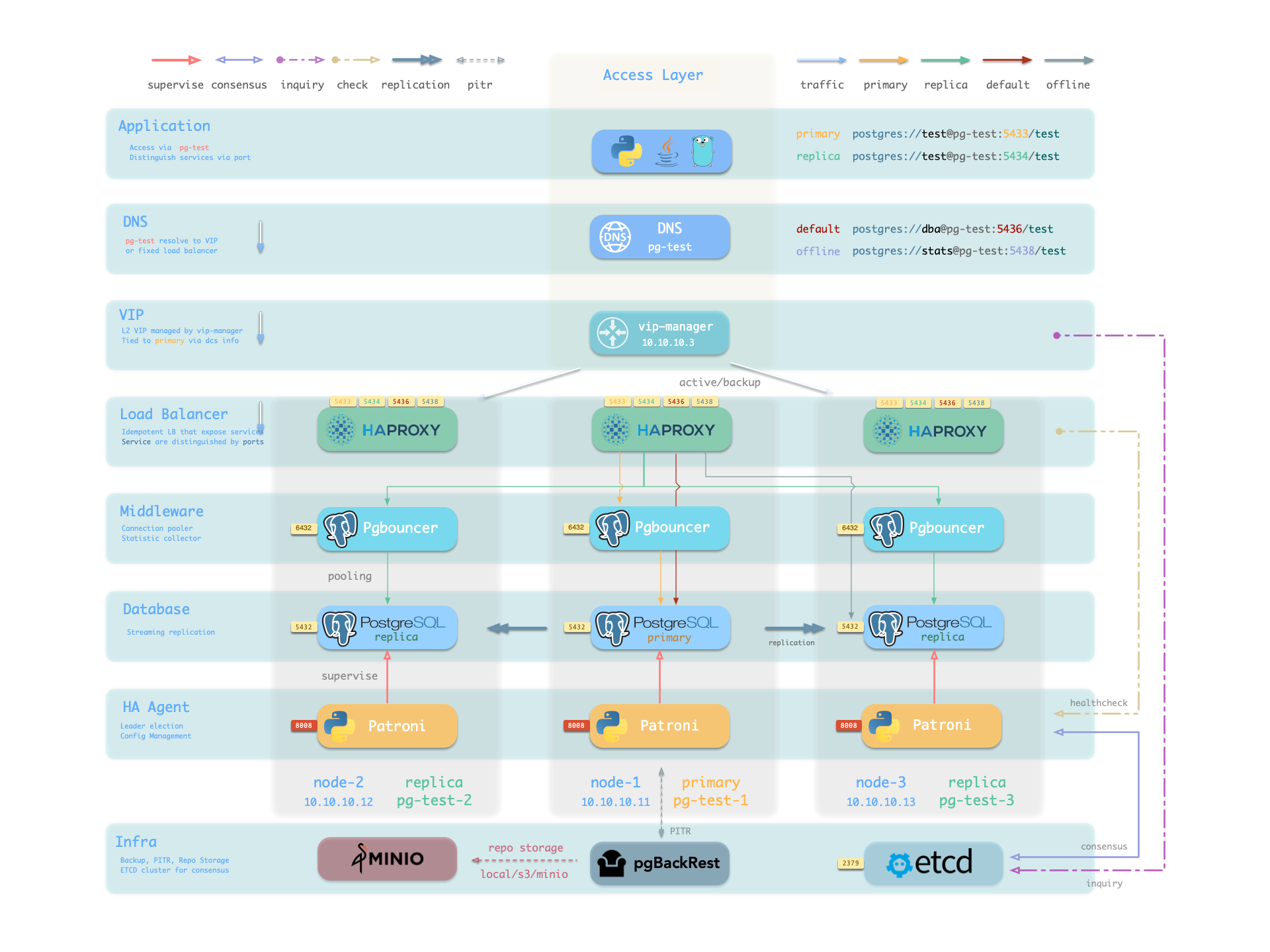
Hardware failures are covered by the self-healing HA architecture provided by patroni, etcd, and haproxy—in case of primary failure, automatic failover executes within 30 seconds by default.
Clients don’t need to modify config or restart applications: Haproxy uses patroni health checks for traffic distribution, and read-write requests are automatically routed to the new cluster primary, avoiding split-brain issues.
This process is seamless—for example, in case of replica failure or planned switchover, clients experience only a momentary flash of the current query.
Software failures, human errors, and datacenter-level disasters are covered by pgbackrest and the optional MinIO cluster. This provides local/cloud PITR capabilities and, in case of datacenter failure, offers cross-region replication and disaster recovery.
1.1 - Nodes
A node is an abstraction of hardware/OS resources - physical machines, bare metal, VMs, or containers/pods.
A node is an abstraction of hardware/OS resources. It can be a physical machine, bare metal, virtual machine, or container/pod.
Any machine running a Linux OS with systemd and standard CPU/memory/disk/network resources can be treated as a node.
Nodes can have modules installed. Pigsty has several node types, distinguished by which modules are deployed:
In a singleton Pigsty deployment, multiple roles converge on one node: it serves as the regular node, admin node, infra node, ETCD node, and database node simultaneously.
Regular Node
Nodes managed by Pigsty can have modules installed. The node.yml playbook configures nodes to the desired state.
A regular node may run the following services:
Component
Port
Description
Status
node_exporter
9100
Host metrics exporter
Enabled
haproxy
9101
HAProxy load balancer (admin port)
Enabled
vector
9598
Log collection agent
Enabled
docker
9323
Container runtime support
Optional
keepalived
n/a
L2 VIP for node cluster
Optional
keepalived_exporter
9650
Keepalived status monitor
Optional
Here, node_exporter exposes host metrics, vector sends logs to the collection system, and haproxy provides load balancing. These three are enabled by default.
Docker, keepalived, and keepalived_exporter are optional and can be enabled as needed.
ADMIN Node
A Pigsty deployment has exactly one admin node—the node that runs Ansible playbooks and issues control/deployment commands.
This node has ssh/sudo access to all other nodes. Admin node security is critical; ensure access is strictly controlled.
During single-node installation and configuration, the current node becomes the admin node.
However, alternatives exist. For example, if your laptop can SSH to all managed nodes and has Ansible installed, it can serve as the admin node—though this isn’t recommended for production.
For instance, you might use your laptop to manage a Pigsty VM in the cloud. In this case, your laptop is the admin node.
In serious production environments, the admin node is typically 1-2 dedicated DBA machines. In resource-constrained setups, INFRA nodes often double as admin nodes since all INFRA nodes have Ansible installed by default.
INFRA Node
A Pigsty deployment may have 1 or more INFRA nodes; large production environments typically have 2-3.
The infra group in the inventory defines which nodes are INFRA nodes. These nodes run the INFRA module with these components:
Component
Port
Description
nginx
80/443
Web UI, local software repository
grafana
3000
Visualization platform
victoriaMetrics
8428
Time-series database (metrics)
victoriaLogs
9428
Log collection server
victoriaTraces
10428
Trace collection server
vmalert
8880
Alerting and derived metrics
alertmanager
9093
Alert aggregation and routing
blackbox_exporter
9115
Blackbox probing (ping nodes/VIPs)
dnsmasq
53
Internal DNS resolution
chronyd
123
NTP time server
ansible
-
Playbook execution
Nginx serves as the module’s entry point, providing the web UI and local software repository.
With multiple INFRA nodes, services on each are independent, but you can access all monitoring data sources from any INFRA node’s Grafana.
Note: The INFRA module is licensed under AGPLv3 due to Grafana.
As an exception, if you only use Nginx/Victoria components without Grafana, you’re effectively under Apache-2.0.
ETCD Node
The ETCD module provides Distributed Consensus Service (DCS) for PostgreSQL high availability.
The etcd group in the inventory defines ETCD nodes. These nodes run etcd servers on two ports:
The minio group in the inventory defines MinIO nodes. These nodes run MinIO servers on:
Component
Port
Description
minio
9000
MinIO S3 API endpoint
minio
9001
MinIO admin console
PGSQL Node
Nodes with the PGSQL module are called PGSQL nodes. Node and PostgreSQL instance have a 1:1 deployment—one PG instance per node.
PGSQL nodes can borrow identity from their PostgreSQL instance—controlled by node_id_from_pg, defaulting to true, meaning the node name is set to the PG instance name.
PGSQL nodes run these additional components beyond regular node services:
Component
Port
Description
Status
postgres
5432
PostgreSQL database server
Enabled
pgbouncer
6432
PgBouncer connection pool
Enabled
patroni
8008
Patroni HA management
Enabled
pg_exporter
9630
PostgreSQL metrics exporter
Enabled
pgbouncer_exporter
9631
PgBouncer metrics exporter
Enabled
pgbackrest_exporter
9854
pgBackRest metrics exporter
Enabled
vip-manager
n/a
Binds L2 VIP to cluster primary
Optional
{{ pg_cluster }}-primary
5433
HAProxy service: pooled read/write
Enabled
{{ pg_cluster }}-replica
5434
HAProxy service: pooled read-only
Enabled
{{ pg_cluster }}-default
5436
HAProxy service: primary direct connection
Enabled
{{ pg_cluster }}-offline
5438
HAProxy service: offline read
Enabled
{{ pg_cluster }}-<service>
543x
HAProxy service: custom PostgreSQL services
Custom
The vip-manager is only enabled when users configure a PG VIP.
Additional custom services can be defined in pg_services, exposed via haproxy using additional service ports.
Node Relationships
Regular nodes typically reference an INFRA node via the admin_ip parameter as their infrastructure provider.
For example, with global admin_ip = 10.10.10.10, all nodes use infrastructure services at this IP.
Typically the admin node and INFRA node coincide. With multiple INFRA nodes, the admin node is usually the first one; others serve as backups.
In large-scale production deployments, you might separate the Ansible admin node from INFRA module nodes.
For example, use 1-2 small dedicated hosts under the DBA team as the control hub (ADMIN nodes), and 2-3 high-spec physical machines as monitoring infrastructure (INFRA nodes).
Typical node counts by deployment scale:
Scale
ADMIN
INFRA
ETCD
MINIO
PGSQL
Single-node
1
1
1
0
1
3-node
1
3
3
0
3
Small prod
1
2
3
0
N
Large prod
2
3
5
4+
N
1.2 - PGSQL Architecture
PostgreSQL module component interactions and data flow.
The PGSQL module organizes PostgreSQL in production as clusters—logical entities composed of a group of database instances associated by primary-replica relationships.
Each cluster is an autonomous business unit consisting of at least one primary instance, exposing capabilities through services.
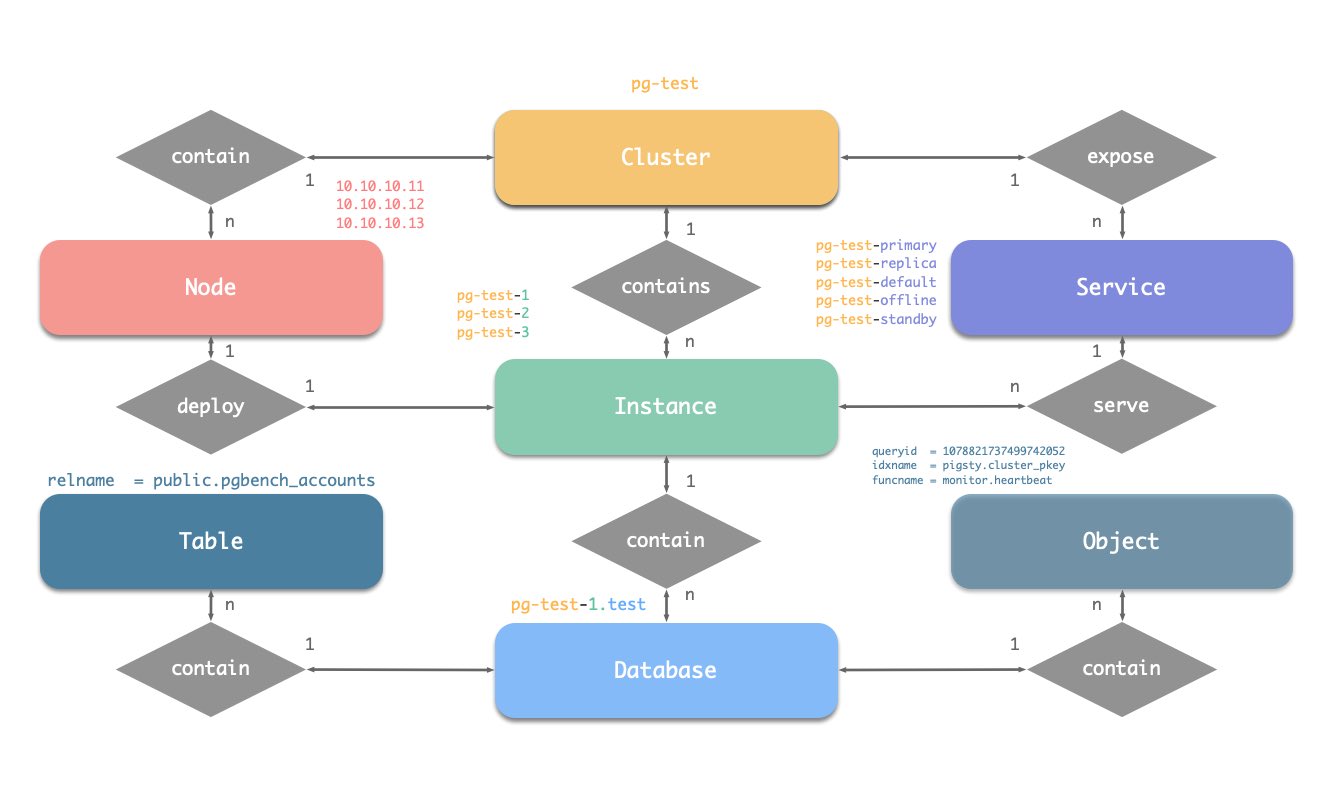
There are four core entities in Pigsty’s PGSQL module:
Cluster: An autonomous PostgreSQL business unit serving as the top-level namespace for other entities.
Service: A named abstraction that exposes capabilities, routes traffic, and exposes services using node ports.
Instance: A single PostgreSQL server consisting of running processes and database files on a single node.
Node: A hardware resource abstraction running Linux + Systemd environment—can be bare metal, VM, container, or Pod.
Along with two business entities—“Database” and “Role”—these form the complete logical view as shown below:
Naming Conventions (following Pigsty’s early constraints)
Cluster names should be valid DNS domain names without any dots, regex: [a-zA-Z0-9-]+
Service names should be prefixed with the cluster name and suffixed with specific words: primary, replica, offline, delayed, connected by -.
Instance names are prefixed with the cluster name and suffixed with a positive integer instance number, connected by -, e.g., ${cluster}-${seq}.
Nodes are identified by their primary internal IP address; since databases and hosts are deployed 1:1 in the PGSQL module, hostnames typically match instance names.
1.3 - INFRA Arch
Infrastructure architecture, components and functionality in Pigsty.
Running production-grade, highly available PostgreSQL clusters typically requires a comprehensive set of infrastructure services (foundation) for support, such as monitoring and alerting, log collection, time synchronization, DNS resolution, and local software repositories.
Pigsty provides the INFRA module to solve this problem — it’s an optional module, but we strongly recommend enabling it.
Overview
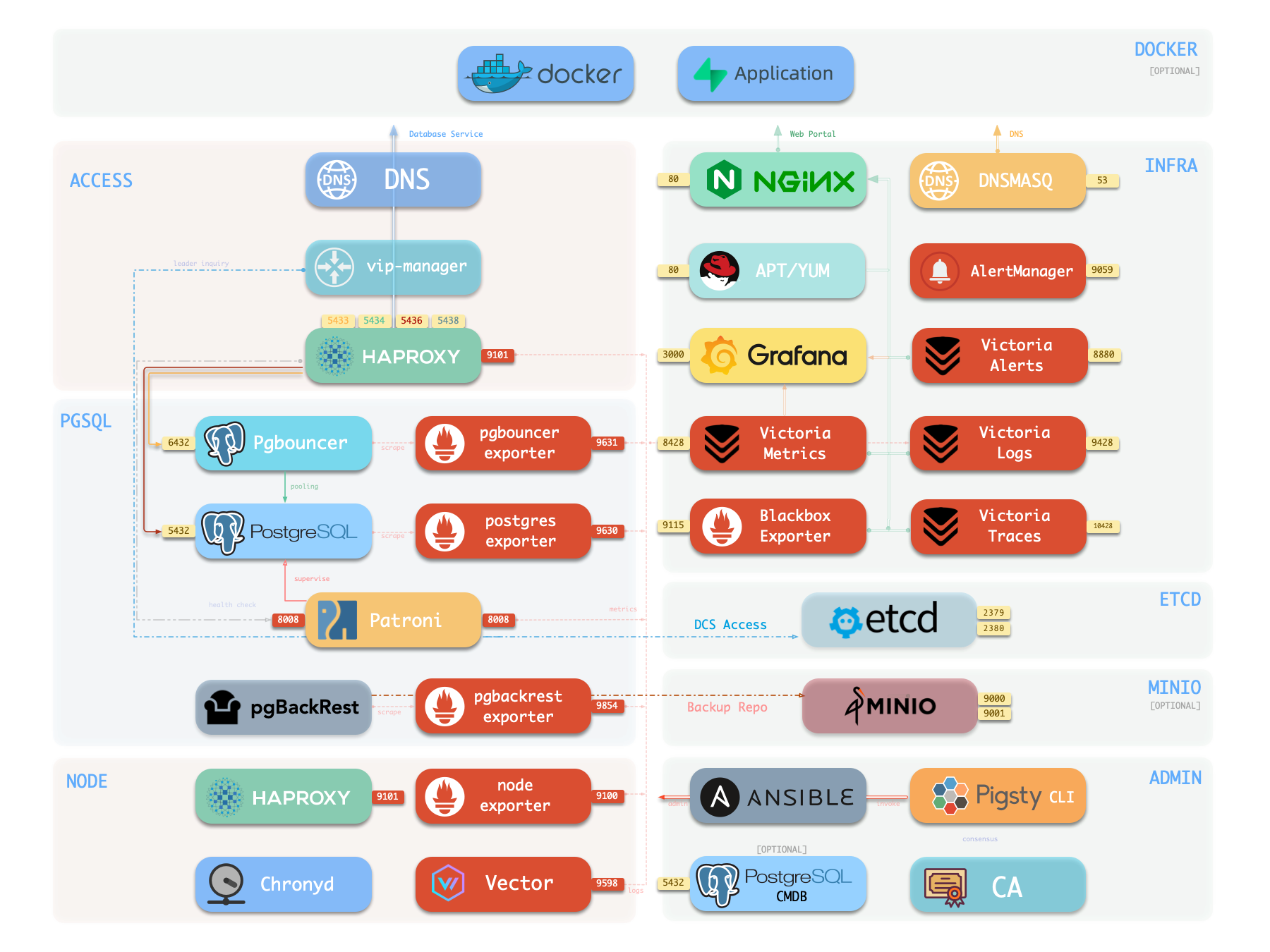
The diagram below shows the architecture of a single-node deployment. The right half represents the components included in the INFRA module:
Provides NTP time synchronization to ensure all nodes have consistent time [Optional]
Nginx
Nginx is the access entry point for all WebUI services in Pigsty, using ports 80 / 443 for HTTP/HTTPS by default. Live Demo
Infrastructure components with WebUIs can be exposed uniformly through Nginx, such as Grafana, VictoriaMetrics (VMUI), AlertManager,
and HAProxy console. Additionally, local yum/apt repo and other static resources are served internally via Nginx.
Nginx configures local web servers or reverse proxy servers based on definitions in infra_portal.
infra_portal:home :{domain:i.pigsty }
By default, it exposes Pigsty’s admin homepage: i.pigsty. You can expose more services; see Nginx Management for details.
Pigsty creates a local software repository on the Infra node during installation to accelerate subsequent software installations. Live Demo
This repository defaults to the /www/pigsty directory,
served by Nginx, mounted at the /pigsty path, accessible via ports 80/443.
http://<admin_ip>/pigsty / http://i.pigsty/pigsty
Pigsty supports offline installation, which essentially pre-copies a prepared local software repository to the target environment.
When Pigsty performs production deployment and needs to create a local software repository, if it finds the /www/pigsty/repo_complete marker file already exists locally, it skips downloading packages from upstream and uses existing packages directly, avoiding internet downloads.
Grafana is the core component of Pigsty’s monitoring system, used for visualizing metrics, logs, and various information. Demo
It listens on port 3000 by default, accessible via IP:3000 or http://g.pigsty.
Pigsty provides pre-built Dashboards based on VictoriaMetrics/Logs/Traces, with one-click drill-down and roll-up via URL jumps for rapid troubleshooting.
Grafana can also serve as a low-code visualization platform, so ECharts, victoriametrics-datasource, victorialogs-datasource plugins are installed by default, with Vector/Victoria datasources registered uniformly as vmetrics-*, vlogs-*, vtraces-* for easy custom dashboard extension.
Pigsty v4.0 uses VictoriaMetrics components to replace Prometheus/Loki, providing a unified observability platform:
VictoriaMetrics: Listens on port 8428 by default, accessible via http://p.pigsty or https://i.pigsty/vmetrics/ for VMUI, compatible with PromQL, remote read/write protocols, and Alertmanager API.
VMAlert: Runs alerting rules on port 8880, sends events to Alertmanager.
VictoriaLogs: Listens on port 9428 by default, searchable via https://i.pigsty/vlogs/. Node-side Vector pushes system logs, PostgreSQL logs, etc. structured here.
VictoriaTraces: Listens on port 10428, provides Jaeger-compatible interface for slow SQL and trace analysis.
Alertmanager: Listens on port 9059, accessible via http://a.pigsty or https://i.pigsty/alertmgr/ for alert routing and notification management.
Blackbox Exporter: Listens on port 9115 by default, responsible for ICMP/TCP/HTTP blackbox probing.
Pigsty installs Ansible on the meta node by default. Ansible is a popular ops tool with declarative config style and idempotent playbook design, greatly reducing system maintenance complexity.
DNSMASQ
DNSMASQ provides DNS resolution within the environment; domains from other modules are registered with the DNSMASQ service on INFRA nodes.
DNS records are placed in the /etc/hosts.d/ directory on all INFRA nodes by default.
A standard Pigsty deployment includes an INFRA module that provides services for managed nodes and database clusters:
The INFRA module is not mandatory for HA PostgreSQL—for example, in slim install mode, the Infra module is not installed.
However, the INFRA module provides essential supporting services for running production-grade HA PostgreSQL clusters; it’s strongly recommended to enable it for the complete Pigsty DBaaS experience.
If you already have your own infrastructure (Nginx, local repo, monitoring system, DNS, NTP), you can disable the INFRA module and modify config to use existing infrastructure.
Component
Port
Default Domain
Description
Nginx
80/443
i.pigsty
Web portal, local repo
Grafana
3000
g.pigsty
Visualization platform
VictoriaMetrics
8428
p.pigsty
Time series DB (VMUI, Prometheus compatible)
VictoriaLogs
9428
-
Log database (receives Vector push)
VictoriaTraces
10428
-
Trace / slow SQL storage
VMAlert
8880
-
Metrics computation, alerting rules
AlertManager
9059
a.pigsty
Alert aggregation and dispatch
BlackboxExporter
9115
-
Blackbox monitoring probes
DNSMasq
53
-
DNS server
Chronyd
123
-
NTP time server
2 - Cluster Model
How Pigsty abstracts different functionalities into modules, and the logical model of these modules.
In Pigsty, functional modules are organized as “clusters”. Each cluster is an Ansible group containing several node resources with defined instances.
PGSQL Module Overview: Key Concepts and Architecture Details
The PGSQL module is organized as clusters in production environments, which are logical entities composed of a set of database instances associated by primary-replica relationships.
Each database cluster is an autonomous business service unit consisting of at least one database (primary) instance.
Entity Relationship
Let’s start with the ER diagram. In Pigsty’s PGSQL module, there are four core entities:
Cluster: An autonomous PostgreSQL business unit, serving as the top-level namespace for other entities.
Service: A named abstraction of cluster capability that routes traffic and exposes PostgreSQL services using node ports.
Instance: A single PostgreSQL server consisting of a running process and database files on a single node.
Node: An abstraction of hardware resources, which can be bare metal, virtual machines, or even Kubernetes pods.
Naming Conventions
Cluster names should be valid DNS domain names without dots, matching the regex: [a-zA-Z0-9-]+
Service names should be prefixed with the cluster name and suffixed with specific words: primary, replica, offline, delayed, connected by -.
Instance names are prefixed with the cluster name and suffixed with a positive integer instance number, connected by -, e.g., ${cluster}-${seq}.
Nodes are identified by their primary internal IP address. Since databases and hosts are deployed 1:1 in the PGSQL module, the hostname is usually the same as the instance name.
Identity Parameters
Pigsty uses identity parameters to identify entities: PG_ID.
Besides the node IP address, pg_cluster, pg_role, and pg_seq are the minimum required parameters for defining a PostgreSQL cluster.
Using the sandbox environment test cluster pg-test as an example:
Pigsty uses Infrastructure as Code (IaC) philosophy to manage all components, providing declarative management for large-scale clusters.
Pigsty follows the IaC and GitOPS philosophy: use a declarative config inventory to describe the entire environment, and materialize it through idempotent playbooks.
Users describe their desired state declaratively through parameters, and playbooks idempotently adjust target nodes to reach that state.
This is similar to Kubernetes CRDs & Operators, but Pigsty implements this functionality on bare metal and virtual machines through Ansible.
Pigsty was born to solve the operational management problem of ultra-large-scale PostgreSQL clusters. The idea behind it is simple — we need the ability to replicate the entire infrastructure (100+ database clusters + PG/Redis + observability) on ready servers within ten minutes.
No GUI + ClickOps can complete such a complex task in such a short time, making CLI + IaC the only choice — it provides precise, efficient control.
The config inventory pigsty.yml file describes the state of the entire deployment. Whether it’s production (prod), staging, test, or development (devbox) environments,
the difference between infrastructures lies only in the config inventory, while the deployment delivery logic is exactly the same.
You can use git for version control and auditing of this deployment “seed/gene”, and Pigsty even supports storing the config inventory as database tables in PostgreSQL CMDB, further achieving Infra as Data capability.
Seamlessly integrate with your existing workflows.
IaC is designed for professional users and enterprise scenarios but is also deeply optimized for individual developers and SMBs.
Even if you’re not a professional DBA, you don’t need to understand these hundreds of adjustment knobs and switches. All parameters come with well-performing default values.
You can get an out-of-the-box single-node database with zero configuration;
Simply add two more IP addresses to get an enterprise-grade high-availability PostgreSQL cluster.
Declare Modules
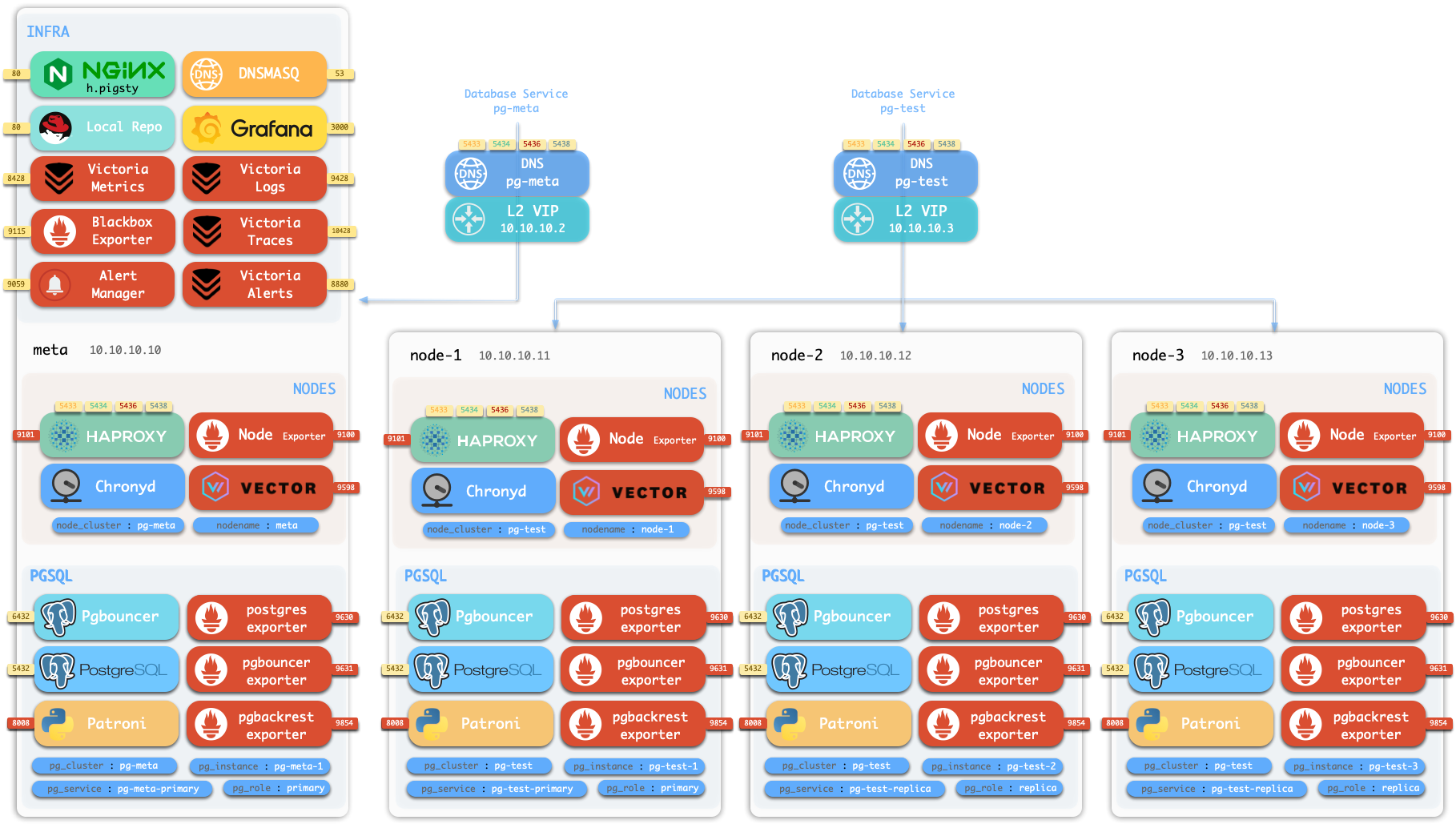
Take the following default config snippet as an example. This config describes a node 10.10.10.10 with INFRA, NODE, ETCD, and PGSQL modules installed.
# monitoring, alerting, DNS, NTP and other infrastructure cluster...infra:{hosts:{10.10.10.10:{infra_seq:1}}}# minio cluster, s3 compatible object storageminio:{hosts:{10.10.10.10:{minio_seq: 1 } }, vars:{minio_cluster:minio } }# etcd cluster, used as DCS for PostgreSQL high availabilityetcd:{hosts:{10.10.10.10:{etcd_seq: 1 } }, vars:{etcd_cluster:etcd } }# PGSQL example cluster: pg-metapg-meta:{hosts:{10.10.10.10:{pg_seq: 1, pg_role: primary }, vars:{pg_cluster:pg-meta } }
To actually install these modules, execute the following playbooks:
./infra.yml -l 10.10.10.10 # Initialize infra module on node 10.10.10.10./etcd.yml -l 10.10.10.10 # Initialize etcd module on node 10.10.10.10./minio.yml -l 10.10.10.10 # Initialize minio module on node 10.10.10.10./pgsql.yml -l 10.10.10.10 # Initialize pgsql module on node 10.10.10.10
Declare Clusters
You can declare PostgreSQL database clusters by installing the PGSQL module on multiple nodes, making them a service unit:
For example, to deploy a three-node high-availability PostgreSQL cluster using streaming replication on the following three Pigsty-managed nodes,
you can add the following definition to the all.children section of the config file pigsty.yml:
Not only can you define clusters declaratively, but you can also define databases, users, services, and HBA rules within the cluster. For example, the following config file deeply customizes the content of the default pg-meta single-node database cluster:
Including: declaring six business databases and seven business users, adding an extra standby service (synchronous standby, providing read capability with no replication delay), defining some additional pg_hba rules, an L2 VIP address pointing to the cluster primary, and a customized backup strategy.
pg-meta:hosts:{10.10.10.10:{pg_seq: 1, pg_role: primary , pg_offline_query:true}}vars:pg_cluster:pg-metapg_databases:# define business databases on this cluster, array of database definition- name:meta # REQUIRED, `name` is the only mandatory field of a database definitionbaseline:cmdb.sql # optional, database sql baseline path, (relative path among ansible search path, e.g files/)pgbouncer:true# optional, add this database to pgbouncer database list? true by defaultschemas:[pigsty] # optional, additional schemas to be created, array of schema namesextensions: # optional, additional extensions to be installed:array of `{name[,schema]}`- {name: postgis , schema:public }- {name:timescaledb }comment:pigsty meta database # optional, comment string for this databaseowner:postgres # optional, database owner, postgres by defaulttemplate:template1 # optional, which template to use, template1 by defaultencoding:UTF8 # optional, database encoding, UTF8 by default. (MUST same as template database)locale:C # optional, database locale, C by default. (MUST same as template database)lc_collate:C # optional, database collate, C by default. (MUST same as template database)lc_ctype:C # optional, database ctype, C by default. (MUST same as template database)tablespace:pg_default # optional, default tablespace, 'pg_default' by default.allowconn:true# optional, allow connection, true by default. false will disable connect at allrevokeconn:false# optional, revoke public connection privilege. false by default. (leave connect with grant option to owner)register_datasource:true# optional, register this database to grafana datasources? true by defaultconnlimit:-1# optional, database connection limit, default -1 disable limitpool_auth_user:dbuser_meta # optional, all connection to this pgbouncer database will be authenticated by this userpool_mode:transaction # optional, pgbouncer pool mode at database level, default transactionpool_size:64# optional, pgbouncer pool size at database level, default 64pool_size_reserve:32# optional, pgbouncer pool size reserve at database level, default 32pool_size_min:0# optional, pgbouncer pool size min at database level, default 0pool_max_db_conn:100# optional, max database connections at database level, default 100- {name: grafana ,owner: dbuser_grafana ,revokeconn: true ,comment:grafana primary database }- {name: bytebase ,owner: dbuser_bytebase ,revokeconn: true ,comment:bytebase primary database }- {name: kong ,owner: dbuser_kong ,revokeconn: true ,comment:kong the api gateway database }- {name: gitea ,owner: dbuser_gitea ,revokeconn: true ,comment:gitea meta database }- {name: wiki ,owner: dbuser_wiki ,revokeconn: true ,comment:wiki meta database }pg_users:# define business users/roles on this cluster, array of user definition- name:dbuser_meta # REQUIRED, `name` is the only mandatory field of a user definitionpassword:DBUser.Meta # optional, password, can be a scram-sha-256 hash string or plain textlogin:true# optional, can log in, true by default (new biz ROLE should be false)superuser:false# optional, is superuser? false by defaultcreatedb:false# optional, can create database? false by defaultcreaterole:false# optional, can create role? false by defaultinherit:true# optional, can this role use inherited privileges? true by defaultreplication:false# optional, can this role do replication? false by defaultbypassrls:false# optional, can this role bypass row level security? false by defaultpgbouncer:true# optional, add this user to pgbouncer user-list? false by default (production user should be true explicitly)connlimit:-1# optional, user connection limit, default -1 disable limitexpire_in:3650# optional, now + n days when this role is expired (OVERWRITE expire_at)expire_at:'2030-12-31'# optional, YYYY-MM-DD 'timestamp' when this role is expired (OVERWRITTEN by expire_in)comment:pigsty admin user # optional, comment string for this user/roleroles: [dbrole_admin] # optional, belonged roles. default roles are:dbrole_{admin,readonly,readwrite,offline}parameters:{}# optional, role level parameters with `ALTER ROLE SET`pool_mode:transaction # optional, pgbouncer pool mode at user level, transaction by defaultpool_connlimit:-1# optional, max database connections at user level, default -1 disable limit- {name: dbuser_view ,password: DBUser.Viewer ,pgbouncer: true ,roles: [dbrole_readonly], comment:read-only viewer for meta database}- {name: dbuser_grafana ,password: DBUser.Grafana ,pgbouncer: true ,roles: [dbrole_admin] ,comment:admin user for grafana database }- {name: dbuser_bytebase ,password: DBUser.Bytebase ,pgbouncer: true ,roles: [dbrole_admin] ,comment:admin user for bytebase database }- {name: dbuser_kong ,password: DBUser.Kong ,pgbouncer: true ,roles: [dbrole_admin] ,comment:admin user for kong api gateway }- {name: dbuser_gitea ,password: DBUser.Gitea ,pgbouncer: true ,roles: [dbrole_admin] ,comment:admin user for gitea service }- {name: dbuser_wiki ,password: DBUser.Wiki ,pgbouncer: true ,roles: [dbrole_admin] ,comment:admin user for wiki.js service }pg_services:# extra services in addition to pg_default_services, array of service definition# standby service will route {ip|name}:5435 to sync replica's pgbouncer (5435->6432 standby)- name: standby # required, service name, the actual svc name will be prefixed with `pg_cluster`, e.g:pg-meta-standbyport:5435# required, service exposed port (work as kubernetes service node port mode)ip:"*"# optional, service bind ip address, `*` for all ip by defaultselector:"[]"# required, service member selector, use JMESPath to filter inventorydest:default # optional, destination port, default|postgres|pgbouncer|<port_number>, 'default' by defaultcheck:/sync # optional, health check url path, / by defaultbackup:"[? pg_role == `primary`]"# backup server selectormaxconn:3000# optional, max allowed front-end connectionbalance: roundrobin # optional, haproxy load balance algorithm (roundrobin by default, other:leastconn)options:'inter 3s fastinter 1s downinter 5s rise 3 fall 3 on-marked-down shutdown-sessions slowstart 30s maxconn 3000 maxqueue 128 weight 100'pg_hba_rules:- {user: dbuser_view , db: all ,addr: infra ,auth: pwd ,title:'allow grafana dashboard access cmdb from infra nodes'}pg_vip_enabled:truepg_vip_address:10.10.10.2/24pg_vip_interface:eth1node_crontab:# make a full backup 1 am everyday- '00 01 * * * postgres /pg/bin/pg-backup full'
Declare Access Control
You can also deeply customize Pigsty’s access control capabilities through declarative configuration. For example, the following config file provides deep security customization for the pg-meta cluster:
Uses the three-node core cluster template: crit.yml, to ensure data consistency is prioritized with zero data loss during failover.
Enables L2 VIP and restricts database and connection pool listening addresses to local loopback IP + internal network IP + VIP three specific addresses.
The template enforces Patroni’s SSL API and Pgbouncer’s SSL, and in HBA rules, enforces SSL usage for accessing the database cluster.
Also enables the $libdir/passwordcheck extension in pg_libs to enforce password strength security policy.
Finally, a separate pg-meta-delay cluster is declared as pg-meta’s delayed replica from one hour ago, for emergency data deletion recovery.
pg-meta:# 3 instance postgres cluster `pg-meta`hosts:10.10.10.10:{pg_seq: 1, pg_role:primary }10.10.10.11:{pg_seq: 2, pg_role:replica }10.10.10.12:{pg_seq: 3, pg_role: replica , pg_offline_query:true}vars:pg_cluster:pg-metapg_conf:crit.ymlpg_users:- {name: dbuser_meta , password: DBUser.Meta , pgbouncer: true , roles: [ dbrole_admin ] , comment:pigsty admin user }- {name: dbuser_view , password: DBUser.Viewer , pgbouncer: true , roles: [ dbrole_readonly ] , comment:read-only viewer for meta database }pg_databases:- {name: meta ,baseline: cmdb.sql ,comment: pigsty meta database ,schemas: [pigsty] ,extensions:[{name: postgis, schema:public}, {name: timescaledb}]}pg_default_service_dest:postgrespg_services:- {name: standby ,src_ip:"*",port: 5435 , dest: default ,selector:"[]", backup:"[? pg_role == `primary`]"}pg_vip_enabled:truepg_vip_address:10.10.10.2/24pg_vip_interface:eth1pg_listen:'${ip},${vip},${lo}'patroni_ssl_enabled:truepgbouncer_sslmode:requirepgbackrest_method:miniopg_libs:'timescaledb, $libdir/passwordcheck, pg_stat_statements, auto_explain'# add passwordcheck extension to enforce strong passwordpg_default_roles:# default roles and users in postgres cluster- {name: dbrole_readonly ,login: false ,comment:role for global read-only access }- {name: dbrole_offline ,login: false ,comment:role for restricted read-only access }- {name: dbrole_readwrite ,login: false ,roles: [dbrole_readonly] ,comment:role for global read-write access }- {name: dbrole_admin ,login: false ,roles: [pg_monitor, dbrole_readwrite] ,comment:role for object creation }- {name: postgres ,superuser: true ,expire_in: 7300 ,comment:system superuser }- {name: replicator ,replication: true ,expire_in: 7300 ,roles: [pg_monitor, dbrole_readonly] ,comment:system replicator }- {name: dbuser_dba ,superuser: true ,expire_in: 7300 ,roles: [dbrole_admin] ,pgbouncer: true ,pool_mode: session, pool_connlimit: 16 , comment:pgsql admin user }- {name: dbuser_monitor ,roles: [pg_monitor] ,expire_in: 7300 ,pgbouncer: true ,parameters:{log_min_duration_statement: 1000 } ,pool_mode: session ,pool_connlimit: 8 ,comment:pgsql monitor user }pg_default_hba_rules:# postgres host-based auth rules by default- {user:'${dbsu}',db: all ,addr: local ,auth: ident ,title:'dbsu access via local os user ident'}- {user:'${dbsu}',db: replication ,addr: local ,auth: ident ,title:'dbsu replication from local os ident'}- {user:'${repl}',db: replication ,addr: localhost ,auth: ssl ,title:'replicator replication from localhost'}- {user:'${repl}',db: replication ,addr: intra ,auth: ssl ,title:'replicator replication from intranet'}- {user:'${repl}',db: postgres ,addr: intra ,auth: ssl ,title:'replicator postgres db from intranet'}- {user:'${monitor}',db: all ,addr: localhost ,auth: pwd ,title:'monitor from localhost with password'}- {user:'${monitor}',db: all ,addr: infra ,auth: ssl ,title:'monitor from infra host with password'}- {user:'${admin}',db: all ,addr: infra ,auth: ssl ,title:'admin @ infra nodes with pwd & ssl'}- {user:'${admin}',db: all ,addr: world ,auth: cert ,title:'admin @ everywhere with ssl & cert'}- {user: '+dbrole_readonly',db: all ,addr: localhost ,auth: ssl ,title:'pgbouncer read/write via local socket'}- {user: '+dbrole_readonly',db: all ,addr: intra ,auth: ssl ,title:'read/write biz user via password'}- {user: '+dbrole_offline' ,db: all ,addr: intra ,auth: ssl ,title:'allow etl offline tasks from intranet'}pgb_default_hba_rules:# pgbouncer host-based authentication rules- {user:'${dbsu}',db: pgbouncer ,addr: local ,auth: peer ,title:'dbsu local admin access with os ident'}- {user: 'all' ,db: all ,addr: localhost ,auth: pwd ,title:'allow all user local access with pwd'}- {user:'${monitor}',db: pgbouncer ,addr: intra ,auth: ssl ,title:'monitor access via intranet with pwd'}- {user:'${monitor}',db: all ,addr: world ,auth: deny ,title:'reject all other monitor access addr'}- {user:'${admin}',db: all ,addr: intra ,auth: ssl ,title:'admin access via intranet with pwd'}- {user:'${admin}',db: all ,addr: world ,auth: deny ,title:'reject all other admin access addr'}- {user: 'all' ,db: all ,addr: intra ,auth: ssl ,title:'allow all user intra access with pwd'}# OPTIONAL delayed cluster for pg-metapg-meta-delay:# delayed instance for pg-meta (1 hour ago)hosts:{10.10.10.13:{pg_seq: 1, pg_role: primary, pg_upstream: 10.10.10.10, pg_delay:1h } }vars:{pg_cluster:pg-meta-delay }
Citus Distributed Cluster
Below is a declarative configuration for a four-node Citus distributed cluster:
all:children:pg-citus0:# citus coordinator, pg_group = 0hosts:{10.10.10.10:{pg_seq: 1, pg_role:primary } }vars:{pg_cluster: pg-citus0 , pg_group:0}pg-citus1:# citus data node 1hosts:{10.10.10.11:{pg_seq: 1, pg_role:primary } }vars:{pg_cluster: pg-citus1 , pg_group:1}pg-citus2:# citus data node 2hosts:{10.10.10.12:{pg_seq: 1, pg_role:primary } }vars:{pg_cluster: pg-citus2 , pg_group:2}pg-citus3:# citus data node 3, with an extra replicahosts:10.10.10.13:{pg_seq: 1, pg_role:primary }10.10.10.14:{pg_seq: 2, pg_role:replica }vars:{pg_cluster: pg-citus3 , pg_group:3}vars:# global parameters for all citus clusterspg_mode: citus # pgsql cluster mode:cituspg_shard: pg-citus # citus shard name:pg-cituspatroni_citus_db:meta # citus distributed database namepg_dbsu_password:DBUser.Postgres# all dbsu password access for citus clusterpg_users:[{name: dbuser_meta ,password: DBUser.Meta ,pgbouncer: true ,roles:[dbrole_admin ] } ]pg_databases:[{name: meta ,extensions:[{name:citus }, { name: postgis }, { name: timescaledb } ] } ]pg_hba_rules:- {user: 'all' ,db: all ,addr: 127.0.0.1/32 ,auth: ssl ,title:'all user ssl access from localhost'}- {user: 'all' ,db: all ,addr: intra ,auth: ssl ,title:'all user ssl access from intranet'}
Redis Clusters
Below are declarative configuration examples for Redis primary-replica cluster, sentinel cluster, and Redis Cluster:
Below is a declarative configuration example for a three-node Etcd cluster:
etcd:# dcs service for postgres/patroni ha consensushosts:# 1 node for testing, 3 or 5 for production10.10.10.10:{etcd_seq:1}# etcd_seq required10.10.10.11:{etcd_seq:2}# assign from 1 ~ n10.10.10.12:{etcd_seq:3}# odd number pleasevars:# cluster level parameter override roles/etcdetcd_cluster:etcd # mark etcd cluster name etcdetcd_safeguard:false# safeguard against purgingetcd_clean:true# purge etcd during init process
MinIO Cluster
Below is a declarative configuration example for a three-node MinIO cluster:
minio:hosts:10.10.10.10:{minio_seq:1}10.10.10.11:{minio_seq:2}10.10.10.12:{minio_seq:3}vars:minio_cluster:miniominio_data:'/data{1...2}'# use two disks per nodeminio_node:'${minio_cluster}-${minio_seq}.pigsty'# node name patternhaproxy_services:- name:minio # [required] service name, must be uniqueport:9002# [required] service port, must be uniqueoptions:- option httpchk- option http-keep-alive- http-check send meth OPTIONS uri /minio/health/live- http-check expect status 200servers:- {name: minio-1 ,ip: 10.10.10.10 , port: 9000 , options:'check-ssl ca-file /etc/pki/ca.crt check port 9000'}- {name: minio-2 ,ip: 10.10.10.11 , port: 9000 , options:'check-ssl ca-file /etc/pki/ca.crt check port 9000'}- {name: minio-3 ,ip: 10.10.10.12 , port: 9000 , options:'check-ssl ca-file /etc/pki/ca.crt check port 9000'}
3.1 - Inventory
Describe your infrastructure and clusters using declarative configuration files
Every Pigsty deployment corresponds to an Inventory that describes key properties of the infrastructure and database clusters.
You can directly edit this configuration file to customize your deployment, or use the configure wizard script provided by Pigsty to automatically generate an appropriate configuration file.
Configuration Structure
The inventory uses standard Ansible YAML configuration format, consisting of two parts: global parameters (all.vars) and multiple groups (all.children).
You can define new clusters in all.children and describe the infrastructure using global variables: all.vars, which looks like this:
all: # Top-level object:allvars:{...} # Global parameterschildren:# Group definitionsinfra: # Group definition:'infra'hosts:{...} # Group members:'infra'vars:{...} # Group parameters:'infra'etcd:{...} # Group definition:'etcd'pg-meta:{...} # Group definition:'pg-meta'pg-test:{...} # Group definition:'pg-test'redis-test:{...} # Group definition:'redis-test'# ...
Cluster Definition
Each Ansible group may represent a cluster, which can be a node cluster, PostgreSQL cluster, Redis cluster, Etcd cluster, MinIO cluster, etc.
A cluster definition consists of two parts: cluster members (hosts) and cluster parameters (vars).
You can define cluster members in <cls>.hosts and describe the cluster using configuration parameters in <cls>.vars.
Here’s an example of a 3-node high-availability PostgreSQL cluster definition:
all:children:# Ansible group listpg-test:# Ansible group namehosts:# Ansible group instances (cluster members)10.10.10.11:{pg_seq: 1, pg_role:primary }# Host 110.10.10.12:{pg_seq: 2, pg_role:replica }# Host 210.10.10.13:{pg_seq: 3, pg_role:offline }# Host 3vars:# Ansible group variables (cluster parameters)pg_cluster:pg-test
Cluster-level vars (cluster parameters) override global parameters, and instance-level vars override both cluster parameters and global parameters.
Splitting Configuration
If your deployment is large or you want to better organize configuration files,
you can split the inventory into multiple files for easier management and maintenance.
inventory/├── hosts.yml # Host and cluster definitions├── group_vars/│ ├── all.yml # Global default variables (corresponds to all.vars)│ ├── infra.yml # infra group variables│ ├── etcd.yml # etcd group variables│ └── pg-meta.yml # pg-meta cluster variables└── host_vars/├── 10.10.10.10.yml # Specific host variables└── 10.10.10.11.yml
You can place cluster member definitions in the hosts.yml file and put cluster-level configuration parameters in corresponding files under the group_vars directory.
Switching Configuration
You can temporarily specify a different inventory file when running playbooks using the -i parameter.
Additionally, Ansible supports multiple configuration methods. You can use local yaml|ini configuration files, or use CMDB and any dynamic configuration scripts as configuration sources.
In Pigsty, we specify pigsty.yml in the same directory as the default inventory through ansible.cfg in the Pigsty home directory. You can modify it as needed.
[defaults]inventory=pigsty.yml
Additionally, Pigsty supports using a CMDB metabase to store the inventory, facilitating integration with existing systems.
3.2 - Configure
Use the configure script to automatically generate recommended configuration files based on your environment.
Pigsty provides a configure script as a configuration wizard that automatically generates an appropriate pigsty.yml configuration file based on your current environment.
This is an optional script: if you already understand how to configure Pigsty, you can directly edit the pigsty.yml configuration file and skip the wizard.
Quick Start
Enter the pigsty source home directory and run ./configure to automatically start the configuration wizard. Without any arguments, it defaults to the meta single-node configuration template:
cd ~/pigsty
./configure          # Interactive configuration wizard, auto-detect environment and generate config
This command will use the selected template as a base, detect the current node’s IP address and region, and generate a pigsty.yml configuration file suitable for the current environment.
Features
The configure script performs the following adjustments based on environment and input, generating a pigsty.yml configuration file in the current directory.
Detects the current node IP address; if multiple IPs exist, prompts the user to input a primary IP address as the node’s identity
Uses the IP address to replace the placeholder 10.10.10.10 in the configuration template and sets it as the admin_ip parameter value
Detects the current region, setting region to default (global default repos) or china (using Chinese mirror repos)
For micro instances (vCPU < 4), uses the tiny parameter template for node_tune and pg_conf to optimize resource usage
If -v PG major version is specified, sets pg_version and all PG alias parameters to the corresponding major version
If -g is specified, replaces all default passwords with randomly generated strong passwords for enhanced security (strongly recommended)
When PG major version ≥ 17, prioritizes the built-in C.UTF-8 locale, or the OS-supported C.UTF-8
Checks if the core dependency ansible for deployment is available in the current environment
Also checks if the deployment target node is SSH-reachable and can execute commands with sudo (-s to skip)
Usage Examples
# Basic usage./configure # Interactive configuration wizard./configure -i 10.10.10.10 # Specify primary IP address# Specify configuration template./configure -c meta # Use default single-node template (default)./configure -c rich # Use feature-rich single-node template./configure -c slim # Use minimal template (PGSQL + ETCD only)./configure -c ha/full # Use 4-node HA sandbox template./configure -c ha/trio # Use 3-node HA template./configure -c app/supa # Use Supabase self-hosted template# Specify PostgreSQL version./configure -v 17# Use PostgreSQL 17./configure -v 16# Use PostgreSQL 16./configure -c rich -v 16# rich template + PG 16# Region and proxy./configure -r china # Use Chinese mirrors./configure -r europe # Use European mirrors./configure -x # Import current proxy environment variables# Skip and automation./configure -s # Skip IP detection, keep placeholder./configure -n -i 10.10.10.10 # Non-interactive mode with specified IP./configure -c ha/full -s # 4-node template, skip IP replacement# Security enhancement./configure -g # Generate random passwords./configure -c meta -g -i 10.10.10.10 # Complete production configuration# Specify output and SSH port./configure -o prod.yml # Output to prod.yml./configure -p 2222# Use SSH port 2222
Command Arguments
./configure
[-c|--conf <template>]# Configuration template name (meta|rich|slim|ha/full|...)[-i|--ip <ipaddr>]# Specify primary IP address[-v|--version <pgver>]# PostgreSQL major version (13|14|15|16|17|18)[-r|--region <region>]# Upstream software repo region (default|china|europe)[-o|--output <file>]# Output configuration file path (default: pigsty.yml)[-s|--skip]# Skip IP address detection and replacement[-x|--proxy]# Import proxy settings from environment variables[-n|--non-interactive]# Non-interactive mode (don't ask any questions)[-p|--port <port>]# Specify SSH port[-g|--generate]# Generate random passwords[-h|--help]# Display help information
Argument Details
Argument
Description
-c, --conf
Generate config from conf/<template>.yml, supports subdirectories like ha/full
-i, --ip
Replace placeholder 10.10.10.10 in config template with specified IP
-v, --version
Specify PostgreSQL major version (13-18), keeps template default if not specified
-r, --region
Set software repo mirror region: default, china (Chinese mirrors), europe (European)
-o, --output
Specify output file path, defaults to pigsty.yml
-s, --skip
Skip IP address detection and replacement, keep 10.10.10.10 placeholder in template
-x, --proxy
Write current environment proxy variables (HTTP_PROXY, HTTPS_PROXY, ALL_PROXY, NO_PROXY) to config
-n, --non-interactive
Non-interactive mode, don’t ask any questions (requires -i to specify IP)
-p, --port
Specify SSH port (when using non-default port 22)
-g, --generate
Generate random values for passwords in config file, improving security (strongly recommended)
Execution Flow
The configure script executes detection and configuration in the following order:
When using the -g argument, the script generates 24-character random strings for the following passwords:
Password Parameter
Description
grafana_admin_password
Grafana admin password
pg_admin_password
PostgreSQL admin password
pg_monitor_password
PostgreSQL monitor user password
pg_replication_password
PostgreSQL replication user password
patroni_password
Patroni API password
haproxy_admin_password
HAProxy admin password
minio_secret_key
MinIO Secret Key
etcd_root_password
ETCD Root password
It also replaces the following placeholder passwords:
DBUser.Meta → random password
DBUser.Viewer → random password
S3User.Backup → random password
S3User.Meta → random password
S3User.Data → random password
$ ./configure -g
[INFO] generating random passwords...
    grafana_admin_password   : xK9mL2nP4qR7sT1vW3yZ5bD8
    pg_admin_password        : aB3cD5eF7gH9iJ1kL2mN4oP6
    ...
[INFO] random passwords generated, check and save them
Configuration Templates
The script reads configuration templates from the conf/ directory, supporting the following templates:
Core Templates
Template
Description
meta
Default template: Single-node installation with INFRA + NODE + ETCD + PGSQL
rich
Feature-rich version: Includes almost all extensions, MinIO, local repo
slim
Minimal version: PostgreSQL + ETCD only, no monitoring infrastructure
fat
Complete version: rich base with more extensions installed
$ ./configure
configure pigsty v4.0.0 begin
[ OK ]region= china
[ OK ]kernel= Linux
[ OK ]machine= x86_64
[ OK ]package= rpm,dnf
[ OK ]vendor= rocky (Rocky Linux)[ OK ]version=9(9.5)[ OK ]sudo= vagrant ok
[ OK ]ssh= vagrant@127.0.0.1 ok
[WARN] Multiple IP address candidates found:
(1) 192.168.121.193 inet 192.168.121.193/24 brd 192.168.121.255 scope global dynamic noprefixroute eth0
(2) 10.10.10.10 inet 10.10.10.10/24 brd 10.10.10.255 scope global noprefixroute eth1
[ OK ]primary_ip= 10.10.10.10 (from demo)[ OK ]admin= vagrant@10.10.10.10 ok
[ OK ]mode= meta (el9)[ OK ]locale= C.UTF-8
[ OK ]ansible= ready
[ OK ] pigsty configured
[WARN] don't forget to check it and change passwords!
proceed with ./deploy.yml
Environment Variables
The script supports the following environment variables:
Environment Variable
Description
Default
PIGSTY_HOME
Pigsty installation directory
~/pigsty
METADB_URL
Metabase connection URL
service=meta
HTTP_PROXY
HTTP proxy
-
HTTPS_PROXY
HTTPS proxy
-
ALL_PROXY
Universal proxy
-
NO_PROXY
Proxy whitelist
Built-in default
Notes
Passwordless access: Before running configure, ensure the current user has passwordless sudo privileges and passwordless SSH to localhost. This can be automatically configured via the bootstrap script.
IP address selection: Choose an internal IP as the primary IP address, not a public IP or 127.0.0.1.
Password security: In production environments, always modify default passwords in the configuration file, or use the -g argument to generate random passwords.
Configuration review: After the script completes, it’s recommended to review the generated pigsty.yml file to confirm the configuration meets expectations.
Multiple executions: You can run configure multiple times to regenerate configuration; each run will overwrite the existing pigsty.yml.
macOS limitations: When running on macOS, the script skips some Linux-specific checks and uses placeholder IP 10.10.10.10. macOS can only serve as an admin node.
FAQ
How to use a custom configuration template?
Place your configuration file in the conf/ directory, then specify it with the -c argument:
Inventory: Understand the Ansible inventory structure
Parameters: Understand Pigsty parameter hierarchy and priority
Templates: View all available configuration templates
Installation: Understand the complete installation process
Metabase: Use PostgreSQL as a dynamic configuration source
3.3 - Parameters
Fine-tune Pigsty customization using configuration parameters
In the inventory, you can use various parameters to fine-tune Pigsty customization. These parameters cover everything from infrastructure settings to database configuration.
Parameter List
Pigsty provides approximately 380+ configuration parameters distributed across 8 default modules for fine-grained control of various system aspects. See Reference - Parameter List for the complete list.
Parameters are key-value pairs that describe entities. The Key is a string, and the Value can be one of five types: boolean, string, number, array, or object.
Exceptions are etcd_cluster and minio_cluster which have default values.
This assumes each deployment has only one etcd cluster for DCS and one optional MinIO cluster for centralized backup storage, so they are assigned default cluster names etcd and minio.
However, you can still deploy multiple etcd or MinIO clusters using different names.
3.4 - Conf Templates
Use pre-made configuration templates to quickly generate configuration files adapted to your environment
In Pigsty, deployment blueprint details are defined by the inventory, which is the pigsty.yml configuration file. You can customize it through declarative configuration.
However, writing configuration files directly can be daunting for new users. To address this, we provide some ready-to-use configuration templates covering common usage scenarios.
Each template is a predefined pigsty.yml configuration file containing reasonable defaults suitable for specific scenarios.
You can choose a template as your customization starting point, then modify it as needed to meet your specific requirements.
Using Templates
Pigsty provides the configure script as an optional configuration wizard that generates an inventory with good defaults based on your environment and input.
Use ./configure -c <conf> to specify a configuration template, where <conf> is the path relative to the conf directory (the .yml suffix can be omitted).
./configure # Default to meta.yml configuration template./configure -c meta # Explicitly specify meta.yml single-node template./configure -c rich # Use feature-rich template with all extensions and MinIO./configure -c slim # Use minimal single-node template# Use different database kernels./configure -c pgsql # Native PostgreSQL kernel, basic features (13~18)./configure -c citus # Citus distributed HA PostgreSQL (14~17)./configure -c mssql # Babelfish kernel, SQL Server protocol compatible (15)./configure -c polar # PolarDB PG kernel, Aurora/RAC style (15)./configure -c ivory # IvorySQL kernel, Oracle syntax compatible (18)./configure -c mysql # OpenHalo kernel, MySQL compatible (14)./configure -c pgtde # Percona PostgreSQL Server transparent encryption (18)./configure -c oriole # OrioleDB kernel, OLTP enhanced (17)./configure -c supabase # Supabase self-hosted configuration (15~18)# Use multi-node HA templates./configure -c ha/dual # Use 2-node HA template./configure -c ha/trio # Use 3-node HA template./configure -c ha/full # Use 4-node HA template
If no template is specified, Pigsty defaults to the meta.yml single-node configuration template.
Template List
Main Templates
The following are single-node configuration templates for installing Pigsty on a single server:
Open source build config for EL 9/10, Debian 12/13, Ubuntu 22.04/24.04
3.5 - Use CMDB as Config Inventory
Use PostgreSQL as a CMDB metabase to store Ansible inventory.
Pigsty allows you to use a PostgreSQL metabase as a dynamic configuration source, replacing static YAML configuration files for more powerful configuration management capabilities.
Overview
CMDB (Configuration Management Database) is a method of storing configuration information in a database for management.
In Pigsty, the default configuration source is a static YAML file pigsty.yml,
which serves as Ansible’s inventory.
This approach is simple and direct, but when infrastructure scales and requires complex, fine-grained management and external integration, a single static file becomes insufficient.
Feature
Static YAML File
CMDB Metabase
Querying
Manual search/grep
SQL queries with any conditions, aggregation analysis
Database transactions naturally support concurrency
External Integration
Requires YAML parsing
Standard SQL interface, easy integration with any language
Scalability
Difficult to maintain when file becomes too large
Scales to physical limits
Dynamic Generation
Static file, changes require manual application
Immediate effect, real-time configuration changes
Pigsty provides the CMDB database schema in the sample database pg-meta.meta schema baseline definition.
How It Works
The core idea of CMDB is to replace the static configuration file with a dynamic script.
Ansible supports using executable scripts as inventory, as long as the script outputs inventory data in JSON format.
When you enable CMDB, Pigsty creates a dynamic inventory script named inventory.sh:
#!/bin/bash
psql ${METADB_URL} -AXtwc 'SELECT text FROM pigsty.inventory;'
This script’s function is simple: every time Ansible needs to read the inventory, it queries configuration data from the PostgreSQL database’s pigsty.inventory view and returns it in JSON format.
The overall architecture is as follows:
flowchart LR
    conf["bin/inventory_conf"]
    tocmdb["bin/inventory_cmdb"]
    load["bin/inventory_load"]
    ansible["🚀 Ansible"]

    subgraph static["📄 Static Config Mode"]
        yml[("pigsty.yml")]
    end

    subgraph dynamic["🗄️ CMDB Dynamic Mode"]
        sh["inventory.sh"]
        cmdb[("PostgreSQL CMDB")]
    end

    conf -->|"switch"| yml
    yml -->|"load config"| load
    load -->|"write"| cmdb
    tocmdb -->|"switch"| sh
    sh --> cmdb

    yml --> ansible
    cmdb --> ansible
Data Model
The CMDB database schema is defined in files/cmdb.sql, with all objects in the pigsty schema.
Core Tables
Table
Description
Primary Key
pigsty.group
Cluster/group definitions, corresponds to Ansible groups
cls
pigsty.host
Host definitions, belongs to a group
(cls, ip)
pigsty.global_var
Global variables, corresponds to all.vars
key
pigsty.group_var
Group variables, corresponds to all.children.<cls>.vars
CREATETABLEpigsty.group(clsTEXTPRIMARYKEY,-- Cluster name, primary key
ctimeTIMESTAMPTZDEFAULTnow(),-- Creation time
mtimeTIMESTAMPTZDEFAULTnow()-- Modification time
);
Host Table pigsty.host
CREATETABLEpigsty.host(clsTEXTNOTNULLREFERENCESpigsty.group(cls),-- Parent cluster
ipINETNOTNULL,-- Host IP address
ctimeTIMESTAMPTZDEFAULTnow(),mtimeTIMESTAMPTZDEFAULTnow(),PRIMARYKEY(cls,ip));
Global Variables Table pigsty.global_var
CREATETABLEpigsty.global_var(keyTEXTPRIMARYKEY,-- Variable name
valueJSONBNULL,-- Variable value (JSON format)
mtimeTIMESTAMPTZDEFAULTnow()-- Modification time
);
Modifies ansible.cfg to set inventory to inventory.sh
The generated inventory.sh contents:
#!/bin/bash
psql ${METADB_URL} -AXtwc 'SELECT text FROM pigsty.inventory;'
inventory_conf
Switch back to using static YAML configuration file:
bin/inventory_conf
The script modifies ansible.cfg to set inventory back to pigsty.yml.
Usage Workflow
First-time CMDB Setup
Initialize CMDB schema (usually done automatically during Pigsty installation):
psql -f ~/pigsty/files/cmdb.sql
Load configuration to database:
bin/inventory_load
Switch to CMDB mode:
bin/inventory_cmdb
Verify configuration:
ansible all --list-hosts # List all hostsansible-inventory --list # View complete inventory
Query Configuration
After enabling CMDB, you can flexibly query configuration using SQL:
-- View all clusters
SELECTclsFROMpigsty.group;-- View all hosts in a cluster
SELECTipFROMpigsty.hostWHEREcls='pg-meta';-- View global variables
SELECTkey,valueFROMpigsty.global_var;-- View cluster variables
SELECTkey,valueFROMpigsty.group_varWHEREcls='pg-meta';-- View all PostgreSQL clusters
SELECTcls,name,pg_databases,pg_usersFROMpigsty.pg_cluster;-- View all PostgreSQL instances
SELECTcls,ins,ip,seq,roleFROMpigsty.pg_instance;-- View all database definitions
SELECTcls,datname,owner,encodingFROMpigsty.pg_database;-- View all user definitions
SELECTcls,name,login,superuserFROMpigsty.pg_users;
Modify Configuration
You can modify configuration directly via SQL:
-- Add new cluster
INSERTINTOpigsty.group(cls)VALUES('pg-new');-- Add cluster variable
INSERTINTOpigsty.group_var(cls,key,value)VALUES('pg-new','pg_cluster','"pg-new"');-- Add host
INSERTINTOpigsty.host(cls,ip)VALUES('pg-new','10.10.10.20');-- Add host variables
INSERTINTOpigsty.host_var(cls,ip,key,value)VALUES('pg-new','10.10.10.20','pg_seq','1'),('pg-new','10.10.10.20','pg_role','"primary"');-- Modify global variable
UPDATEpigsty.global_varSETvalue='"new-value"'WHEREkey='some_param';-- Delete cluster (cascades to hosts and variables)
DELETEFROMpigsty.groupWHEREcls='pg-old';
Changes take effect immediately without reloading or restarting any service.
Track configuration changes using the mtime field:
-- View recently modified global variables
SELECTkey,value,mtimeFROMpigsty.global_varORDERBYmtimeDESCLIMIT10;-- View changes after a specific time
SELECT*FROMpigsty.group_varWHEREmtime>'2024-01-01'::timestamptz;
Integration with External Systems
CMDB uses standard PostgreSQL, making it easy to integrate with other systems:
Web Management Interface: Expose configuration data through REST API (e.g., PostgREST)
CI/CD Pipelines: Read/write database directly in deployment scripts
Monitoring & Alerting: Generate monitoring rules based on configuration data
ITSM Systems: Sync with enterprise CMDB systems
Considerations
Data Consistency: After modifying configuration, you need to re-run the corresponding Ansible playbooks to apply changes to the actual environment
Backup: Configuration data in CMDB is critical, ensure regular backups
Permissions: Configure appropriate database access permissions for CMDB to avoid accidental modifications
Transactions: When making batch configuration changes, perform them within a transaction for rollback on errors
Connection Pooling: The inventory.sh script creates a new connection on each execution; if Ansible runs frequently, consider using connection pooling
Summary
CMDB is Pigsty’s advanced configuration management solution, suitable for scenarios requiring large-scale cluster management, complex queries, external integration, or fine-grained access control. By storing configuration data in PostgreSQL, you can fully leverage the database’s powerful capabilities to manage infrastructure configuration.
Feature
Description
Storage
PostgreSQL pigsty schema
Dynamic Inventory
inventory.sh script
Config Load
bin/inventory_load
Switch to CMDB
bin/inventory_cmdb
Switch to YAML
bin/inventory_conf
Core View
pigsty.inventory
4 - High Availability
Pigsty uses Patroni to implement PostgreSQL high availability, ensuring automatic failover when the primary becomes unavailable.
Overview
Pigsty’s PostgreSQL clusters come with out-of-the-box high availability, powered by Patroni, Etcd, and HAProxy.
When your PostgreSQL cluster has two or more instances, you automatically have self-healing database high availability without any additional configuration — as long as any instance in the cluster survives, the cluster can provide complete service. Clients only need to connect to any node in the cluster to get full service without worrying about primary-replica topology changes.
With default configuration, the primary failure Recovery Time Objective (RTO) ≈ 30s, and Recovery Point Objective (RPO) < 1MB; for replica failures, RPO = 0 and RTO ≈ 0 (brief interruption). In consistency-first mode, failover can guarantee zero data loss: RPO = 0. All these metrics can be configured as needed based on your actual hardware conditions and reliability requirements.
Pigsty includes built-in HAProxy load balancers for automatic traffic switching, providing DNS/VIP/LVS and other access methods for clients. Failover and switchover are almost transparent to the business side except for brief interruptions - applications don’t need to modify connection strings or restart.
The minimal maintenance window requirements bring great flexibility and convenience: you can perform rolling maintenance and upgrades on the entire cluster without application coordination. The feature that hardware failures can wait until the next day to handle lets developers, operations, and DBAs sleep well during incidents.
Many large organizations and core institutions have been using Pigsty in production for extended periods. The largest deployment has 25K CPU cores and 220+ PostgreSQL ultra-large instances (64c / 512g / 3TB NVMe SSD). In this deployment case, dozens of hardware failures and various incidents occurred over five years, yet overall availability of over 99.999% was maintained.
What problems does High Availability solve?
Elevates data security C/IA availability to a new level: RPO ≈ 0, RTO < 30s.
Gains seamless rolling maintenance capability, minimizing maintenance window requirements and bringing great convenience.
Hardware failures can self-heal immediately without human intervention, allowing operations and DBAs to sleep well.
Replicas can handle read-only requests, offloading primary load and fully utilizing resources.
What are the costs of High Availability?
Infrastructure dependency: HA requires DCS (etcd/zk/consul) for consensus.
Higher starting threshold: A meaningful HA deployment requires at least three nodes.
Extra resource consumption: Each new replica consumes additional resources, though this is usually not a major concern.
Since replication happens in real-time, all changes are immediately applied to replicas. Therefore, streaming replication-based HA solutions cannot handle data deletion or modification caused by human errors and software defects. (e.g., DROP TABLE or DELETE data)
Such failures require using delayed clusters or performing point-in-time recovery using previous base backups and WAL archives.
Configuration Strategy
RTO
RPO
Standalone + Nothing
Data permanently lost, unrecoverable
All data lost
Standalone + Base Backup
Depends on backup size and bandwidth (hours)
Lose data since last backup (hours to days)
Standalone + Base Backup + WAL Archive
Depends on backup size and bandwidth (hours)
Lose unarchived data (tens of MB)
Primary-Replica + Manual Failover
~10 minutes
Lose data in replication lag (~100KB)
Primary-Replica + Auto Failover
Within 1 minute
Lose data in replication lag (~100KB)
Primary-Replica + Auto Failover + Sync Commit
Within 1 minute
No data loss
How It Works
In Pigsty, the high availability architecture works as follows:
PostgreSQL uses standard streaming replication to build physical replicas; replicas take over when the primary fails.
Patroni manages PostgreSQL server processes and handles high availability matters.
Etcd provides distributed configuration storage (DCS) capability and is used for leader election after failures.
Patroni relies on Etcd to reach cluster leader consensus and provides health check interfaces externally.
HAProxy exposes cluster services externally and uses Patroni health check interfaces to automatically distribute traffic to healthy nodes.
vip-manager provides an optional Layer 2 VIP, retrieves leader information from Etcd, and binds the VIP to the node where the cluster primary resides.
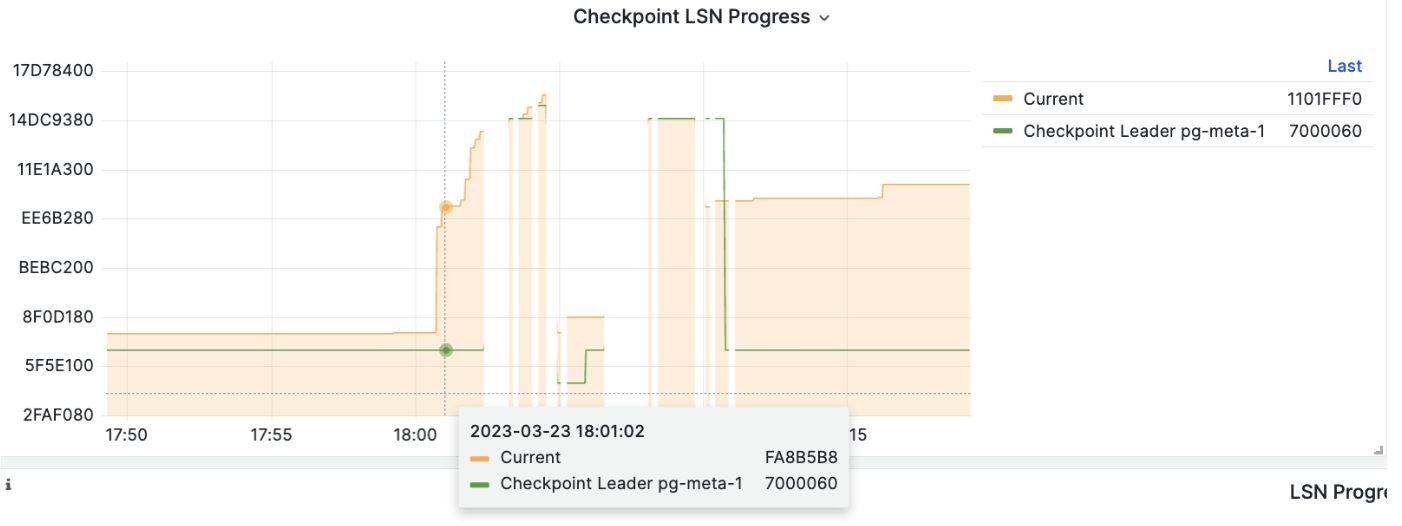
When the primary fails, a new round of leader election is triggered. The healthiest replica in the cluster (highest LSN position, minimum data loss) wins and is promoted to the new primary. After the winning replica is promoted, read-write traffic is immediately routed to the new primary.
The impact of primary failure is brief write service unavailability: write requests will be blocked or fail directly from primary failure until new primary promotion, with unavailability typically lasting 15 to 30 seconds, usually not exceeding 1 minute.
When a replica fails, read-only traffic is routed to other replicas. Only when all replicas fail will read-only traffic ultimately be handled by the primary.
The impact of replica failure is partial read-only query interruption: queries currently running on that replica will abort due to connection reset and be immediately taken over by other available replicas.
Failure detection is performed jointly by Patroni and Etcd. The cluster leader holds a lease; if the cluster leader fails to renew the lease in time (10s) due to failure, the lease is released, triggering a Failover and new cluster election.
Even without any failures, you can proactively change the cluster primary through Switchover.
In this case, write queries on the primary will experience a brief interruption and be immediately routed to the new primary. This operation is typically used for rolling maintenance/upgrades of database servers.
Tradeoffs
Recovery Time Objective (RTO) and Recovery Point Objective (RPO) are two parameters that require careful tradeoffs when designing high availability clusters.
The default RTO and RPO values used by Pigsty meet reliability requirements for most scenarios. You can adjust them based on your hardware level, network quality, and business requirements.
RTO and RPO are NOT always better when smaller!
Too small an RTO increases false positive rates; too small an RPO reduces the probability of successful automatic failover.
The upper limit of unavailability during failover is controlled by the pg_rto parameter. RTO defaults to 30s. Increasing it will result in longer primary failure write unavailability, while decreasing it will increase the rate of false positive failovers (e.g., repeated switching due to brief network jitter).
The upper limit of potential data loss is controlled by the pg_rpo parameter, defaulting to 1MB. Reducing this value can lower the data loss ceiling during failover but also increases the probability of refusing automatic failover when replicas are not healthy enough (lagging too far behind).
Pigsty uses availability-first mode by default, meaning it will failover as quickly as possible when the primary fails, and data not yet replicated to replicas may be lost (under typical 10GbE networks, replication lag is usually a few KB to 100KB).
If you need to ensure zero data loss during failover, you can use the crit.yml template to ensure no data loss during failover, but this sacrifices some performance as a tradeoff.
Recovery Time Objective (RTO) in seconds. This is used to calculate Patroni’s TTL value, defaulting to 30 seconds.
If the primary instance is missing for this long, a new leader election will be triggered. This value is not always better when lower; it involves tradeoffs:
Reducing this value can decrease unavailability during cluster failover (inability to write), but makes the cluster more sensitive to short-term network jitter, increasing the probability of false positive failover triggers.
You need to configure this value based on network conditions and business constraints, making a tradeoff between failure probability and failure impact.
Recovery Point Objective (RPO) in bytes, default: 1048576.
Defaults to 1MiB, meaning up to 1MiB of data loss can be tolerated during failover.
When the primary goes down and all replicas are lagging, you must make a difficult choice:
Either promote a replica to become the new primary immediately, accepting acceptable data loss (e.g., less than 1MB), and restore service as quickly as possible.
Or wait for the primary to come back online (which may never happen) to avoid any data loss, or abandon automatic failover and wait for human intervention to make the final decision.
You need to configure this value based on business preference, making a tradeoff between availability and consistency.
Additionally, you can always ensure RPO = 0 by enabling synchronous commit (e.g., using the crit.yml template), sacrificing some cluster latency/throughput performance to guarantee data consistency.
4.1 - Service Access
Pigsty uses HAProxy to provide service access, with optional pgBouncer for connection pooling, and optional L2 VIP and DNS access.
Split read and write operations, route traffic correctly, and deliver PostgreSQL cluster capabilities reliably.
Service is an abstraction: it represents the form in which database clusters expose their capabilities externally, encapsulating underlying cluster details.
Services are crucial for stable access in production environments, showing their value during automatic failover in high availability clusters. Personal users typically don’t need to worry about this concept.
Personal Users
The concept of “service” is for production environments. Personal users with single-node clusters can skip the complexity and directly use instance names or IP addresses to access the database.
For example, Pigsty’s default single-node pg-meta.meta database can be connected directly using three different users:
psql postgres://dbuser_dba:DBUser.DBA@10.10.10.10/meta # Connect directly with DBA superuserpsql postgres://dbuser_meta:DBUser.Meta@10.10.10.10/meta # Connect with default business admin userpsql postgres://dbuser_view:DBUser.View@pg-meta/meta # Connect with default read-only user via instance domain name
Service Overview
In real-world production environments, we use primary-replica database clusters based on replication. Within a cluster, one and only one instance serves as the leader (primary) that can accept writes.
Other instances (replicas) continuously fetch change logs from the cluster leader to stay synchronized. Replicas can also handle read-only requests, significantly offloading the primary in read-heavy, write-light scenarios.
Therefore, distinguishing write requests from read-only requests is a common practice.
Additionally, for production environments with high-frequency, short-lived connections, we pool requests through connection pool middleware (Pgbouncer) to reduce connection and backend process creation overhead. However, for scenarios like ETL and change execution, we need to bypass the connection pool and directly access the database.
Meanwhile, high-availability clusters may undergo failover during failures, causing cluster leadership changes. Therefore, high-availability database solutions require write traffic to automatically adapt to cluster leadership changes.
These varying access needs (read-write separation, pooled vs. direct connections, failover auto-adaptation) ultimately lead to the abstraction of the Service concept.
Typically, database clusters must provide this most basic service:
Read-write service (primary): Can read from and write to the database
For production database clusters, at least these two services should be provided:
Read-write service (primary): Write data: Can only be served by the primary.
Read-only service (replica): Read data: Can be served by replicas; falls back to primary when no replicas are available
Additionally, depending on specific business scenarios, there may be other services, such as:
Default direct service (default): Allows (admin) users to bypass the connection pool and directly access the database
Offline replica service (offline): Dedicated replica not serving online read traffic, used for ETL and analytical queries
Sync replica service (standby): Read-only service with no replication delay, handled by synchronous standby/primary for read queries
Delayed replica service (delayed): Access data from the same cluster as it was some time ago, handled by delayed replicas
Access Services
Pigsty’s service delivery boundary stops at the cluster’s HAProxy. Users can access these load balancers through various means.
The typical approach is to use DNS or VIP access, binding them to all or any number of load balancers in the cluster.
You can use different host & port combinations, which provide PostgreSQL service in different ways.
Host
Type
Sample
Description
Cluster Domain Name
pg-test
Access via cluster domain name (resolved by dnsmasq @ infra nodes)
Cluster VIP Address
10.10.10.3
Access via L2 VIP address managed by vip-manager, bound to primary node
Instance Hostname
pg-test-1
Access via any instance hostname (resolved by dnsmasq @ infra nodes)
Instance IP Address
10.10.10.11
Access any instance’s IP address
Port
Pigsty uses different ports to distinguish pg services
Port
Service
Type
Description
5432
postgres
Database
Direct access to postgres server
6432
pgbouncer
Middleware
Access postgres through connection pool middleware
5433
primary
Service
Access primary pgbouncer (or postgres)
5434
replica
Service
Access replica pgbouncer (or postgres)
5436
default
Service
Access primary postgres
5438
offline
Service
Access offline postgres
Combinations
# Access via cluster domainpostgres://test@pg-test:5432/test # DNS -> L2 VIP -> primary direct connectionpostgres://test@pg-test:6432/test # DNS -> L2 VIP -> primary connection pool -> primarypostgres://test@pg-test:5433/test # DNS -> L2 VIP -> HAProxy -> primary connection pool -> primarypostgres://test@pg-test:5434/test # DNS -> L2 VIP -> HAProxy -> replica connection pool -> replicapostgres://dbuser_dba@pg-test:5436/test # DNS -> L2 VIP -> HAProxy -> primary direct connection (for admin)postgres://dbuser_stats@pg-test:5438/test # DNS -> L2 VIP -> HAProxy -> offline direct connection (for ETL/personal queries)# Access via cluster VIP directlypostgres://test@10.10.10.3:5432/test # L2 VIP -> primary direct accesspostgres://test@10.10.10.3:6432/test # L2 VIP -> primary connection pool -> primarypostgres://test@10.10.10.3:5433/test # L2 VIP -> HAProxy -> primary connection pool -> primarypostgres://test@10.10.10.3:5434/test # L2 VIP -> HAProxy -> replica connection pool -> replicapostgres://dbuser_dba@10.10.10.3:5436/test # L2 VIP -> HAProxy -> primary direct connection (for admin)postgres://dbuser_stats@10.10.10.3::5438/test # L2 VIP -> HAProxy -> offline direct connection (for ETL/personal queries)# Directly specify any cluster instance namepostgres://test@pg-test-1:5432/test # DNS -> database instance direct connection (singleton access)postgres://test@pg-test-1:6432/test # DNS -> connection pool -> databasepostgres://test@pg-test-1:5433/test # DNS -> HAProxy -> connection pool -> database read/writepostgres://test@pg-test-1:5434/test # DNS -> HAProxy -> connection pool -> database read-onlypostgres://dbuser_dba@pg-test-1:5436/test # DNS -> HAProxy -> database direct connectionpostgres://dbuser_stats@pg-test-1:5438/test # DNS -> HAProxy -> database offline read/write# Directly specify any cluster instance IP accesspostgres://test@10.10.10.11:5432/test # Database instance direct connection (directly specify instance, no automatic traffic distribution)postgres://test@10.10.10.11:6432/test # Connection pool -> databasepostgres://test@10.10.10.11:5433/test # HAProxy -> connection pool -> database read/writepostgres://test@10.10.10.11:5434/test # HAProxy -> connection pool -> database read-onlypostgres://dbuser_dba@10.10.10.11:5436/test # HAProxy -> database direct connectionpostgres://dbuser_stats@10.10.10.11:5438/test # HAProxy -> database offline read-write# Smart client: read/write separation via URLpostgres://test@10.10.10.11:6432,10.10.10.12:6432,10.10.10.13:6432/test?target_session_attrs=primary
postgres://test@10.10.10.11:6432,10.10.10.12:6432,10.10.10.13:6432/test?target_session_attrs=prefer-standby
5 - Point-in-Time Recovery
Pigsty uses pgBackRest to implement PostgreSQL point-in-time recovery, allowing users to roll back to any point in time within the backup policy window.
Overview
You can restore and roll back your cluster to any point in the past, avoiding data loss caused by software defects and human errors.
Pigsty’s PostgreSQL clusters come with auto-configured Point-in-Time Recovery (PITR) capability, powered by the backup component pgBackRest and optional object storage repository MinIO.
High availability solutions can address hardware failures but are powerless against data deletion/overwriting/database drops caused by software defects and human errors.
For such situations, Pigsty provides out-of-the-box Point-in-Time Recovery (PITR) capability, enabled by default without additional configuration.
Pigsty provides default configurations for base backups and WAL archiving. You can use local directories and disks, or dedicated MinIO clusters or S3 object storage services to store backups and achieve geo-redundant disaster recovery.
When using local disks, the default capability to recover to any point within the past day is retained. When using MinIO or S3, the default capability to recover to any point within the past week is retained.
As long as storage space permits, you can retain any arbitrarily long recoverable time window, as your budget allows.
What problems does PITR solve?
Enhanced disaster recovery: RPO drops from ∞ to tens of MB, RTO drops from ∞ to hours/minutes.
Ensures data security: Data integrity in C/I/A: avoids data consistency issues caused by accidental deletion.
Ensures data security: Data availability in C/I/A: provides fallback for “permanently unavailable” disaster scenarios
Standalone Configuration Strategy
Event
RTO
RPO
Nothing
Crash
Permanently lost
All lost
Base Backup
Crash
Depends on backup size and bandwidth (hours)
Lose data since last backup (hours to days)
Base Backup + WAL Archive
Crash
Depends on backup size and bandwidth (hours)
Lose unarchived data (tens of MB)
What are the costs of PITR?
Reduces C in data security: Confidentiality, creates additional leak points, requires additional backup protection.
Extra resource consumption: Local storage or network traffic/bandwidth overhead, usually not a concern.
Increased complexity: Users need to pay backup management costs.
Limitations of PITR
If only PITR is used for failure recovery, RTO and RPO metrics are inferior compared to high availability solutions, and typically both should be used together.
RTO: With only standalone + PITR, recovery time depends on backup size and network/disk bandwidth, ranging from tens of minutes to hours or days.
RPO: With only standalone + PITR, some data may be lost during crashes - one or several WAL segment files may not yet be archived, losing 16 MB to tens of MB of data.
Besides PITR, you can also use delayed clusters in Pigsty to address data deletion/modification caused by human errors or software defects.
How It Works
Point-in-time recovery allows you to restore and roll back your cluster to “any point” in the past, avoiding data loss caused by software defects and human errors. To achieve this, two preparations are needed: Base Backup and WAL Archiving.
Having a base backup allows users to restore the database to its state at backup time, while having WAL archives starting from a base backup allows users to restore the database to any point after the base backup time.
Pigsty uses pgBackRest to manage PostgreSQL backups. pgBackRest initializes empty repositories on all cluster instances but only actually uses the repository on the cluster primary.
pgBackRest supports three backup modes: full backup, incremental backup, and differential backup, with the first two being most commonly used.
Full backup takes a complete physical snapshot of the database cluster at the current moment; incremental backup records the differences between the current database cluster and the previous full backup.
Pigsty provides a wrapper command for backups: /pg/bin/pg-backup [full|incr]. You can schedule regular base backups as needed through Crontab or any other task scheduling system.
WAL Archiving
Pigsty enables WAL archiving on the cluster primary by default and uses the pgbackrest command-line tool to continuously push WAL segment files to the backup repository.
pgBackRest automatically manages required WAL files and timely cleans up expired backups and their corresponding WAL archive files based on the backup retention policy.
If you don’t need PITR functionality, you can disable WAL archiving by configuring the cluster: archive_mode: off and remove node_crontab to stop scheduled backup tasks.
Implementation
By default, Pigsty provides two preset backup strategies: The default uses local filesystem backup repository, performing one full backup daily to ensure users can roll back to any point within the past day. The alternative strategy uses dedicated MinIO clusters or S3 storage for backups, with weekly full backups, daily incremental backups, and two weeks of backup and WAL archive retention by default.
Pigsty uses pgBackRest to manage backups, receive WAL archives, and perform PITR. Backup repositories can be flexibly configured (pgbackrest_repo): defaults to primary’s local filesystem (local), but can also use other disk paths, or the included optional MinIO service (minio) and cloud S3 services.
pgbackrest_enabled:true# enable pgBackRest on pgsql host?pgbackrest_clean:true# remove pg backup data during init?pgbackrest_log_dir:/pg/log/pgbackrest# pgbackrest log dir, `/pg/log/pgbackrest` by defaultpgbackrest_method: local # pgbackrest repo method:local, minio, [user-defined...]pgbackrest_repo: # pgbackrest repo:https://pgbackrest.org/configuration.html#section-repositorylocal:# default pgbackrest repo with local posix fspath:/pg/backup # local backup directory, `/pg/backup` by defaultretention_full_type:count # retention full backup by countretention_full:2# keep at most 3 full backup, at least 2, when using local fs repominio:# optional minio repo for pgbackresttype:s3 # minio is s3-compatible, so use s3s3_endpoint:sss.pigsty # minio endpoint domain name, `sss.pigsty` by defaults3_region:us-east-1 # minio region, us-east-1 by default, not used for minios3_bucket:pgsql # minio bucket name, `pgsql` by defaults3_key:pgbackrest # minio user access key for pgbackrests3_key_secret:S3User.Backup # minio user secret key for pgbackrests3_uri_style:path # use path style uri for minio rather than host stylepath:/pgbackrest # minio backup path, `/pgbackrest` by defaultstorage_port:9000# minio port, 9000 by defaultstorage_ca_file:/etc/pki/ca.crt # minio ca file path, `/etc/pki/ca.crt` by defaultbundle:y# bundle small files into a single filecipher_type:aes-256-cbc # enable AES encryption for remote backup repocipher_pass:pgBackRest # AES encryption password, default is 'pgBackRest'retention_full_type:time # retention full backup by time on minio reporetention_full:14# keep full backup for last 14 days# You can also add other optional backup repos, such as S3, for geo-redundant disaster recovery
Pigsty parameter pgbackrest_repo target repositories are converted to repository definitions in the /etc/pgbackrest/pgbackrest.conf configuration file.
For example, if you define a US West S3 repository for storing cold backups, you can use the following reference configuration.
You can directly use the following wrapper commands for PostgreSQL database cluster point-in-time recovery.
Pigsty uses incremental differential parallel recovery by default, allowing you to recover to a specified point in time at maximum speed.
pg-pitr # Restore to the end of WAL archive stream (e.g., for entire datacenter failure)pg-pitr -i # Restore to the most recent backup completion time (rarely used)pg-pitr --time="2022-12-30 14:44:44+08"# Restore to a specified point in time (for database or table drops)pg-pitr --name="my-restore-point"# Restore to a named restore point created with pg_create_restore_pointpg-pitr --lsn="0/7C82CB8" -X # Restore to immediately before the LSNpg-pitr --xid="1234567" -X -P # Restore to immediately before the specified transaction ID, then promote cluster to primarypg-pitr --backup=latest # Restore to the latest backup setpg-pitr --backup=20221108-105325 # Restore to a specific backup set, backup sets can be listed with pgbackrest infopg-pitr # pgbackrest --stanza=pg-meta restorepg-pitr -i # pgbackrest --stanza=pg-meta --type=immediate restorepg-pitr -t "2022-12-30 14:44:44+08"# pgbackrest --stanza=pg-meta --type=time --target="2022-12-30 14:44:44+08" restorepg-pitr -n "my-restore-point"# pgbackrest --stanza=pg-meta --type=name --target=my-restore-point restorepg-pitr -b 20221108-105325F # pgbackrest --stanza=pg-meta --type=name --set=20221230-120101F restorepg-pitr -l "0/7C82CB8" -X # pgbackrest --stanza=pg-meta --type=lsn --target="0/7C82CB8" --target-exclusive restorepg-pitr -x 1234567 -X -P # pgbackrest --stanza=pg-meta --type=xid --target="0/7C82CB8" --target-exclusive --target-action=promote restore
When performing PITR, you can use Pigsty’s monitoring system to observe the cluster LSN position status and determine whether recovery to the specified point in time, transaction point, LSN position, or other point was successful.
6 - Monitoring System
How Pigsty’s monitoring system is architected and how monitored targets are automatically managed.
If you only have one minute, remember this diagram:
flowchart TB
    subgraph L1["Layer 1: Network Security"]
        L1A["Firewall + SSL/TLS Encryption + HAProxy Proxy"]
        L1B["Who can connect? Is the connection encrypted?"]
    end

    subgraph L2["Layer 2: Authentication"]
        L2A["HBA Rules + SCRAM-SHA-256 Passwords + Certificate Auth"]
        L2B["Who are you? How do you prove it?"]
    end

    subgraph L3["Layer 3: Access Control"]
        L3A["Role System + Object Permissions + Database Isolation"]
        L3B["What can you do? What data can you access?"]
    end

    subgraph L4["Layer 4: Data Security"]
        L4A["Data Checksums + Backup Encryption + Audit Logs"]
        L4B["Is data intact? Are operations logged?"]
    end

    L1 --> L2 --> L3 --> L4
Core Value: Enterprise-grade security configuration out of the box, best practices enabled by default, additional configuration achieves SOC 2 compliance.
Important: After production deployment, immediately change these default passwords!
Role and Permission System
Pigsty provides a four-tier role system out of the box:
flowchart TB
    subgraph Admin["dbrole_admin (Admin)"]
        A1["Inherits dbrole_readwrite"]
        A2["Can CREATE/DROP/ALTER objects (DDL)"]
        A3["For: Business admins, apps needing table creation"]
    end

    subgraph RW["dbrole_readwrite (Read-Write)"]
        RW1["Inherits dbrole_readonly"]
        RW2["Can INSERT/UPDATE/DELETE"]
        RW3["For: Production business accounts"]
    end

    subgraph RO["dbrole_readonly (Read-Only)"]
        RO1["Can SELECT all tables"]
        RO2["For: Reporting, data analysis"]
    end

    subgraph Offline["dbrole_offline (Offline)"]
        OFF1["Can only access offline instances"]
        OFF2["For: ETL, personal analysis, slow queries"]
    end

    Admin --> |inherits| RW
    RW --> |inherits| RO
Creating Business Users
pg_users:# Read-only user - for reporting- name:dbuser_reportpassword:ReportUser123roles:[dbrole_readonly]pgbouncer:true# Read-write user - for production- name:dbuser_apppassword:AppUser456roles:[dbrole_readwrite]pgbouncer:true# Admin user - for DDL operations- name:dbuser_adminpassword:AdminUser789roles:[dbrole_admin]pgbouncer:true
HBA Access Control
HBA (Host-Based Authentication) controls “who can connect from where”:
flowchart LR
    subgraph Sources["Connection Sources"]
        S1["Local Socket"]
        S2["localhost"]
        S3["Intranet CIDR"]
        S4["Admin Nodes"]
        S5["External"]
    end

    subgraph Auth["Auth Methods"]
        A1["ident/peer<br/>OS user mapping, most secure"]
        A2["scram-sha-256<br/>Password auth"]
        A3["scram-sha-256 + SSL<br/>Enforce SSL"]
    end

    S1 --> A1
    S2 --> A2
    S3 --> A2
    S4 --> A3
    S5 --> A3

    Note["Rules matched in order<br/>First matching rule applies"]
Custom HBA Rules
pg_hba_rules:# Allow app servers from intranet- {user: dbuser_app, db: mydb, addr: '10.10.10.0/24', auth:scram-sha-256}# Force SSL for certain users- {user: admin, db: all, addr: world, auth:ssl}# Require certificate auth (highest security)- {user: secure_user, db: all, addr: world, auth:cert}
Encrypted Communication
SSL/TLS Architecture
sequenceDiagram
    participant Client as Client
    participant Server as PostgreSQL

    Client->>Server: 1. ClientHello
    Server->>Client: 2. ServerHello
    Server->>Client: 3. Server Certificate
    Client->>Server: 4. Client Key
    Client->>Server: 5. Encrypted Channel Established
    Server->>Client: 5. Encrypted Channel Established

    rect rgb(200, 255, 200)
        Note over Client,Server: Encrypted Data Transfer
        Client->>Server: 6. Application Data (encrypted)
        Server->>Client: 6. Application Data (encrypted)
    end

    Note over Client,Server: Prevents eavesdropping, tampering, verifies server identity
Local CA
Pigsty automatically generates a local CA and issues certificates:
/etc/pki/
├── ca.crt              # CA certificate (public)
├── ca.key              # CA private key (keep secret!)
└── server.crt/key      # Server certificate/key
Important: Securely back up ca.key—if lost, all certificates must be reissued!
Pigsty includes a self-signed CA PKI infrastructure for issuing SSL certificates and encrypting network traffic.
Pigsty enables security best practices by default: using SSL to encrypt network traffic and HTTPS for web interfaces.
To achieve this, Pigsty includes a local self-signed CA for issuing SSL certificates and encrypting network communications.
By default, SSL and HTTPS are enabled but not enforced. For environments with higher security requirements, you can enforce SSL and HTTPS usage.
Local CA
During initialization, Pigsty generates a self-signed CA in the Pigsty source directory (~/pigsty) on the ADMIN node. This CA can be used for SSL, HTTPS, digital signatures, issuing database client certificates, and advanced security features.
Each Pigsty deployment uses a unique CA—CAs from different Pigsty deployments are not mutually trusted.
The local CA consists of two files, located in the files/pki/ca directory by default:
ca.crt: Self-signed CA root certificate, distributed to all managed nodes for certificate verification.
ca.key: CA private key for issuing certificates and verifying CA identity—keep this file secure and prevent leakage!
Protect the CA Private Key
Keep the CA private key file safe—don’t lose it or leak it. We recommend encrypting and backing up this file after completing Pigsty installation.
Using an Existing CA
If you already have your own CA PKI infrastructure, Pigsty can be configured to use your existing CA.
Simply place your CA public key and private key files in the files/pki/ca directory:
files/pki/ca/ca.key # Core CA private key file, must exist; if missing, a new one is randomly generatedfiles/pki/ca/ca.crt # If certificate file is missing, Pigsty auto-generates a new root certificate from the CA private key
When Pigsty executes the install.yml or infra.yml playbooks, if a ca.key private key file exists in files/pki/ca, the existing CA will be used. Since ca.crt can be generated from the ca.key private key, Pigsty will automatically regenerate the root certificate file if it’s missing.
Note When Using Existing CA
You can set the ca_method parameter to copy to ensure Pigsty errors out and stops if it can’t find a local CA, rather than auto-generating a new self-signed CA.
Trusting the CA
During Pigsty installation, ca.crt is distributed to all nodes at /etc/pki/ca.crt during the node_ca task in the node.yml playbook.
EL-family and Debian-family operating systems have different default trusted CA certificate paths, so the distribution path and update methods differ:
Pigsty issues HTTPS certificates for domain names used by web systems on infrastructure nodes by default, allowing HTTPS access to Pigsty’s web interfaces.
If you want to avoid “untrusted CA certificate” warnings in client browsers, distribute ca.crt to the trusted certificate directory on client machines.
You can double-click the ca.crt file to add it to your system keychain. For example, on MacOS, open “Keychain Access,” search for pigsty-ca, and set it to “trust” this root certificate.
Viewing Certificate Contents
Use the following command to view the Pigsty CA certificate contents:
openssl x509 -text -in /etc/pki/ca.crt
Local CA Root Certificate Content Example
Certificate:
    Data:
        Version: 3 (0x2)
        Serial Number:
            50:29:e3:60:96:93:f4:85:14:fe:44:81:73:b5:e1:09:2a:a8:5c:0a
        Signature Algorithm: sha256WithRSAEncryption
        Issuer: O=pigsty, OU=ca, CN=pigsty-ca
        Validity
            Not Before: Feb  7 00:56:27 2023 GMT
            Not After : Jan 14 00:56:27 2123 GMT
        Subject: O=pigsty, OU=ca, CN=pigsty-ca
        Subject Public Key Info:
            Public Key Algorithm: rsaEncryption
                Public-Key: (4096 bit)
                Modulus:
                    00:c1:41:74:4f:28:c3:3c:2b:13:a2:37:05:87:31:
                    ....
                    e6:bd:69:a5:5b:e3:b4:c0:65:09:6e:84:14:e9:eb:
                    90:f7:61
                Exponent: 65537 (0x10001)
        X509v3 extensions:
            X509v3 Subject Alternative Name:
                DNS:pigsty-ca
            X509v3 Key Usage:
                Digital Signature, Certificate Sign, CRL Sign
            X509v3 Basic Constraints: critical
                CA:TRUE, pathlen:1
            X509v3 Subject Key Identifier:
                C5:F6:23:CE:BA:F3:96:F6:4B:48:A5:B1:CD:D4:FA:2B:BD:6F:A6:9C
    Signature Algorithm: sha256WithRSAEncryption
    Signature Value:
        89:9d:21:35:59:6b:2c:9b:c7:6d:26:5b:a9:49:80:93:81:18:
        ....
        9e:dd:87:88:0d:c4:29:9e
-----BEGIN CERTIFICATE-----
...
cXyWAYcvfPae3YeIDcQpng==
-----END CERTIFICATE-----
Issuing Certificates
If you want to use client certificate authentication, you can use the local CA and the cert.yml playbook to manually issue PostgreSQL client certificates.
Set the certificate’s CN field to the database username:
Access control is important, but many users struggle to implement it properly. Pigsty provides a streamlined access control model that serves as a security baseline for your cluster.
pg_default_roles:# Global default roles and system users- {name: dbrole_readonly ,login: false ,comment:role for global read-only access }- {name: dbrole_offline ,login: false ,comment:role for restricted read-only access }- {name: dbrole_readwrite ,login: false ,roles: [dbrole_readonly] ,comment:role for global read-write access }- {name: dbrole_admin ,login: false ,roles: [pg_monitor, dbrole_readwrite] ,comment:role for object creation }- {name: postgres ,superuser: true ,comment:system superuser }- {name: replicator ,replication: true ,roles: [pg_monitor, dbrole_readonly] ,comment:system replicator }- {name: dbuser_dba ,superuser: true ,roles: [dbrole_admin] ,pgbouncer: true ,pool_mode: session, pool_connlimit: 16 ,comment:pgsql admin user }- {name: dbuser_monitor ,roles: [pg_monitor] ,pgbouncer: true ,parameters:{log_min_duration_statement: 1000 } ,pool_mode: session ,pool_connlimit: 8 ,comment:pgsql monitor user }
Default Roles
Pigsty has four default roles:
Business Read-Only (dbrole_readonly): Role for global read-only access. Use this if other services need read-only access to this database.
Business Read-Write (dbrole_readwrite): Role for global read-write access. Production accounts for primary business should have database read-write permissions.
Business Admin (dbrole_admin): Role with DDL permissions. Typically used for business administrators or scenarios requiring table creation in applications.
Offline Read-Only (dbrole_offline): Restricted read-only access role (can only access offline instances). Usually for personal users or ETL tool accounts.
Default roles are defined in pg_default_roles. Unless you know what you’re doing, don’t change the default role names.
- {name: dbrole_readonly , login: false , comment:role for global read-only access }- {name: dbrole_offline , login: false , comment:role for restricted read-only access (offline instance) }- {name: dbrole_readwrite , login: false , roles: [dbrole_readonly], comment:role for global read-write access }- {name: dbrole_admin , login: false , roles: [pg_monitor, dbrole_readwrite] , comment:role for object creation }
Default Users
Pigsty also has four default users (system users):
Superuser (postgres): Cluster owner and creator, same name as OS dbsu.
Replication User (replicator): System user for primary-replica replication.
Monitor User (dbuser_monitor): User for monitoring database and connection pool metrics.
Admin User (dbuser_dba): Administrator for daily operations and database changes.
These 4 default users’ username/password are defined by 4 pairs of dedicated parameters and referenced in many places:
pg_dbsu: OS dbsu name, defaults to postgres. Best not to change it.
pg_dbsu_password: dbsu password, default empty means no password. Best not to set it.
Remember to change these passwords in production deployments—don’t use defaults!
pg_dbsu:postgres # Database superuser name, recommended not to changepg_dbsu_password:''# Database superuser password, recommended to leave empty!pg_replication_username:replicator # System replication usernamepg_replication_password:DBUser.Replicator # System replication password, must change!pg_monitor_username:dbuser_monitor # System monitor usernamepg_monitor_password:DBUser.Monitor # System monitor password, must change!pg_admin_username:dbuser_dba # System admin usernamepg_admin_password:DBUser.DBA # System admin password, must change!
Permission System
Pigsty has an out-of-the-box permission model that works with default roles.
All users can access all schemas.
Read-only users (dbrole_readonly) can read from all tables. (SELECT, EXECUTE)
Read-write users (dbrole_readwrite) can write to all tables and run DML. (INSERT, UPDATE, DELETE)
Admin users (dbrole_admin) can create objects and run DDL. (CREATE, USAGE, TRUNCATE, REFERENCES, TRIGGER)
Offline users (dbrole_offline) are similar to read-only but with restricted access—only offline instances (pg_role = 'offline' or pg_offline_query = true)
Objects created by admin users will have correct permissions.
Default privileges are configured on all databases, including template databases.
Database connection permissions are managed by database definition.
CREATE privilege on databases and public schema is revoked from PUBLIC by default.
Object Privileges
Default privileges for newly created objects are controlled by pg_default_privileges:
- GRANT USAGE ON SCHEMAS TO dbrole_readonly- GRANT SELECT ON TABLES TO dbrole_readonly- GRANT SELECT ON SEQUENCES TO dbrole_readonly- GRANT EXECUTE ON FUNCTIONS TO dbrole_readonly- GRANT USAGE ON SCHEMAS TO dbrole_offline- GRANT SELECT ON TABLES TO dbrole_offline- GRANT SELECT ON SEQUENCES TO dbrole_offline- GRANT EXECUTE ON FUNCTIONS TO dbrole_offline- GRANT INSERT ON TABLES TO dbrole_readwrite- GRANT UPDATE ON TABLES TO dbrole_readwrite- GRANT DELETE ON TABLES TO dbrole_readwrite- GRANT USAGE ON SEQUENCES TO dbrole_readwrite- GRANT UPDATE ON SEQUENCES TO dbrole_readwrite- GRANT TRUNCATE ON TABLES TO dbrole_admin- GRANT REFERENCES ON TABLES TO dbrole_admin- GRANT TRIGGER ON TABLES TO dbrole_admin- GRANT CREATE ON SCHEMAS TO dbrole_admin
Objects newly created by admins will have the above privileges by default. Use \ddp+ to view these default privileges:
Type
Access Privileges
Function
=X
dbrole_readonly=X
dbrole_offline=X
dbrole_admin=X
Schema
dbrole_readonly=U
dbrole_offline=U
dbrole_admin=UC
Sequence
dbrole_readonly=r
dbrole_offline=r
dbrole_readwrite=wU
dbrole_admin=rwU
Table
dbrole_readonly=r
dbrole_offline=r
dbrole_readwrite=awd
dbrole_admin=arwdDxt
Default Privileges
The SQL statement ALTER DEFAULT PRIVILEGES lets you set privileges for future objects. It doesn’t affect existing objects or objects created by non-admin users.
In Pigsty, default privileges are defined for three roles:
{%forprivinpg_default_privileges%}ALTERDEFAULTPRIVILEGESFORROLE{{pg_dbsu}}{{priv}};{%endfor%}{%forprivinpg_default_privileges%}ALTERDEFAULTPRIVILEGESFORROLE{{pg_admin_username}}{{priv}};{%endfor%}-- For other business admins, they should SET ROLE dbrole_admin before executing DDL
{%forprivinpg_default_privileges%}ALTERDEFAULTPRIVILEGESFORROLE"dbrole_admin"{{priv}};{%endfor%}
To maintain correct object permissions, you must execute DDL with admin users:
Business admin users granted dbrole_admin role (using SET ROLE to switch to dbrole_admin)
Using postgres as global object owner is wise. If creating objects as business admin, use SET ROLE dbrole_admin before creation to maintain correct permissions.