This is the multi-page printable view of this section. Click here to print.
Architecture
1 - Entity-Relationship
First understand “what objects exist and how they reference each other” before discussing deployment and operations. Pigsty’s PGSQL module is built around a stable ER diagram of several core entities. Understanding this diagram helps you design clear configurations and automation workflows.
The PGSQL module organizes in the form of clusters in production environments. These clusters are logical entities composed of a group of database instances associated through primary-replica relationships.
Each cluster is an autonomous business unit consisting of at least one primary instance and exposes capabilities through services.
There are four types of core entities in Pigsty’s PGSQL module:
- Cluster: An autonomous PostgreSQL business unit, serving as the top-level namespace for other entities.
- Service: A named abstraction for exposing capabilities, routing traffic, and exposing services via node ports.
- Instance: A single PostgreSQL server consisting of running processes and database files on a single node.
- Node: An abstraction of hardware resources running Linux + Systemd environment, which can be bare metal, VMs, containers, or Pods.
Together with two business entities “Database” and “Role”, they form a complete logical view, as shown below:
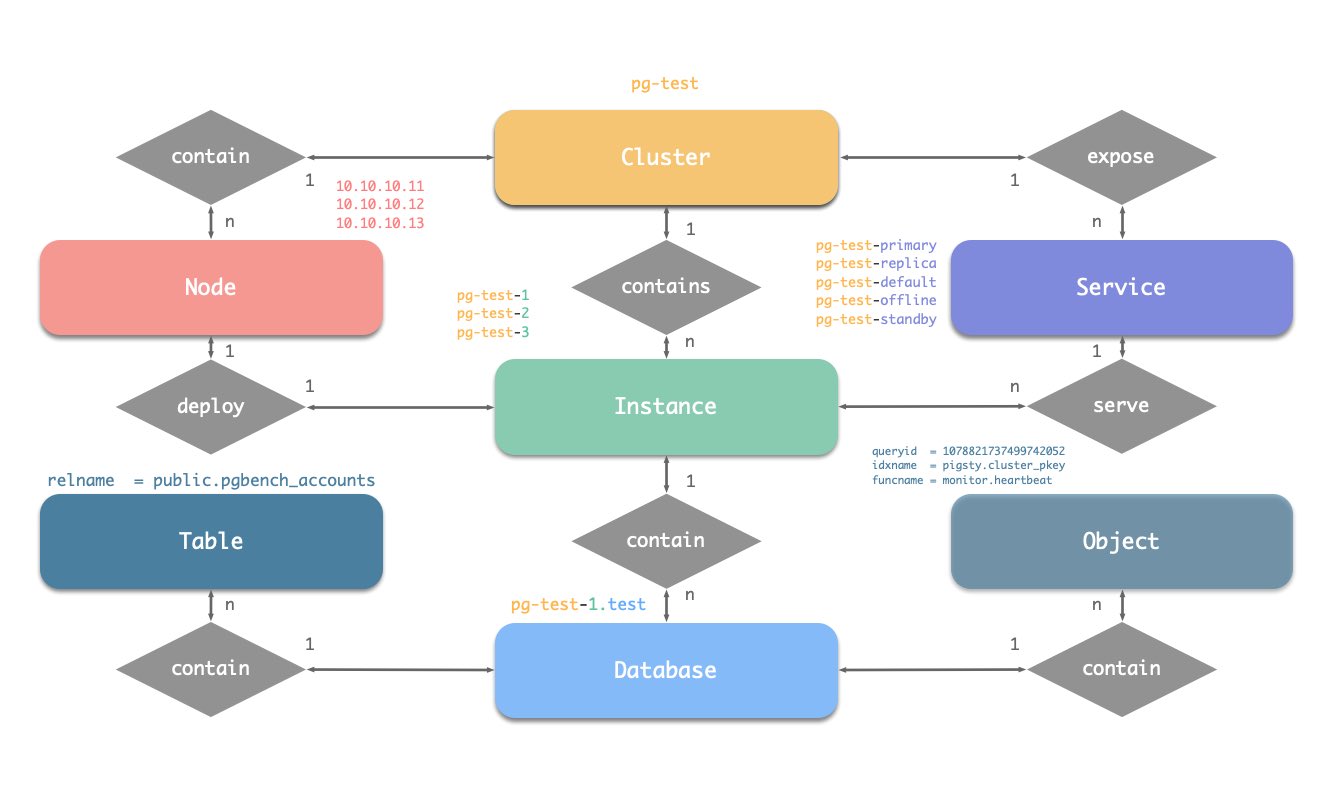
Naming Conventions (following Pigsty’s early constraints)
- Cluster names should be valid DNS domain names without any dots, matching the regex:
[a-zA-Z0-9-]+ - Service names should be prefixed with the cluster name and suffixed with specific words:
primary,replica,offline,delayed, connected with-. - Instance names are prefixed with the cluster name and suffixed with a positive integer instance number, connected with
-, e.g.,${cluster}-${seq}. - Nodes are identified by their primary internal IP address. Since the PGSQL module deploys database and host 1:1, the hostname is typically the same as the instance name.
2 - Components
Overview
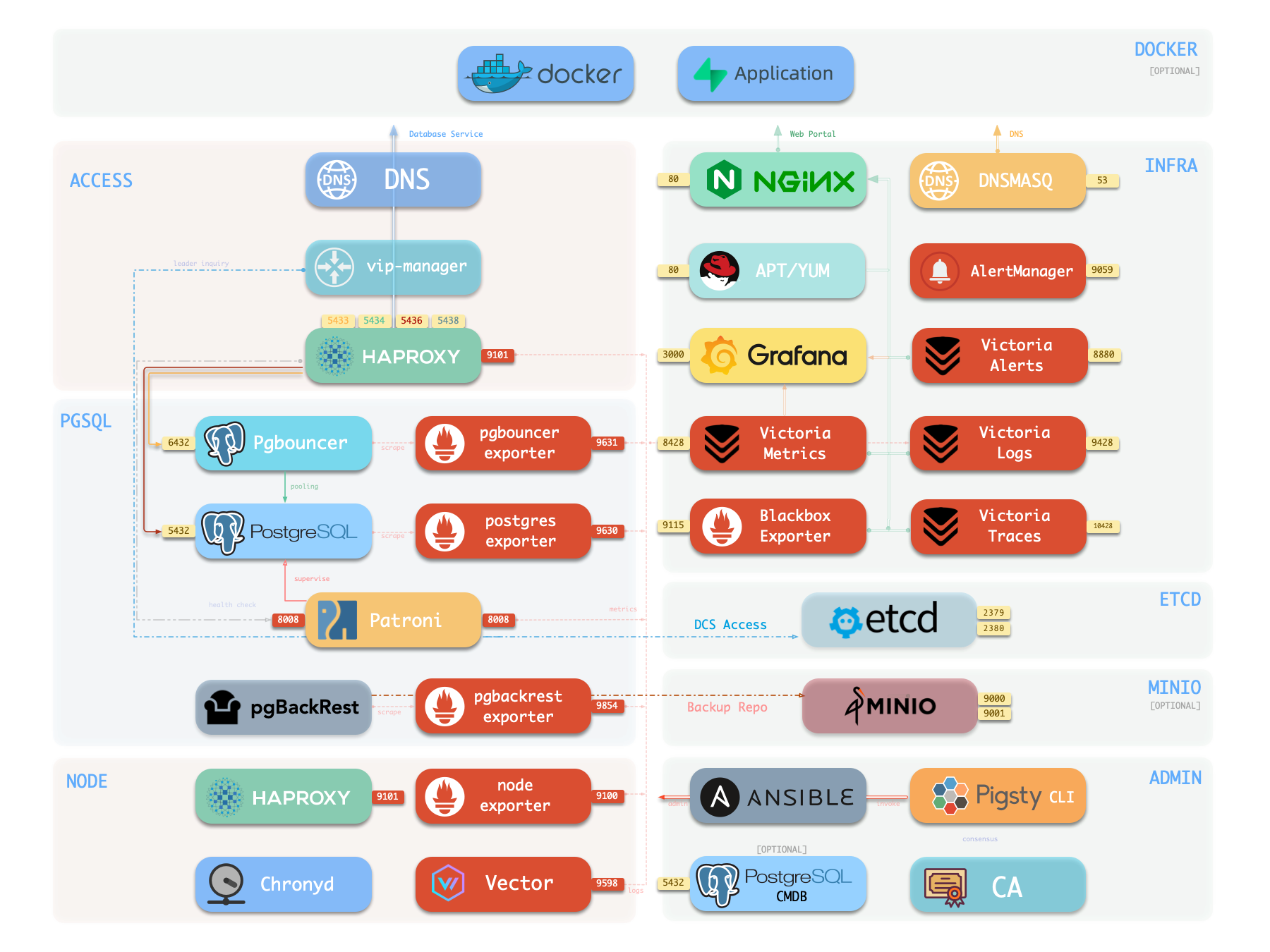
The following is a detailed description of PostgreSQL module components and their interactions, from top to bottom:
- Cluster DNS is resolved by DNSMASQ on infra nodes
- Cluster VIP is managed by the
vip-managercomponent, which bindspg_vip_addressto the cluster primary node.vip-managerobtains cluster leader information written bypatronifrom theetcdcluster
- Cluster services are exposed by Haproxy on nodes, with different services distinguished by different node ports (543x).
- Haproxy port 9101: monitoring metrics & statistics & admin page
- Haproxy port 5433: routes to primary pgbouncer by default: read-write service
- Haproxy port 5434: routes to replica pgbouncer by default: read-only service
- Haproxy port 5436: routes to primary postgres by default: default service
- Haproxy port 5438: routes to offline postgres by default: offline service
- HAProxy routes traffic based on health check information provided by
patroni.
- Pgbouncer is a connection pool middleware that listens on port 6432 by default, capable of buffering connections, exposing additional metrics, and providing extra flexibility.
- Pgbouncer is stateless and deployed 1:1 with the Postgres server via local Unix socket.
- Production traffic (primary/replica) will go through pgbouncer by default (can be skipped by specifying
pg_default_service_dest) - Default/offline services will always bypass pgbouncer and connect directly to the target Postgres.
- PostgreSQL listens on port 5432, providing relational database services
- Installing the PGSQL module on multiple nodes with the same cluster name will automatically form a high-availability cluster based on streaming replication
- PostgreSQL processes are managed by
patroniby default.
- Patroni listens on port 8008 by default, supervising the PostgreSQL server process
- Patroni spawns the Postgres server as a child process
- Patroni uses
etcdas DCS: storing configuration, fault detection, and leader election. - Patroni provides Postgres information through health checks (such as primary/replica), and HAProxy uses this information to distribute service traffic
- Patroni metrics will be scraped by VictoriaMetrics on infra nodes
- PG Exporter exposes postgres metrics on port 9630
- PostgreSQL metrics will be scraped by VictoriaMetrics on infra nodes
- Pgbouncer Exporter exposes pgbouncer metrics on port 9631
- Pgbouncer metrics will be scraped by VictoriaMetrics on infra nodes
- pgBackRest uses local backup repository by default (
pgbackrest_method=local)- If
local(default) is used as the backup repository, pgBackRest will create a local repository under the primary node’spg_fs_bkup - If
miniois used as the backup repository, pgBackRest will create a backup repository on a dedicated MinIO cluster:pgbackrest_repo.minio
- If
- Postgres-related logs (postgres, pgbouncer, patroni, pgbackrest) are collected by vector
- Vector listens on port 9598 and also exposes its own monitoring metrics to VictoriaMetrics on infra nodes
- Vector sends logs to VictoriaLogs on infra nodes
Cluster DNS
Cluster DNS service is maintained by DNSMASQ on infra nodes, providing stable FQDNs (<cluster>.<pg_dns_suffix>) for each pg_cluster. DNS records point to the primary or VIP, for access by business sides, automation processes, and cross-cluster data services without needing to directly care about real-time node IPs. DNS relies on inventory information written during deployment and only updates during VIP or primary node drift at runtime. Its upstream is vip-manager and the primary node status in etcd.
DNS’s downstream includes clients and third-party service endpoints, and it also provides unified target addresses for intermediate layers like HAProxy. This component is optional; it can be skipped when the cluster runs in an isolated network or when business ends directly use IPs, but it is recommended for most production environments to avoid hard-coding node addresses.
Key Parameters
pg_dns_suffix: Defines the unified suffix for cluster DNS records.pg_dns_target: Controls whether the resolution target points to VIP, primary, or explicit IP.
Primary Virtual IP (vip-manager)
vip-manager runs on each PG node, monitors the leader key written by Patroni in etcd, and binds pg_vip_address to the current primary node, achieving transparent L2 drift. It depends on the health status of the DCS and requires that the target network interface can be controlled by the current node, so that VIP is immediately released and rebound during failover, ensuring the old primary does not continue responding.
VIP’s downstream includes DNS, self-built clients, legacy systems, and other accessors needing fixed endpoints. This component is optional: only enabled when pg_vip_enabled is true and business requires static addresses. When enabled, all participating nodes must have the same VLAN access, otherwise VIP cannot drift correctly.
Key Parameters
pg_vip_enabled: Controls whether to enable L2 VIP.pg_vip_interface: Specifies the network interface listening and drifting VIP.pg_vip_address: Defines VIP IPv4/mask.pg_namespace: Namespace in etcd, shared by Patroni and vip-manager.
Service Entry and Traffic Scheduling (HAProxy)
HAProxy is installed on PG nodes (or dedicated service nodes), uniformly exposing database service port groups: 5433/5434 (read-write/read-only, via Pgbouncer), 5436/5438 (direct primary/offline), and 9101 management interface. Each backend pool relies on role and health information provided by patroni REST API for routing decisions and forwards traffic to corresponding instances or connection pools.
This component is the entry point for the entire cluster, with downstream directly facing applications, ETL, and management tools. You can point pg_service_provider to dedicated HA nodes to carry higher traffic, or publish locally on instances. HAProxy has no dependency on VIP but usually works with DNS and VIP to create a unified access point. Service definitions are composed of pg_default_services and pg_services, allowing fine-grained configuration of ports, load balancing strategies, and targets.
Key Parameters
pg_default_services: Defines global default service ports, targets, and check methods.pg_services: Appends or overrides business services for specific clusters.pg_service_provider: Specifies HAProxy node group publishing services (empty means local).pg_default_service_dest: Determines whether default service forwards to Pgbouncer or Postgres.pg_weight: Configures a single instance’s weight in specific services.
Connection Pool (Pgbouncer)
Pgbouncer runs in a stateless manner on each instance, preferentially connecting to PostgreSQL via local Unix Socket, used to absorb transient connections, stabilize sessions, and provide additional metrics. Pigsty routes production traffic (5433/5434) via Pgbouncer by default, with only default/offline services bypassing it to directly connect to PostgreSQL. Pgbouncer has no dependency on VIP and can scale independently with HAProxy and Patroni. When Pgbouncer stops, PostgreSQL can still provide direct connection services.
Pgbouncer’s downstream consists of massive short-connection clients and the unified entry HAProxy. It allows dynamic user loading based on auth_query and can configure SSL as needed. Component is optional. When disabled via pgbouncer_enabled, default services will point directly to PostgreSQL, requiring corresponding adjustments to connection counts and session management strategies.
Key Parameters
pgbouncer_enabled: Determines whether to enable local connection pool.pgbouncer_port: Listening port (default 6432).pgbouncer_poolmode: Connection pool mode, controlling transaction or session-level reuse.pgbouncer_auth_query: Whether to dynamically pull credentials from PostgreSQL.pgbouncer_sslmode: SSL strategy from client to connection pool.pg_default_service_dest: Affects whether default service goes via Pgbouncer.
Database Instance (PostgreSQL)
The PostgreSQL process is the core of the entire module, listening on 5432 by default and managed by Patroni. Installing the PGSQL module on multiple nodes with the same pg_cluster will automatically build a primary-replica topology based on physical streaming replication; primary/replica/offline roles are controlled by pg_role, and multiple instances can run on the same node via pg_instances when necessary. Instances depend on local data disks, OS kernel tuning, and system services provided by the NODE module.
This component’s downstream includes business read-write traffic, pgBackRest, pg_exporter, etc.; upstream includes Patroni, Ansible bootstrap scripts, and metadata in etcd. You can switch OLTP/OLAP configurations via pg_conf templates and define cascading replication via pg_upstream. If using citus/gpsql, further set pg_shard and pg_group. pg_hba_rules and pg_default_hba_rules determine access control policies.
Key Parameters
pg_mode: Instance running mode (standard PG, Citus, MSSQL compatibility, etc.).pg_seq: Instance sequence number, used to lock replication topology and service weight.pg_role: Defines instance role (primary/replica/offline).pg_instances: Mapping for deploying multiple instances on a single node.pg_upstream: Cascading replica’s replication source.pg_conf: Loaded configuration template, determining resources and connection limits.pg_hba_rules/pg_default_hba_rules: Access control lists.
High Availability Controller (Patroni + etcd)
Patroni listens on 8008, taking over PostgreSQL’s startup, configuration, and health status, writing leader and member information to etcd (namespace defined by pg_namespace). It is responsible for automatic failover, maintaining replication factor, coordinating parameters, and providing REST API for HAProxy, monitoring, and administrators to query. Patroni can enable watchdog to forcibly isolate the old primary to avoid split-brain.
Patroni’s upstream includes etcd cluster and system services (systemd, Keepalive), and downstream includes vip-manager, HAProxy, Pgbackrest, and monitoring components. You can switch to pause/remove mode via patroni_mode for maintenance or cluster deletion. Disabling Patroni is only used when managing external PG instances.
Key Parameters
patroni_enabled: Determines whether PostgreSQL is managed by Patroni.patroni_mode: Sets running mode (default/pause/remove).patroni_port: REST API port.patroni_ssl_enabled: Whether to enable SSL for REST API.patroni_watchdog_mode: Watchdog strategy.patroni_username/patroni_password: Credentials for accessing REST API.
Backup Subsystem (pgBackRest)
pgBackRest creates local or remote repositories on the primary for full/incremental backups and WAL archiving. It cooperates with PostgreSQL to execute control commands, supports multiple targets like local disk (default) and MinIO, and can cover PITR, backup chain verification, and remote bootstrap. Upstream is the primary’s data and archive stream, downstream is object storage or local backup disk, and observability provided by pgbackrest_exporter.
Component can run on-demand, usually initiating a full backup immediately after initialization completion; also supports disabling (experimental environments or external backup systems). When enabling minio repository, a reachable object storage service and credentials are needed. Recovery process integrates with Patroni, and replicas can be bootstrapped as new primary or replica via pgbackrest command.
Key Parameters
pgbackrest_enabled: Controls whether to install and activate backup subsystem.pgbackrest_method: Repository type (local/minio/custom).pgbackrest_repo: Repository definition and access credentials.pgbackrest_init_backup: Whether to automatically execute full backup after initialization.pgbackrest_clean: Whether to clean old backup directories during initialization.pgbackrest_log_dir: Log output path.pg_fs_bkup: Local backup disk mount point.
PostgreSQL Metrics (pg_exporter)
pg_exporter runs on PG nodes, logs in using local socket, exports metrics covering sessions, buffer hits, replication lag, transaction rate, etc., for Prometheus on infra nodes to scrape. It is tightly coupled with PostgreSQL, automatically reconnecting when PostgreSQL restarts, listening externally on 9630 (default). Exporter has no dependency on VIP and decouples from HA topology.
Key Parameters
pg_exporter_enabled: Enable or disable exporter.pg_exporter_port: HTTP listening port.pg_exporter_config: Collection configuration template.pg_exporter_cache_ttls: Cache TTL for each collector.
Connection Pool Metrics (pgbouncer_exporter)
pgbouncer_exporter starts on nodes, reads Pgbouncer’s statistics view, providing metrics for connection pool utilization, wait queue, and hit rate. It depends on Pgbouncer’s admin user and exposes to Prometheus via independent port. If Pgbouncer is disabled, this component should also be disabled.
Key Parameters
pgbouncer_exporter_enabled: Controls whether to enable exporter.pgbouncer_exporter_port: Listening port (default 9631).pgbouncer_exporter_url: Overrides auto-generated DSN.pgbouncer_exporter_options: Additional command-line parameters.
Backup Metrics (pgbackrest_exporter)
pgbackrest_exporter parses pgBackRest status on this node, generating metrics for recent backup time, size, type, etc. Prometheus collects these metrics via 9854 (default), combined with alert policies to quickly detect backup expiration or failure. Component depends on pgBackRest metadata directory and should also be disabled when backup system is turned off.
Key Parameters
pgbackrest_exporter_enabled: Whether to collect backup metrics.pgbackrest_exporter_port: HTTP listening port.pgbackrest_exporter_options: Extra command-line parameters.
Log Collection (Vector)
Vector resides on nodes, tracking log directories of PostgreSQL, Pgbouncer, Patroni, and pgBackRest.
Key Parameters (located in NODE module’s VECTOR component)
3 - Identity
Pigsty uses the PG_ID parameter group to assign deterministic identities to each entity in the PGSQL module.
Core Identity Parameters
Three mandatory parameters constitute the minimal ID set for PGSQL:
| Parameter | Level | Purpose | Constraints |
|---|---|---|---|
pg_cluster | Cluster | Business namespace | [a-z][a-z0-9-]* |
pg_seq | Instance | Instance sequence number within cluster | Incrementally assigned natural number, unique and non-reusable |
pg_role | Instance | Replication role | primary / replica / offline / delayed |
pg_clusterdetermines all derived names: instances, services, monitoring labels.pg_seqbinds 1:1 with nodes, expressing topology order and expected priority.pg_roledrives Patroni/HAProxy behavior:primaryis unique,replicaserves online read-only,offlineonly accepts offline services,delayedis used for delayed clusters.
Pigsty does not provide default values for the above parameters and they must be explicitly specified in the inventory.
Entity Identifiers
Pigsty’s PostgreSQL entity identifiers are automatically generated based on the core identity parameters above:
| Entity | Generation Rule | Example |
|---|---|---|
| Instance | {{ pg_cluster }}-{{ pg_seq }} | pg-test-1 |
| Service | {{ pg_cluster }}-{{ pg_role }} | pg-test-primary |
| Node Name | Defaults to instance name, but can be explicitly overridden | pg-test-1 |
Service suffixes follow built-in conventions: primary, replica, default, offline, delayed, etc. HAProxy/pgbouncer read these identifiers to automatically build routing. Naming maintains prefix consistency, allowing direct queries or filtering via pg-test-*.
Monitoring Label System
In the PGSQL module, all monitoring metrics use the following label system:
cls: Cluster name:{{ pg_cluster }}.ins: Instance name:{{ pg_cluster }}-{{ pg_seq }}.ip: IP of the node where the instance resides.
For VictoriaMetrics, the job name for collecting PostgreSQL metrics is fixed as pgsql;
The job name for monitoring remote PG instances is fixed as pgrds.
For VictoriaLogs, the job name for collecting PostgreSQL CSV logs is fixed as postgres;
The job name for collecting pgbackrest logs is fixed as pgbackrest, while other components collect logs via syslog.
Example: pg-test Identity View
pg-test:
  hosts:
    10.10.10.11: { pg_seq: 1, pg_role: primary }
    10.10.10.12: { pg_seq: 2, pg_role: replica }
    10.10.10.13: { pg_seq: 3, pg_role: replica, pg_offline_query: true }
  vars:
    pg_cluster: pg-test
| Cluster | Seq | Role | Node/IP | Instance | Service Endpoints |
|---|---|---|---|---|---|
| pg-test | 1 | primary | 10.10.10.11 | pg-test-1 | pg-test-primary |
| pg-test | 2 | replica | 10.10.10.12 | pg-test-2 | pg-test-replica |
| pg-test | 3 | replica+offline | 10.10.10.13 | pg-test-3 | pg-test-replica / pg-test-offline |
Prometheus label example:
pg_up{cls="pg-test", ins="pg-test-1", ip="10.10.10.11", job="pgsql"}
pg_up{cls="pg-test", ins="pg-test-2", ip="10.10.10.12", job="pgsql"}
pg_up{cls="pg-test", ins="pg-test-3", ip="10.10.10.13", job="pgsql"}
4 - High Availability Cluster
Pigsty’s PostgreSQL clusters come with an out-of-the-box high availability solution, powered by Patroni, Etcd, and HAProxy.
When your PostgreSQL cluster contains two or more instances, you gain hardware failure self-healing database high availability capability without any configuration — as long as any instance in the cluster is alive, the cluster can provide complete service to the outside world. Clients only need to connect to any node in the cluster to obtain complete service without worrying about primary-replica topology changes.
With default configuration, the primary failure Recovery Time Objective (RTO) ≈ 30s, Recovery Point Objective (RPO) < 1MB; replica failure RPO = 0, RTO ≈ 0 (brief interruption); in consistency-first mode, zero data loss during failover can be ensured: RPO = 0. All these metrics can be configured on-demand according to your actual hardware conditions and reliability requirements.
Pigsty has built-in HAProxy load balancer for automatic traffic switching, providing various access methods such as DNS/VIP/LVS for clients to choose from. Failover and switchover are almost imperceptible to the business side except for occasional brief interruptions, and applications do not need to modify connection strings and restart. The minimal maintenance window requirement brings great flexibility and convenience: you can perform rolling maintenance and upgrades of the entire cluster without application cooperation. The feature that hardware failures can be handled the next day allows developers, operations, and DBAs to sleep soundly during failures.
Many large organizations and core institutions have been using Pigsty in production environments for a long time. The largest deployment has 25K CPU cores and 220+ PostgreSQL extra-large instances (64c / 512g / 3TB NVMe SSD); in this deployment case, dozens of hardware failures and various incidents occurred within five years, but it still maintained an overall availability record of more than 99.999%.
Architecture Overview
Pigsty’s high availability architecture consists of four core components that work together to achieve automatic failure detection, leader election, and traffic switching:
flowchart TB
    subgraph Client["🖥️ Client Access Layer"]
        C[("Client")]
        ACCESS["DNS / VIP / HAProxy / L4 LVS"]
    end

    subgraph Node1["📦 Node 1"]
        HAP1["HAProxy :9101<br/>Primary :5433 | Replica :5434"]
        subgraph Stack1["Patroni :8008"]
            PG1[("PostgreSQL<br/>[Primary] :5432")]
            PGB1["PgBouncer :6432"]
        end
    end

    subgraph Node2["📦 Node 2"]
        HAP2["HAProxy :9101<br/>Primary :5433 | Replica :5434"]
        subgraph Stack2["Patroni :8008"]
            PG2[("PostgreSQL<br/>[Replica] :5432")]
            PGB2["PgBouncer :6432"]
        end
    end

    subgraph Node3["📦 Node 3"]
        HAP3["HAProxy :9101<br/>Primary :5433 | Replica :5434"]
        subgraph Stack3["Patroni :8008"]
            PG3[("PostgreSQL<br/>[Replica] :5432")]
            PGB3["PgBouncer :6432"]
        end
    end

    subgraph ETCD["🔐 Etcd Cluster (Raft Consensus)"]
        E1[("Etcd-1<br/>:2379")]
        E2[("Etcd-2<br/>:2379")]
        E3[("Etcd-3<br/>:2379")]
    end

    C --> ACCESS
    ACCESS --> HAP1 & HAP2 & HAP3

    HAP1 -.->|"HTTP Health Check"| Stack1
    HAP2 -.->|"HTTP Health Check"| Stack2
    HAP3 -.->|"HTTP Health Check"| Stack3

    HAP1 --> PGB1
    HAP2 --> PGB2
    HAP3 --> PGB3

    PG1 ==>|"Streaming Replication"| PG2
    PG1 ==>|"Streaming Replication"| PG3

    Stack1 <-->|"Leader Lease"| ETCD
    Stack2 <-->|"Leader Lease"| ETCD
    Stack3 <-->|"Leader Lease"| ETCD

    E1 <--> E2 <--> E3
    E1 <--> E3

    style PG1 fill:#4CAF50,color:#fff
    style PG2 fill:#2196F3,color:#fff
    style PG3 fill:#2196F3,color:#fff
    style ETCD fill:#FF9800,color:#fff
Component Details
PostgreSQL
PostgreSQL is the core database service, using standard Streaming Replication to build physical replicas:
- Primary: Accepts read-write requests, generates WAL logs
- Replica: Receives WAL in real-time through streaming replication, provides read-only queries
- Replication Slot: Ensures WAL is not cleaned up prematurely
- Synchronous Commit: Optional synchronous replication mode, ensuring RPO = 0
Key configuration (dynamically managed by Patroni):
wal_level: logical                    # Enable logical replication level
max_wal_senders: 50                   # Maximum WAL sender processes
max_replication_slots: 50             # Maximum replication slots
hot_standby: on                       # Replica readable
wal_log_hints: on                     # Support pg_rewind
track_commit_timestamp: on            # Track transaction timestamps
synchronous_standby_names: ''         # Synchronous standby list (dynamically managed)
Patroni
Patroni is the core engine of high availability, responsible for managing PostgreSQL lifecycle and cluster state:
Core Responsibilities:
- Manage PostgreSQL process start/stop and configuration
- Maintain leader lease
- Execute automatic failover and switchover
- Provide REST API for health checks and cluster management
- Handle replica auto-rebuild and
pg_rewind
Key Timing Parameters (controlling RTO):
| Parameter | Default | Description |
|---|---|---|
ttl | 30s | Leader lease validity period, i.e., failure detection time window |
loop_wait | 10s | Patroni main loop interval |
retry_timeout | 10s | DCS and PostgreSQL operation retry timeout |
primary_start_timeout | 10s | Primary startup timeout |
primary_stop_timeout | 30s | Primary graceful stop timeout (effective in sync mode) |
These parameters are uniformly calculated and derived by pg_rto. The default 30s RTO corresponds to:
ttl: 30                               # Leader lease TTL
loop_wait: 10                         # Main loop interval = RTO/3
retry_timeout: 10                     # Retry timeout = RTO/3
primary_start_timeout: 10             # Primary start timeout = RTO/3
Constraint: ttl >= loop_wait + retry_timeout * 2
Health Check Endpoints (used by HAProxy):
| Endpoint | Purpose | Return 200 Condition |
|---|---|---|
/primary | Primary service | Current node is Leader |
/replica | Replica service | Current node is Replica |
/read-only | Read-only service | Node is readable (primary or replica) |
/health | Health check | PostgreSQL running normally |
/leader | Leader check | Holds leader lock |
/async | Async replica | Asynchronous replication replica |
/sync | Sync replica | Synchronous replication replica |
Etcd
Etcd serves as the distributed configuration store (DCS), providing cluster consensus capability:
Core Responsibilities:
- Store cluster configuration and state information
- Provide atomic operations for leader election
- Implement failure detection through lease mechanism
- Store PostgreSQL dynamic configuration
Storage Structure (using /pg namespace as example):
/pg/
├── <cluster_name>/
│   ├── leader          # Current leader identifier
│   ├── config          # Cluster configuration (DCS configuration)
│   ├── history         # Failover history
│   ├── initialize      # Cluster initialization flag
│   ├── members/        # Member information directory
│   │   ├── pg-test-1   # Instance 1 metadata
│   │   ├── pg-test-2   # Instance 2 metadata
│   │   └── pg-test-3   # Instance 3 metadata
│   └── sync            # Synchronous standby state
Key Configuration:
election_timeout: 1000ms              # Election timeout (affects Etcd's own HA)
heartbeat_interval: 100ms             # Heartbeat interval
quota_backend_bytes: 16GB             # Storage quota
auto_compaction_mode: periodic        # Auto compaction
auto_compaction_retention: 24h        # Retain 24 hours of history
Etcd Cluster Requirements:
- Must be odd number of nodes: 3, 5, 7 nodes, ensuring majority quorum
- Recommend independent deployment on management nodes, separated from PostgreSQL nodes
- Network latency should be kept within 10ms
HAProxy
HAProxy is responsible for service discovery and traffic distribution:
Core Responsibilities:
- Discover primary/replica roles through HTTP health checks
- Route traffic to correct backend nodes
- Provide load balancing and connection pooling functions
- Implement automatic service failover
Default Service Definitions:
| Service Name | Port | Target | Health Check | Purpose |
|---|---|---|---|---|
| primary | 5433 | pgbouncer | /primary | Read-write service, route to primary |
| replica | 5434 | pgbouncer | /read-only | Read-only service, prefer routing to replica |
| default | 5436 | postgres | /primary | Direct connection to primary (bypass connection pool) |
| offline | 5438 | postgres | /replica | Offline replica (ETL/backup) |
Health Check Configuration:
listen pg-test-primary
    bind *:5433
    mode tcp
    option httpchk
    http-check send meth OPTIONS uri /primary
    http-check expect status 200
    default-server inter 3s fastinter 1s downinter 5s rise 3 fall 3
                   on-marked-down shutdown-sessions slowstart 30s
                   maxconn 3000 maxqueue 128 weight 100
    server pg-test-1 10.10.10.11:6432 check port 8008
    server pg-test-2 10.10.10.12:6432 check port 8008 backup
    server pg-test-3 10.10.10.13:6432 check port 8008 backup
Health Check Timing Parameters (affecting RTO sensitivity):
| Parameter | Default | Description |
|---|---|---|
inter | 3s | Normal check interval |
fastinter | 1s | Fast check interval after state change |
downinter | 5s | Check interval after node down |
rise | 3 | Consecutive successes required for node recovery |
fall | 3 | Consecutive failures required for node down |
Traffic Switching Timing (primary failure):
- Failure detection:
fall × inter= 3 × 3s = 9s - Fast probing: Once anomaly detected, switch to
fastinter(1s) - Service recovery: After new primary promoted,
rise × fastinter= 3 × 1s = 3s
VIP Manager (Optional)
vip-manager provides optional Layer 2 VIP support:
Working Principle:
- Listen to leader key in Etcd (
/pg/<cluster>/leader) - When this node becomes leader, bind VIP to specified NIC
- Send gratuitous ARP to notify network devices to update MAC mapping
- When losing leader status, unbind VIP
Configuration Example:
interval: 1000                        # Check interval (milliseconds)
trigger-key: "/pg/pg-test/leader"     # Etcd key to listen to
trigger-value: "pg-test-1"            # Leader value to match
ip: 10.10.10.100                      # VIP address
netmask: 24                           # Subnet mask
interface: eth0                       # Bind NIC
dcs-type: etcd                        # DCS type
retry-num: 2                          # Retry count
retry-after: 250                      # Retry interval (milliseconds)
Usage Limitations:
- Requires all nodes in the same Layer 2 network
- Cloud environments usually don’t support, need to use cloud provider VIP or DNS solutions
- Switching time about 1-2 seconds
Control Flow and Data Flow
Normal Operation State
Control Flow: Heartbeat and lease management between Patroni and Etcd
flowchart LR
    subgraph Control["⚙️ Control Flow"]
        direction LR
        P1["Patroni<br/>(Primary)"]
        P2["Patroni<br/>(Replica)"]
        ETCD[("Etcd<br/>Cluster")]

        P1 -->|"Renew/Heartbeat"| ETCD
        P2 -->|"Renew/Heartbeat"| ETCD
        ETCD -->|"Lease/Config"| P1
        ETCD -->|"Lease/Config"| P2
    end

    style ETCD fill:#FF9800,color:#fff
Data Flow: Client requests and WAL replication
flowchart LR
    subgraph Data["📊 Data Flow"]
        direction LR
        CLIENT["Client"]
        HAP["HAProxy"]
        PGB["PgBouncer"]
        PG_P[("PostgreSQL<br/>[Primary]")]
        PG_R[("PostgreSQL<br/>[Replica]")]
        PATRONI["Patroni :8008"]

        CLIENT -->|"SQL Request"| HAP
        HAP -->|"Route"| PGB
        PGB --> PG_P
        HAP -.->|"Health Check<br/>/primary /replica"| PATRONI
        PG_P ==>|"WAL Stream"| PG_R
    end

    style PG_P fill:#4CAF50,color:#fff
    style PG_R fill:#2196F3,color:#fff
Failover Process
When primary failure occurs, the system goes through the following phases:
sequenceDiagram
    autonumber
    participant Primary as 🟢 Primary
    participant Patroni_P as Patroni (Primary)
    participant Etcd as 🟠 Etcd Cluster
    participant Patroni_R as Patroni (Replica)
    participant Replica as 🔵 Replica
    participant HAProxy as HAProxy

    Note over Primary: T=0s Primary failure occurs

    rect rgb(255, 235, 235)
        Note right of Primary: Failure Detection Phase (0-10s)
        Primary-x Patroni_P: Process crash
        Patroni_P--x Etcd: Stop lease renewal
        HAProxy--x Patroni_P: Health check fails
        Etcd->>Etcd: Lease countdown starts
    end

    rect rgb(255, 248, 225)
        Note right of Etcd: Election Phase (10-20s)
        Etcd->>Etcd: Lease expires, release leader lock
        Patroni_R->>Etcd: Check eligibility (LSN, replication lag)
        Etcd->>Patroni_R: Grant leader lock
    end

    rect rgb(232, 245, 233)
        Note right of Replica: Promotion Phase (20-30s)
        Patroni_R->>Replica: Execute PROMOTE
        Replica-->>Replica: Promote to new primary
        Patroni_R->>Etcd: Update state
        HAProxy->>Patroni_R: Health check /primary
        Patroni_R-->>HAProxy: 200 OK
    end

    Note over HAProxy: T≈30s Service recovery
    HAProxy->>Replica: Route write traffic to new primary
Key Timing Formula:
RTO ≈ TTL + Election_Time + Promote_Time + HAProxy_Detection

Where:
- TTL = pg_rto (default 30s)
- Election_Time ≈ 1-2s
- Promote_Time ≈ 1-5s
- HAProxy_Detection = fall × inter + rise × fastinter ≈ 12s

Actual RTO usually between 15-40s, depending on:
- Network latency
- Replica WAL replay progress
- PostgreSQL recovery speed
High Availability Deployment Modes
Three-Node Standard Mode
Most recommended production deployment mode, providing complete automatic failover capability:
flowchart TB
    subgraph Cluster["🏢 Three-Node HA Architecture"]
        direction TB

        subgraph Node1["Node 1"]
            E1[("Etcd")]
            H1["HAProxy"]
            P1["Patroni + PostgreSQL<br/>🟢 Primary"]
        end

        subgraph Node2["Node 2"]
            E2[("Etcd")]
            H2["HAProxy"]
            P2["Patroni + PostgreSQL<br/>🔵 Replica"]
        end

        subgraph Node3["Node 3"]
            E3[("Etcd")]
            H3["HAProxy"]
            P3["Patroni + PostgreSQL<br/>🔵 Replica"]
        end
    end

    E1 <-->|"Raft"| E2
    E2 <-->|"Raft"| E3
    E1 <-->|"Raft"| E3

    P1 ==>|"Replication"| P2
    P1 ==>|"Replication"| P3

    style P1 fill:#4CAF50,color:#fff
    style P2 fill:#2196F3,color:#fff
    style P3 fill:#2196F3,color:#fff
    style E1 fill:#FF9800,color:#fff
    style E2 fill:#FF9800,color:#fff
    style E3 fill:#FF9800,color:#fff
Fault Tolerance:
- ✅ Any 1 node failure: Automatic switch, service continues
- ⚠️ 2 nodes failure: Manual intervention required
Configuration Example:
pg-test:
  hosts:
    10.10.10.11: { pg_seq: 1, pg_role: primary }
    10.10.10.12: { pg_seq: 2, pg_role: replica }
    10.10.10.13: { pg_seq: 3, pg_role: replica }
  vars:
    pg_cluster: pg-test
Five-Node Enhanced Mode
Deployment with higher availability requirements, can tolerate 2 node failures:
flowchart LR
    subgraph Cluster["🏛️ Five-Node HA Architecture"]
        direction TB

        subgraph Row1[""]
            direction LR
            N1["Node 1<br/>Etcd + 🟢 Primary"]
            N2["Node 2<br/>Etcd + 🔵 Replica"]
            N3["Node 3<br/>Etcd + 🔵 Replica"]
            N4["Node 4<br/>Etcd + 🔵 Replica"]
            N5["Node 5<br/>Etcd + 🔵 Replica"]
        end
    end

    N1 ==> N2 & N3 & N4 & N5

    N1 <-.->|"Etcd Raft"| N2
    N2 <-.->|"Etcd Raft"| N3
    N3 <-.->|"Etcd Raft"| N4
    N4 <-.->|"Etcd Raft"| N5

    style N1 fill:#4CAF50,color:#fff
    style N2 fill:#2196F3,color:#fff
    style N3 fill:#2196F3,color:#fff
    style N4 fill:#2196F3,color:#fff
    style N5 fill:#2196F3,color:#fff
Etcd Quorum: 3/5 majority | PostgreSQL: 1 primary 4 replicas
Fault Tolerance:
- ✅ Any 2 node failures: Automatic switch
- ⚠️ 3 node failures: Manual intervention required
Use Cases:
- Financial core systems
- Cross-datacenter deployment (2+2+1 distribution)
- Scenarios requiring dedicated offline replicas
Two-Node Semi-HA Mode
Compromise solution when resources are limited, provides limited automatic switching capability:
flowchart TB
    subgraph Cluster["⚠️ Two-Node Semi-HA Architecture"]
        direction LR

        subgraph Node1["Node 1 (Infra)"]
            E1[("Etcd")]
            H1["HAProxy"]
            P1["Patroni + PostgreSQL<br/>🟢 Primary"]
        end

        subgraph Node2["Node 2"]
            E2[("Etcd")]
            H2["HAProxy"]
            P2["Patroni + PostgreSQL<br/>🔵 Replica"]
        end

        subgraph Arbiter["❓ Arbiter Needed"]
            E3[("Etcd<br/>(External)")]
        end
    end

    E1 <-->|"Cannot form majority"| E2
    E1 <-.-> E3
    E2 <-.-> E3

    P1 ==>|"Replication"| P2

    style P1 fill:#4CAF50,color:#fff
    style P2 fill:#2196F3,color:#fff
    style E1 fill:#FF9800,color:#fff
    style E2 fill:#FF9800,color:#fff
style E3 fill:#9E9E9E,color:#fff,stroke-dasharray: 5 5Problem: Etcd has only 2 nodes, cannot form majority
Solutions:
- Add a 3rd Etcd node externally (pure arbiter)
- Use failsafe_mode to prevent split-brain
- Accept asymmetric failover
Asymmetric Failover:
- Replica failure: ✅ Auto-handled, primary continues service
- Primary failure: ⚠️ Manual intervention required (cannot auto-elect)
Configuration Recommendations:
# Enable failsafe mode to prevent false switching
patroni_watchdog_mode: off            # Disable watchdog
pg_rto: 60                            # Increase RTO to reduce false positives
Dual-Datacenter Same-City Mode
Same-city disaster recovery deployment, datacenter-level fault tolerance:
flowchart TB
    subgraph DualDC["🌐 Dual Datacenter Architecture"]
        direction TB

        subgraph DCA["📍 Datacenter A"]
            direction LR
            N1["Node 1<br/>Etcd + 🟢 Primary"]
            N2["Node 2<br/>Etcd + 🔵 Replica"]
        end

        subgraph DCB["📍 Datacenter B"]
            direction LR
            N3["Node 3<br/>Etcd + 🔵 Replica"]
            N4["Node 4<br/>Etcd + 🔵 Replica"]
        end

        subgraph Arbiter["🏠 Third-party DC"]
            N5["Node 5<br/>Etcd (Arbiter)"]
        end
    end

    N1 ==>|"Replication"| N2 & N3 & N4

    N1 & N2 <-->|"< 5ms"| N3 & N4
    N1 & N2 & N3 & N4 <-.->|"Etcd Raft"| N5

    style N1 fill:#4CAF50,color:#fff
    style N2 fill:#2196F3,color:#fff
    style N3 fill:#2196F3,color:#fff
    style N4 fill:#2196F3,color:#fff
    style N5 fill:#FF9800,color:#fff
Network Requirements:
- Inter-datacenter latency < 5ms (sync replication) or < 20ms (async replication)
- Sufficient bandwidth, ensure WAL transmission
- Arbiter node can be lightweight VM
Failure Scenarios:
| Failure | Impact | Recovery Method |
|---|---|---|
| DC-A single node failure | No impact | Automatic |
| DC-B single node failure | No impact | Automatic |
| DC-A overall failure | Switch to DC-B | Automatic (requires arbiter node) |
| DC-B overall failure | No impact | Automatic |
| Arbiter node failure | Degrade to 4 nodes | Tolerate 1 node failure |
Geo-Distributed Mode
Cross-region deployment, need to consider latency and bandwidth:
flowchart LR
    subgraph GeoDR["🌍 Geo Disaster Recovery Architecture"]
        direction LR

        subgraph Beijing["🏙️ Primary DC (Beijing)"]
            direction TB
            BJ_E[("Etcd<br/>3 nodes")]
            BJ1["🟢 Primary"]
            BJ2["🔵 Replica"]
        end

        subgraph Shanghai["🏙️ DR DC (Shanghai)"]
            direction TB
            SH_E[("Etcd<br/>Independent cluster")]
            SH1["🔵 Replica"]
            SH2["🔵 Replica"]
        end
    end

    BJ1 ==>|"Async Replication<br/>Latency: 20-50ms"| SH1
    BJ1 --> BJ2
    SH1 --> SH2

    style BJ1 fill:#4CAF50,color:#fff
    style BJ2 fill:#2196F3,color:#fff
    style SH1 fill:#9C27B0,color:#fff
    style SH2 fill:#9C27B0,color:#fff
    style BJ_E fill:#FF9800,color:#fff
    style SH_E fill:#607D8B,color:#fff
Deployment Strategy:
- Primary DC: Complete HA cluster (3+ nodes)
- DR DC: Cascading replicas (Standby Cluster)
- Async replication: Tolerate network latency
- Independent Etcd: Avoid cross-region quorum
Cascading Replica Configuration:
# DR cluster configuration
pg-standby:
  hosts:
    10.20.10.11: { pg_seq: 1, pg_role: primary }  # Cascading leader
    10.20.10.12: { pg_seq: 2, pg_role: replica }
  vars:
    pg_cluster: pg-standby
    pg_upstream: 10.10.10.11          # Point to primary cluster
    pg_delay: 1h                       # Optional: delayed replication
Failure Scenario Analysis
Single Node Failure
Primary Process Crash
Scenario: PostgreSQL primary process killed with kill -9 or crashes
flowchart LR
    subgraph Detection["🔍 Failure Detection"]
        D1["Patroni detects process missing"]
        D2["Attempt to restart PostgreSQL"]
        D3["Restart fails, stop lease renewal"]
        D1 --> D2 --> D3
    end

    subgraph Failover["🔄 Failover"]
        F1["Etcd lease expires (~10s)"]
        F2["Trigger election, most up-to-date replica wins"]
        F3["New primary promoted"]
        F4["HAProxy detects new primary"]
        F1 --> F2 --> F3 --> F4
    end

    subgraph Impact["📊 Impact"]
        I1["Write service interruption: 15-30s"]
        I2["Read service: Brief interruption"]
        I3["Data loss: < 1MB or 0"]
    end

    Detection --> Failover --> Impact

    style D1 fill:#ffcdd2
    style F3 fill:#c8e6c9
    style I1 fill:#fff9c4
Patroni Process Failure
Scenario: Patroni process killed or crashes
flowchart TB
    FAULT["Patroni process failure"]

    subgraph Detection["Failure Detection"]
        D1["Patroni stops lease renewal"]
        D2["PostgreSQL continues running<br/>(orphan state)"]
        D3["Etcd lease countdown"]
    end

    subgraph FailsafeOn["failsafe_mode: true"]
        FS1["Check if can access other Patroni"]
        FS2["✅ Yes → Continue as primary"]
        FS3["❌ No → Self-demote"]
    end

    subgraph FailsafeOff["failsafe_mode: false"]
        FF1["Trigger switch after lease expires"]
        FF2["Original primary demoted"]
    end

    FAULT --> Detection
    Detection --> FailsafeOn
    Detection --> FailsafeOff

    style FAULT fill:#f44336,color:#fff
    style FS2 fill:#4CAF50,color:#fff
    style FS3 fill:#ff9800,color:#fff
Replica Failure
Scenario: Any replica node failure
Impact:
- Read-only traffic redistributed to other replicas
- If no other replicas, primary handles read-only traffic
- ✅ Write service completely unaffected
Recovery:
- Node recovers, Patroni automatically starts
- Automatically resync from primary
- Recover as replica role
Multiple Node Failures
Three Nodes, Two Failed (2/3 Failure)
Scenario: 3-node cluster, 2 nodes fail simultaneously
flowchart TB
    subgraph Analysis["Situation Analysis"]
        A1["Etcd loses majority (1/3 < 2/3)"]
        A2["Cannot perform leader election"]
        A3["Auto-switch mechanism fails"]
    end

    subgraph Survivor["Surviving Node Situation"]
        S1{"Surviving node is?"}
        S2["🟢 Primary<br/>Continue running under failsafe_mode"]
        S3["🔵 Replica<br/>Cannot auto-promote"]
    end

    A1 --> A2 --> A3 --> S1
    S1 -->|"Primary"| S2
    S1 -->|"Replica"| S3

    style A1 fill:#ffcdd2
    style S2 fill:#c8e6c9
    style S3 fill:#fff9c4
Emergency Recovery Process:
# 1. Confirm surviving node status
patronictl -c /etc/patroni/patroni.yml list

# 2. If surviving node is replica, manually promote
pg_ctl promote -D /pg/data

# 3. Or use pg-promote script
/pg/bin/pg-promote

# 4. Modify HAProxy config, point directly to surviving node
# Comment out health checks, hard-code routing

# 5. After Etcd cluster recovers, reinitialize
Two Nodes, One Failed (1/2 Failure)
Scenario: 2-node cluster, primary fails
Problem:
- Etcd has only 2 nodes, no majority
- Cannot complete election
- Replica cannot auto-promote
Solutions:
- Solution 1: Add external Etcd arbiter node
- Solution 2: Manual intervention to promote replica
- Solution 3: Use Witness node
Manual Promotion Steps:
- Confirm primary is truly unrecoverable
- Stop replica Patroni:
systemctl stop patroni - Manual promotion:
pg_ctl promote -D /pg/data - Start PostgreSQL directly:
systemctl start postgres - Update application connection strings or HAProxy config
Etcd Cluster Failure
Etcd Single Node Failure
Scenario: 3-node Etcd cluster, 1 node fails
Impact:
- ✅ Etcd still has majority (2/3)
- ✅ Service operates normally
- ✅ PostgreSQL HA unaffected
Recovery:
- Fix failed node
- Use etcd-add to rejoin
- Or replace with new node
Etcd Majority Lost
Scenario: 3-node Etcd cluster, 2 nodes fail
flowchart TB
    subgraph Impact["❌ Impact"]
        I1["Etcd cannot write"]
        I2["Patroni cannot renew lease"]
        I3["failsafe_mode activated"]
        I4["Cannot perform failover"]
    end

    subgraph PG["PostgreSQL Behavior"]
        P1["🟢 Primary: Continue running"]
        P2["🔵 Replica: Continue replication"]
        P3["✅ New writes can continue"]
    end

    subgraph Limit["⚠️ Limitations"]
        L1["Cannot switchover"]
        L2["Cannot failover"]
        L3["Config changes won't take effect"]
    end

    Impact --> PG --> Limit

    style I1 fill:#ffcdd2
    style P1 fill:#c8e6c9
    style L1 fill:#fff9c4
Recovery Priority:
- Restore Etcd majority
- Verify PostgreSQL status
- Check if Patroni is renewing leases normally
Network Partition
Primary Network Isolation
Scenario: Primary network disconnected from Etcd/other nodes
flowchart LR
    subgraph Isolated["🔒 Isolated Side (Primary)"]
        P1["Primary"]
        CHECK{"failsafe_mode<br/>check"}
        CONT["Continue running"]
        DEMOTE["Self-demote"]

        P1 --> CHECK
        CHECK -->|"Can access other Patroni"| CONT
        CHECK -->|"Cannot access"| DEMOTE
    end

    subgraph Majority["✅ Majority Side"]
        E[("Etcd")]
        P2["Replica"]
        ELECT["Trigger election"]
        NEWPRI["New primary emerges"]

        E --> ELECT --> P2 --> NEWPRI
    end

    Isolated -.->|"Network partition"| Majority

    style P1 fill:#ff9800,color:#fff
    style DEMOTE fill:#f44336,color:#fff
    style NEWPRI fill:#4CAF50,color:#fff
Split-Brain Protection:
- Patroni failsafe_mode
- Old primary self-detection
- Fencing (optional)
- Watchdog (optional)
Watchdog Mechanism
Protection in extreme cases:
watchdog:
  mode: automatic                     # off|automatic|required
  device: /dev/watchdog
  safety_margin: 5                    # Safety margin (seconds)
Working Principle:
- Patroni periodically writes to watchdog device
- If Patroni unresponsive, kernel triggers reboot
- Ensure old primary won’t continue serving
- Prevent severe split-brain scenarios
RTO / RPO Deep Analysis
RTO Timing Breakdown
Recovery Time Objective (RTO) consists of multiple phases:
gantt
    title RTO Time Breakdown (Default config pg_rto=30s)
    dateFormat ss
    axisFormat %S seconds

    section Failure Detection
    Patroni detect/stop renewal    :a1, 00, 10s

    section Election Phase
    Etcd lease expires           :a2, after a1, 2s
    Candidate election (compare LSN)    :a3, after a2, 3s

    section Promotion Phase
    Execute promote            :a4, after a3, 3s
    Update Etcd state          :a5, after a4, 2s

    section Traffic Switch
    HAProxy detect new primary      :a6, after a5, 5s
    HAProxy confirm (rise)     :a7, after a6, 3s
    Service recovery                :milestone, after a7, 0s
Key Parameters Affecting RTO
| Parameter | Impact | Tuning Recommendation |
|---|---|---|
pg_rto | Baseline for TTL/loop_wait/retry_timeout | Can reduce to 15-20s with stable network |
ttl | Failure detection time window | = pg_rto |
loop_wait | Patroni check interval | = pg_rto / 3 |
inter | HAProxy health check interval | Can reduce to 1-2s |
fall | Failure determination count | Can reduce to 2 |
rise | Recovery determination count | Can reduce to 2 |
Aggressive Configuration (RTO ≈ 15s):
pg_rto: 15                            # Shorter TTL

# HAProxy configuration
default-server inter 1s fastinter 500ms fall 2 rise 2
Warning: Too short RTO increases risk of false-positive switching!
RPO Timing Breakdown
Recovery Point Objective (RPO) depends on replication mode:
Asynchronous Replication Mode (Default)
sequenceDiagram
    participant P as 🟢 Primary
    participant W as WAL
    participant R as 🔵 Replica

    Note over P: T=0 Commit

    P->>W: WAL write locally
    P-->>P: Return success to client

    Note over P,R: T+Δ (replication lag)

    P->>R: WAL send
    R->>R: WAL receive & replay

    Note over P: T+X Failure occurs
    Note over P: ❌ Unsent WAL lost

    Note over R: RPO = Δ ≈ tens of KB ~ 1MB
Replication Lag Monitoring:
-- Check replication lag
SELECT client_addr,
       state,
       sent_lsn,
       write_lsn,
       flush_lsn,
       replay_lsn,
       pg_wal_lsn_diff(sent_lsn, replay_lsn) AS lag_bytes
FROM pg_stat_replication;
Synchronous Replication Mode (RPO = 0)
sequenceDiagram
    participant P as 🟢 Primary
    participant W as WAL
    participant R as 🔵 Sync Replica

    Note over P: T=0 Commit

    P->>W: WAL write locally
    P->>R: WAL send
    R->>R: WAL receive
    R-->>P: Confirm receipt ✓
    P-->>P: Return success to client

    Note over P: Failure occurs
    Note over R: ✅ All committed data on replica
    Note over P,R: RPO = 0 (zero data loss)
Enable Synchronous Replication:
# Use crit.yml template
pg_conf: crit.yml

# Or set RPO = 0
pg_rpo: 0

# Patroni will auto-configure:
# synchronous_mode: true
# synchronous_standby_names: '*'
RTO / RPO Trade-off Matrix
| Config Mode | pg_rto | pg_rpo | Actual RTO | Actual RPO | Use Case |
|---|---|---|---|---|---|
| Default (OLTP) | 30s | 1MB | 20-40s | < 1MB | Regular business systems |
| Fast Switch | 15s | 1MB | 10-20s | < 1MB | Low latency requirements |
| Zero Loss (CRIT) | 30s | 0 | 20-40s | 0 | Financial core systems |
| Conservative | 60s | 1MB | 40-80s | < 1MB | Unstable network |
Configuration Examples:
# Fast switch mode
pg_rto: 15
pg_rpo: 1048576
pg_conf: oltp.yml

# Zero loss mode
pg_rto: 30
pg_rpo: 0
pg_conf: crit.yml

# Conservative mode (unstable network)
pg_rto: 60
pg_rpo: 1048576
pg_conf: oltp.yml
Trade-offs
Availability-First vs Consistency-First
| Dimension | Availability-First (Default) | Consistency-First (crit) |
|---|---|---|
| Sync Replication | Off | On |
| Failover | Fast, may lose data | Cautious, zero data loss |
| Write Latency | Low | High (one more network round-trip) |
| Throughput | High | Lower |
| Replica Failure Impact | None | May block writes |
| RPO | < 1MB | = 0 |
RTO Trade-offs
| Smaller RTO | Larger RTO |
|---|---|
| ✅ Fast failure recovery | ✅ Low false-positive risk |
| ✅ Short business interruption | ✅ High network jitter tolerance |
| ❌ High false-positive switching risk | ❌ Slow failure recovery |
| ❌ Strict network requirements | ❌ Long business interruption |
RPO Trade-offs
| Larger RPO | RPO = 0 |
|---|---|
| ✅ High performance | ✅ Zero data loss |
| ✅ High availability (single replica failure no impact) | ✅ Financial compliance |
| ❌ May lose data on failure | ❌ Increased write latency |
| ❌ Sync replica failure affects writes |
Best Practices
Production Environment Checklist
Infrastructure:
- At least 3 nodes (PostgreSQL)
- At least 3 nodes (Etcd, can share with PG)
- Nodes distributed across different failure domains (racks/availability zones)
- Network latency < 10ms (same city) or < 50ms (cross-region)
- 10 Gigabit network (recommended)
Parameter Configuration:
-
pg_rtoadjust according to network conditions (15-60s) -
pg_rposet according to business requirements (0 or 1MB) -
pg_confchoose appropriate template (oltp/crit) -
patroni_watchdog_modeevaluate if needed
Monitoring & Alerting:
- Patroni status monitoring (leader/replication lag)
- Etcd cluster health monitoring
- Replication lag alerting (lag > 1MB)
- failsafe_mode activation alerting
Disaster Recovery Drills:
- Regularly execute failover drills
- Verify RTO/RPO meets expectations
- Test backup recovery process
- Verify monitoring alert effectiveness
Common Issue Troubleshooting
Failover Failure:
# Check Patroni status
patronictl -c /etc/patroni/patroni.yml list

# Check Etcd cluster health
etcdctl endpoint health

# Check replication lag
psql -c "SELECT * FROM pg_stat_replication"

# View Patroni logs
journalctl -u patroni -f
Split-Brain Scenario Handling:
# 1. Confirm which is the "true" primary
psql -c "SELECT pg_is_in_recovery()"

# 2. Stop "false" primary
systemctl stop patroni

# 3. Use pg_rewind to sync
pg_rewind --target-pgdata=/pg/data --source-server="host=<true_primary>"

# 4. Restart Patroni
systemctl start patroni
Related Parameters
pg_rto
Parameter name: pg_rto, Type: int, Level: C
Recovery Time Objective (RTO) in seconds. Default is 30 seconds.
This parameter is used to derive Patroni’s key timing parameters:
ttl= pg_rtoloop_wait= pg_rto / 3retry_timeout= pg_rto / 3primary_start_timeout= pg_rto / 3
Reducing this value can speed up failure recovery, but increases risk of false-positive switching.
pg_rpo
Parameter name: pg_rpo, Type: int, Level: C
Recovery Point Objective (RPO) in bytes, default is 1048576 (1MB).
- Set to
0to enable synchronous replication, ensuring zero data loss - Set to larger value to allow more replication lag, improving availability
- This value is also used for
maximum_lag_on_failoverparameter
pg_conf
Parameter name: pg_conf, Type: string, Level: C
Patroni configuration template, default is oltp.yml. Options:
| Template | Purpose | Sync Replication | Use Case |
|---|---|---|---|
oltp.yml | OLTP workload | No | Regular business systems |
olap.yml | OLAP workload | No | Analytical applications |
crit.yml | Critical systems | Yes | Financial core systems |
tiny.yml | Tiny instances | No | Dev/test environments |
patroni_watchdog_mode
Parameter name: patroni_watchdog_mode, Type: string, Level: C
Watchdog mode, default is off. Options:
off: Disable watchdogautomatic: Use if availablerequired: Must use, refuse to start otherwise
Watchdog is used to ensure node self-reboot in extreme cases (like Patroni hanging), preventing split-brain.
pg_vip_enabled
Parameter name: pg_vip_enabled, Type: bool, Level: C
Whether to enable L2 VIP, default is false.
When enabled, need to configure:
pg_vip_address: VIP address (CIDR format)pg_vip_interface: Bind NIC
Note: Cloud environments usually don’t support L2 VIP.
References
5 - Point-in-Time Recovery
You can restore and roll back your cluster to any point in the past, avoiding data loss caused by software defects and human errors.
Pigsty’s PostgreSQL clusters come with automatically configured Point-in-Time Recovery (PITR) solution, provided by backup component pgBackRest and optional object storage repository MinIO.
The High Availability solution can solve hardware failures, but is powerless against data deletion/overwrite/database drops caused by software defects and human errors. For this situation, Pigsty provides out-of-the-box Point-in-Time Recovery (PITR) capability, enabled by default without additional configuration.
Pigsty provides default configuration for base backups and WAL archiving. You can use local directories and disks, or dedicated MinIO clusters or S3 object storage services to store backups and implement off-site disaster recovery. When using local disks, by default, the ability to recover to any point in time within the past day is retained. When using MinIO or S3, by default, the ability to recover to any point in time within the past week is retained. As long as storage space is sufficient, you can keep any length of recoverable time period, depending on your needs.
What problems does Point-in-Time Recovery (PITR) solve?
- Enhanced disaster recovery capability: RPO reduced from ∞ to tens of MB, RTO reduced from ∞ to several hours/quarters.
- Ensure data security: Data Integrity in C/I/A: avoid data consistency issues caused by accidental deletion.
- Ensure data security: Data Availability in C/I/A: provide fallback for “permanently unavailable” disaster situations
| Single Instance Configuration Strategy | Event | RTO | RPO |
|---|---|---|---|
| Do Nothing | Outage | Permanent Loss | Total Loss |
| Base Backup | Outage | Depends on backup size and bandwidth (hours) | Loss of data since last backup (hours to days) |
| Base Backup + WAL Archive | Outage | Depends on backup size and bandwidth (hours) | Loss of last unarchived data (tens of MB) |
What is the cost of Point-in-Time Recovery?
- Reduced confidentiality in data security: Confidentiality: creates additional leakage points, requires additional protection of backups.
- Additional resource consumption: local storage or network traffic/bandwidth overhead, usually not a problem.
- Increased complexity cost: users need to bear backup management costs.
Limitations of Point-in-Time Recovery
If only PITR is used for failure recovery, RTO and RPO metrics are inferior compared to the High Availability solution. Usually, both should be used in combination.
- RTO: If only single instance + PITR, recovery time depends on backup size and network/disk bandwidth, ranging from tens of minutes to hours or days.
- RPO: If only single instance + PITR, some data may be lost during outage, one or several WAL log segment files may not yet be archived, with data loss ranging from 16 MB to tens of MB.
In addition to PITR, you can also use Delayed Clusters in Pigsty to solve data misoperation or software defect-induced data deletion and modification problems.
Principles
Point-in-Time Recovery allows you to restore and roll back your cluster to any “moment” in the past, avoiding data loss caused by software defects and human errors. To do this, two preparatory tasks are required: Base Backup and WAL Archive. Having Base Backup allows users to restore the database to the state at the time of backup, while having WAL Archive starting from a base backup allows users to restore the database to any point in time after the base backup moment.

For detailed operations, refer to PGSQL Admin: Backup & Recovery.
Base Backup
Pigsty uses pgbackrest to manage PostgreSQL backups. pgBackRest initializes empty repositories on all cluster instances, but only actually uses the repository on the cluster primary.
pgBackRest supports three backup modes: Full Backup, Incremental Backup, and Differential Backup, with the first two being most commonly used. Full backup takes a complete physical snapshot of the database cluster at the current moment, while incremental backup records the difference between the current database cluster and the previous full backup.
Pigsty provides wrapper commands for backups: /pg/bin/pg-backup [full|incr]. You can schedule base backups as needed through Crontab or any other task scheduling system.
WAL Archive
Pigsty enables WAL archiving on the cluster primary by default, using the pgbackrest command-line tool to continuously push WAL segment files to the backup repository.
pgBackRest automatically manages required WAL files and timely cleans up expired backups and their corresponding WAL archive files according to the backup retention policy.
If you don’t need PITR functionality, you can disable WAL archiving through Cluster Configuration: archive_mode: off, and remove the node_crontab to stop scheduled backup tasks.
Implementation
By default, Pigsty provides two preset backup strategies: the default uses a local filesystem backup repository, where a full backup is performed daily to ensure users can roll back to any point in time within one day. The alternative strategy uses a dedicated MinIO cluster or S3 storage for backups, with weekly full backups and daily incremental backups, retaining two weeks of backups and WAL archives by default.
Pigsty uses pgBackRest to manage backups, receive WAL archives, and execute PITR. The backup repository can be flexibly configured (pgbackrest_repo): the default uses the primary’s local filesystem (local), but can also use other disk paths, or use the optional built-in MinIO service (minio) or cloud-based S3 services.
pgbackrest_enabled: true          # Enable pgBackRest on pgsql hosts?
pgbackrest_clean: true            # Remove pg backup data during init?
pgbackrest_log_dir: /pg/log/pgbackrest # pgbackrest log directory, default `/pg/log/pgbackrest`
pgbackrest_method: local          # pgbackrest repo method: local, minio, [user-defined...]
pgbackrest_repo:                  # pgbackrest repository: https://pgbackrest.org/configuration.html#section-repository
  local:                          # default pgbackrest repo using local posix fs
    path: /pg/backup              # local backup directory, default `/pg/backup`
    retention_full_type: count    # retain full backup by count
    retention_full: 2             # keep 3 full backups at most, 2 at least with local fs repo
  minio:                          # optional minio repo for pgbackrest
    type: s3                      # minio is s3-compatible, so use s3
    s3_endpoint: sss.pigsty       # minio endpoint domain name, default `sss.pigsty`
    s3_region: us-east-1          # minio region, default us-east-1, useless for minio
    s3_bucket: pgsql              # minio bucket name, default `pgsql`
    s3_key: pgbackrest            # minio user access key for pgbackrest
    s3_key_secret: S3User.Backup  # minio user secret key for pgbackrest
    s3_uri_style: path            # use path style uri for minio rather than host style
    path: /pgbackrest             # minio backup path, default `/pgbackrest`
    storage_port: 9000            # minio port, default 9000
    storage_ca_file: /etc/pki/ca.crt  # minio ca file path, default `/etc/pki/ca.crt`
    bundle: y                     # bundle small files into a single file
    cipher_type: aes-256-cbc      # enable AES encryption for remote backup repo
    cipher_pass: pgBackRest       # AES encryption password, default 'pgBackRest'
    retention_full_type: time     # retain full backup by time on minio repo
    retention_full: 14            # keep full backup in last 14 days
  # You can also add other optional backup repositories, such as S3, for off-site disaster recovery
Pigsty parameter pgbackrest_repo target repositories are converted to repository definitions in the /etc/pgbackrest/pgbackrest.conf configuration file.
For example, if you define an S3 repository in US West region for cold backup storage, you can use the following reference configuration.
s3:    # ------> /etc/pgbackrest/pgbackrest.conf
  repo1-type: s3                                   # ----> repo1-type=s3
  repo1-s3-region: us-west-1                       # ----> repo1-s3-region=us-west-1
  repo1-s3-endpoint: s3-us-west-1.amazonaws.com    # ----> repo1-s3-endpoint=s3-us-west-1.amazonaws.com
  repo1-s3-key: '<your_access_key>'                # ----> repo1-s3-key=<your_access_key>
  repo1-s3-key-secret: '<your_secret_key>'         # ----> repo1-s3-key-secret=<your_secret_key>
  repo1-s3-bucket: pgsql                           # ----> repo1-s3-bucket=pgsql
  repo1-s3-uri-style: host                         # ----> repo1-s3-uri-style=host
  repo1-path: /pgbackrest                          # ----> repo1-path=/pgbackrest
  repo1-bundle: y                                  # ----> repo1-bundle=y
  repo1-cipher-type: aes-256-cbc                   # ----> repo1-cipher-type=aes-256-cbc
  repo1-cipher-pass: pgBackRest                    # ----> repo1-cipher-pass=pgBackRest
  repo1-retention-full-type: time                  # ----> repo1-retention-full-type=time
  repo1-retention-full: 90                         # ----> repo1-retention-full=90
Recovery
You can directly use the following wrapper commands for Point-in-Time Recovery of PostgreSQL database clusters.
Pigsty uses incremental differential parallel recovery by default, allowing you to restore to a specified point in time at the fastest speed.
pg-pitr                                 # Restore to the end of WAL archive stream (use in case of entire data center failure)
pg-pitr -i                              # Restore to the time when the most recent backup completed (less common)
pg-pitr --time="2022-12-30 14:44:44+08" # Restore to specified point in time (use when database or table was dropped)
pg-pitr --name="my-restore-point"       # Restore to named restore point created with pg_create_restore_point
pg-pitr --lsn="0/7C82CB8" -X            # Restore immediately before LSN
pg-pitr --xid="1234567" -X -P           # Restore immediately before specified transaction ID, then promote cluster directly to primary

pg-pitr --backup=latest                 # Restore to latest backup set
pg-pitr --backup=20221108-105325        # Restore to specific backup set, backup sets can be listed using pgbackrest info

pg-pitr                                 # pgbackrest --stanza=pg-meta restore
pg-pitr -i                              # pgbackrest --stanza=pg-meta --type=immediate restore
pg-pitr -t "2022-12-30 14:44:44+08"     # pgbackrest --stanza=pg-meta --type=time --target="2022-12-30 14:44:44+08" restore
pg-pitr -n "my-restore-point"           # pgbackrest --stanza=pg-meta --type=name --target=my-restore-point restore
pg-pitr -b 20221108-105325F             # pgbackrest --stanza=pg-meta --type=name --set=20221230-120101F restore
pg-pitr -l "0/7C82CB8" -X               # pgbackrest --stanza=pg-meta --type=lsn --target="0/7C82CB8" --target-exclusive restore
pg-pitr -x 1234567 -X -P                # pgbackrest --stanza=pg-meta --type=xid --target="0/7C82CB8" --target-exclusive --target-action=promote restore
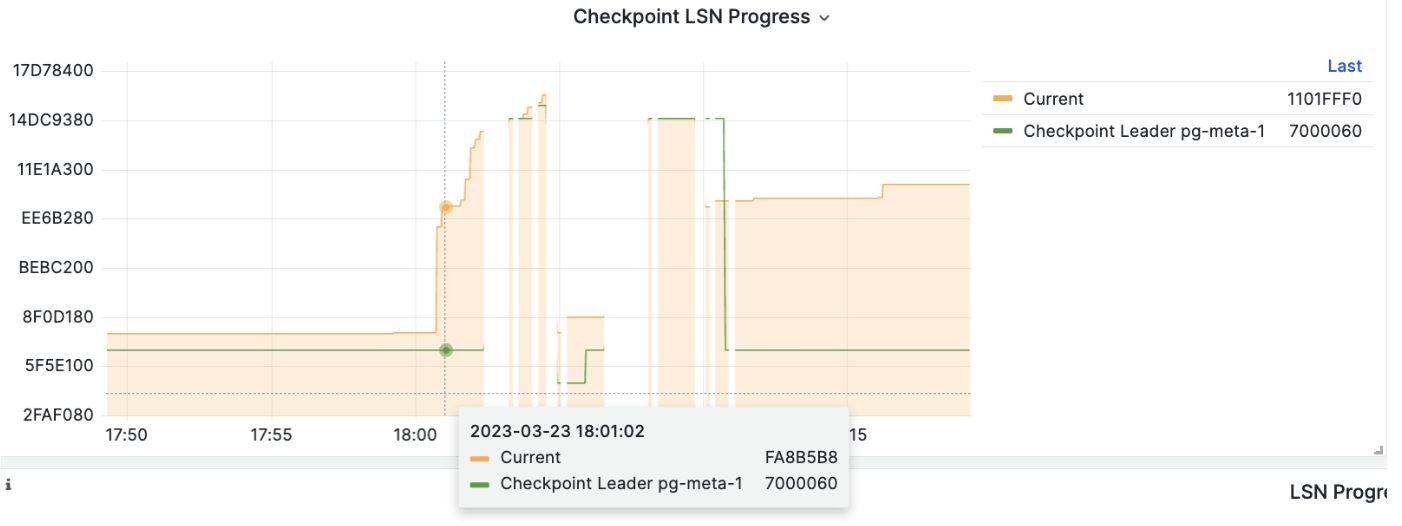
When executing PITR, you can use the Pigsty monitoring system to observe the cluster LSN position status to determine whether you have successfully restored to the specified point in time, transaction point, LSN position, or other points.
6 - Security and Compliance
Pigsty v4.0 provides Enterprise-grade PostgreSQL security configuration, covering multiple dimensions including identity authentication, access control, communication encryption, audit logging, data integrity, backup and recovery, etc.
This document uses China Level 3 MLPS (GB/T 22239-2019) and SOC 2 Type II security compliance requirements as reference, comparing and verifying Pigsty’s security capabilities item by item.
Each security dimension includes two parts:
- Default Configuration: Security compliance status when using
conf/meta.ymland default parameters (Personal use) - Available Configuration: Enhanced security status achievable by adjusting Pigsty parameters (Enterprise-grade configuration achievable)
Compliance Summary
Level 3 MLPS Core Requirements Comparison
| Requirement | Default Met | Config Available | Description |
|---|---|---|---|
| Identity Uniqueness | ✅ | ✅ | Role system ensures unique user identification |
| Password Complexity | ⚠️ | ✅ | Can enable passwordcheck / credcheck to enforce password complexity |
| Password Periodic Change | ⚠️ | ✅ | Set user validity period via expire_in/expire_at and refresh periodically |
| Login Failure Handling | ⚠️ | ✅ | Failed login requests recorded in logs, can work with fail2ban for auto-blocking |
| Two-Factor Auth | ⚠️ | ✅ | Password + Client SSL certificate auth |
| Access Control | ✅ | ✅ | HBA rules + RBAC + SELinux |
| Least Privilege | ✅ | ✅ | Tiered role system |
| Privilege Separation | ✅ | ✅ | DBA / Monitor / App Read/Write/ETL/Personal user separation |
| Communication Encryption | ✅ | ✅ | SSL enabled by default, can enforce SSL |
| Data Integrity | ✅ | ✅ | Data checksums enabled by default |
| Storage Encryption | ⚠️ | ✅ | Backup encryption + Percona TDE kernel support |
| Audit Logging | ✅ | ✅ | Logs record DDL and sensitive operations, can record all operations |
| Log Protection | ✅ | ✅ | File permission isolation, VictoriaLogs centralized collection for tamper-proofing |
| Backup Recovery | ✅ | ✅ | pgBackRest automatic backup |
| Network Isolation | ✅ | ✅ | Firewall + HBA |
SOC 2 Type II Control Points Comparison
| Control Point | Default Met | Config Available | Description |
|---|---|---|---|
| CC6.1 Logical Access Control | ✅ | ✅ | HBA + RBAC + SELinux |
| CC6.2 User Registration Auth | ✅ | ✅ | Ansible declarative management |
| CC6.3 Least Privilege | ✅ | ✅ | Tiered roles |
| CC6.6 Transmission Encryption | ✅ | ✅ | SSL/TLS globally enabled |
| CC6.7 Static Encryption | ⚠️ | ✅ | Can use Percona PGTDE kernel, and pgsodium/vault extensions |
| CC6.8 Malware Protection | ⚠️ | ✅ | Minimal installation + audit |
| CC7.1 Intrusion Detection | ⚠️ | ✅ | Set log Auth Fail monitoring alert rules |
| CC7.2 System Monitoring | ✅ | ✅ | VictoriaMetrics + Grafana |
| CC7.3 Event Response | ✅ | ✅ | Alertmanager |
| CC9.1 Business Continuity | ✅ | ✅ | HA + automatic failover |
| A1.2 Data Recovery | ✅ | ✅ | PITR backup recovery |
Legend: ✅ Default met ⚠️ Requires additional configuration
Identity Authentication
MLPS Requirement: Users logging in should be identified and authenticated, with unique identity identification; two or more combined authentication techniques such as passwords, cryptographic technology, and biometric technology should be used.
SOC 2: CC6.1 - Logical and physical access control; user authentication mechanisms.
User Identity Identification
PostgreSQL implements user identity identification through the Role system, with each user having a unique role name.
| Config Item | Default | Description |
|---|---|---|
pg_default_roles | 4 default roles + 4 system users | Predefined role system |
pg_users | [] | Business user definition list |
Default Configuration: Pigsty presets a tiered role system:
pg_default_roles:
  - { name: dbrole_readonly  ,login: false ,comment: 'Global read-only role' }
  - { name: dbrole_offline   ,login: false ,comment: 'Restricted read-only role (offline queries)' }
  - { name: dbrole_readwrite ,login: false ,roles: [dbrole_readonly] ,comment: 'Global read-write role' }
  - { name: dbrole_admin     ,login: false ,roles: [pg_monitor,dbrole_readwrite] ,comment: 'Object management role' }
  - { name: postgres         ,superuser: true  ,comment: 'System superuser' }
  - { name: replicator       ,replication: true,roles: [pg_monitor,dbrole_readonly] ,comment: 'Replication user' }
  - { name: dbuser_dba       ,superuser: true  ,roles: [dbrole_admin] ,pgbouncer: true ,comment: 'Admin user' }
  - { name: dbuser_monitor   ,roles: [pg_monitor,dbrole_readonly] ,pgbouncer: true ,comment: 'Monitor user' }
Available Configuration: Users can define business users via pg_users, supporting account validity period, connection limits, etc.:
pg_users:
  - name: dbuser_app
    password: 'SecurePass123!'
    roles: [dbrole_readwrite]
    expire_in: 365           # Expires after 365 days
    connlimit: 100           # Maximum 100 connections
    comment: 'Application user'
Password Policy
| Config Item | Default | Description |
|---|---|---|
pg_pwd_enc | scram-sha-256 | Password encryption algorithm |
pg_dbsu_password | '' (empty) | Database superuser password |
Default Configuration:
- Password encryption uses SCRAM-SHA-256 algorithm, the most secure password hash algorithm currently supported by PostgreSQL
- Passwords automatically use
SET log_statement TO 'none'when set to prevent plaintext leakage to logs - Database superuser
postgreshas no password by default, only allows local Unix Socket access viaidentauthentication
Available Configuration:
Enable
passwordcheckextension to enforce password complexity:pg_libs: 'passwordcheck, pg_stat_statements, auto_explain'Use
credcheckextension for richer password policies (length, complexity, history, etc.)Set user account validity period:
pg_users:
  - { name: temp_user, password: 'xxx', expire_in: 30 }  # Expires after 30 days
  - { name: temp_user, password: 'xxx', expire_at: '2025-12-31' }  # Expires on specified date
Authentication Mechanisms
| Config Item | Default | Description |
|---|---|---|
pg_default_hba_rules | 12 rules | Default HBA authentication rules |
pg_hba_rules | [] | Business HBA rules |
Default Configuration: Pigsty implements tiered authentication strategy based on source address:
pg_default_hba_rules:
  - {user: '${dbsu}'    ,db: all         ,addr: local     ,auth: ident ,title: 'dbsu local ident auth'}
  - {user: '${dbsu}'    ,db: replication ,addr: local     ,auth: ident ,title: 'dbsu local replication'}
  - {user: '${repl}'    ,db: replication ,addr: localhost ,auth: pwd   ,title: 'replication user local password auth'}
  - {user: '${repl}'    ,db: replication ,addr: intra     ,auth: pwd   ,title: 'replication user intranet password auth'}
  - {user: '${repl}'    ,db: postgres    ,addr: intra     ,auth: pwd   ,title: 'replication user intranet access postgres'}
  - {user: '${monitor}' ,db: all         ,addr: localhost ,auth: pwd   ,title: 'monitor user local password auth'}
  - {user: '${monitor}' ,db: all         ,addr: infra     ,auth: pwd   ,title: 'monitor user access from infra nodes'}
  - {user: '${admin}'   ,db: all         ,addr: infra     ,auth: ssl   ,title: 'admin SSL+password auth'}
  - {user: '${admin}'   ,db: all         ,addr: world     ,auth: ssl   ,title: 'admin global SSL+password auth'}
  - {user: '+dbrole_readonly',db: all    ,addr: localhost ,auth: pwd   ,title: 'readonly role local password auth'}
  - {user: '+dbrole_readonly',db: all    ,addr: intra     ,auth: pwd   ,title: 'readonly role intranet password auth'}
  - {user: '+dbrole_offline' ,db: all    ,addr: intra     ,auth: pwd   ,title: 'offline role intranet password auth'}
Supported authentication method aliases:
| Alias | Actual Method | Description |
|---|---|---|
deny | reject | Reject connection |
pwd | scram-sha-256 | Password auth (default encrypted) |
ssl | scram-sha-256 + hostssl | SSL + password auth |
cert | cert | Client certificate auth |
os/ident/peer | ident/peer | OS user mapping |
trust | trust | Unconditional trust (not recommended) |
Available Configuration:
Enable client certificate authentication for two-factor auth:
pg_hba_rules:
  - {user: 'secure_user', db: all, addr: world, auth: cert, title: 'Certificate auth user'}
Restrict specific user to access from specified IP only:
pg_hba_rules:
  - {user: 'app_user', db: 'appdb', addr: '192.168.1.100/32', auth: ssl}
Access Control
MLPS Requirement: Management users should be granted minimum necessary privileges, implementing privilege separation for management users; access control policies should be configured by authorized entities.
SOC 2: CC6.3 - Role-based access control and least privilege principle.
Privilege Separation
Default Configuration: Pigsty implements clear separation of duties model:
| Role | Privileges | Purpose |
|---|---|---|
postgres | SUPERUSER | System superuser, local OS auth only |
dbuser_dba | SUPERUSER + dbrole_admin | Database administrator |
replicator | REPLICATION + pg_monitor | Replication and monitoring |
dbuser_monitor | pg_monitor + dbrole_readonly | Read-only monitoring |
dbrole_admin | CREATE + dbrole_readwrite | Object management (DDL) |
dbrole_readwrite | INSERT/UPDATE/DELETE + dbrole_readonly | Data read-write |
dbrole_readonly | SELECT | Read-only access |
dbrole_offline | SELECT (restricted) | Offline/ETL queries |
Available Configuration:
Fine-grained privilege control implemented via
pg_default_privileges:pg_default_privileges: - GRANT USAGE ON SCHEMAS TO dbrole_readonly - GRANT SELECT ON TABLES TO dbrole_readonly - GRANT SELECT ON SEQUENCES TO dbrole_readonly - GRANT EXECUTE ON FUNCTIONS TO dbrole_readonly - GRANT INSERT ON TABLES TO dbrole_readwrite - GRANT UPDATE ON TABLES TO dbrole_readwrite - GRANT DELETE ON TABLES TO dbrole_readwrite - GRANT TRUNCATE ON TABLES TO dbrole_admin - GRANT CREATE ON SCHEMAS TO dbrole_admin
Operating System Level Privileges
| Config Item | Default | Description |
|---|---|---|
pg_dbsu | postgres | Database superuser OS account |
pg_dbsu_sudo | limit | sudo privilege level |
node_admin_sudo | nopass | Admin sudo privileges |
Default Configuration:
- Database superuser
postgressudo privileges arelimit, only allowing execution of specific service management commands:- Start/stop/restart PostgreSQL related services
- Load softdog kernel module (for watchdog)
%postgres ALL=NOPASSWD: /bin/systemctl stop postgres
%postgres ALL=NOPASSWD: /bin/systemctl start postgres
%postgres ALL=NOPASSWD: /bin/systemctl reload patroni
# ... other restricted commands
Available Configuration:
pg_dbsu_sudo: none- Completely disable sudo privileges (strictest)pg_dbsu_sudo: all- Full sudo requiring password (balanced solution)pg_dbsu_sudo: nopass- Full sudo without password (not recommended)
Row Level Security (RLS)
PostgreSQL natively supports Row Level Security (RLS), can set user attributes via pg_users:
pg_users:
  - name: secure_user
    bypassrls: false  # Don't allow bypassing RLS
    roles: [dbrole_readwrite]
Combined with RLS policies in database, can implement fine-grained data access control.
Communication Security
MLPS Requirement: Cryptographic technology should be used to ensure data integrity and confidentiality during communication.
SOC 2: CC6.6 - Data transmission security; CC6.7 - Encryption controls.
SSL/TLS Encryption
| Config Item | Default | Description |
|---|---|---|
ssl (postgresql.conf) | on | Server-side SSL switch |
patroni_ssl_enabled | false | Patroni API SSL |
pgbouncer_sslmode | disable | PgBouncer client SSL |
nginx_sslmode | enable | Nginx HTTPS |
Default Configuration:
- PostgreSQL server enables SSL by default, supports encrypted connections
- Admin users (
${admin}) forced to usehostsslconnections - Automatically generates and distributes SSL certificates to all database nodes
# SSL configuration in patroni.yml
ssl: 'on'
ssl_cert_file: '/pg/cert/server.crt'
ssl_key_file: '/pg/cert/server.key'
ssl_ca_file: '/pg/cert/ca.crt'
Available Configuration:
Enable Patroni REST API SSL encryption:
patroni_ssl_enabled: trueEnable PgBouncer client SSL:
pgbouncer_sslmode: require # or verify-ca, verify-fullForce all connections to use SSL:
pg_hba_rules:
  - {user: all, db: all, addr: world, auth: ssl, title: 'Force SSL'}
PKI Certificate Management
| Config Item | Default | Description |
|---|---|---|
cert_validity | 7300d | Certificate validity period (20 years) |
| CA Certificate Validity | 100 years | Self-signed CA validity |
Default Configuration:
Pigsty uses self-built PKI system, automatically manages certificate lifecycle:
files/pki/
├── ca/           # CA root certificate
│   ├── ca.crt    # CA public key certificate
│   └── ca.key    # CA private key
├── csr/          # Certificate signing requests
├── pgsql/        # PostgreSQL cluster certificates
├── etcd/         # ETCD cluster certificates
├── infra/        # Infrastructure node certificates
└── minio/        # MinIO certificates
- Each PostgreSQL cluster shares one private key, each instance has independent certificate
- Certificates include correct SAN (Subject Alternative Name) configuration
- CA certificate automatically distributed to
/etc/pki/ca.crtand/pg/cert/ca.crt
Available Configuration:
- Use externally CA-signed certificates: Place certificates in
files/pki/directory, setca_create: false - Adjust certificate validity:
cert_validity: 365d(1 year)
ETCD Communication Security
ETCD as Patroni’s DCS (Distributed Configuration Store), uses mTLS (mutual TLS) authentication by default:
etcd3:
  hosts: '10.10.10.10:2379'
  protocol: https
  cacert: /pg/cert/ca.crt
  cert:   /pg/cert/server.crt
  key:    /pg/cert/server.key
  username: 'pg-meta'        # Cluster-specific account
  password: 'pg-meta'        # Default same as cluster name
Data Encryption
MLPS Requirement: Cryptographic technology should be used to ensure confidentiality of important data during storage.
SOC 2: CC6.1 - Data encryption storage.
Backup Encryption
| Config Item | Default | Description |
|---|---|---|
cipher_type | aes-256-cbc | Backup encryption algorithm (MinIO repo) |
cipher_pass | pgBackRest | Encryption password (needs modification) |
Default Configuration:
- Local backup (
pgbackrest_method: local) not encrypted by default - Remote object storage backup supports AES-256-CBC encryption
Available Configuration:
Enable backup encryption (recommended for remote storage):
pgbackrest_method: minio
pgbackrest_repo:
  minio:
    type: s3
    s3_endpoint: sss.pigsty
    s3_bucket: pgsql
    s3_key: pgbackrest
    s3_key_secret: S3User.Backup
    cipher_type: aes-256-cbc
    cipher_pass: 'YourSecureBackupPassword!'  # Must modify!
    retention_full_type: time
    retention_full: 14
Transparent Data Encryption (TDE)
PostgreSQL community edition doesn’t support native TDE, but storage encryption can be implemented via:
- Filesystem-level encryption: Use LUKS/dm-crypt to encrypt storage volumes
- pgsodium extension: Supports column-level encryption
# Enable pgsodium column-level encryption
pg_libs: 'pgsodium, pg_stat_statements, auto_explain'

# Custom encryption key (64-bit hex)
pgsodium_key: 'a1b2c3d4e5f6...'  # Or use external key management script
Data Integrity Verification
| Config Item | Default | Description |
|---|---|---|
pg_checksum | true | Data checksums |
Default Configuration:
- Data checksums enabled by default, can detect storage layer data corruption
crit.ymltemplate enforces data checksums- Supports
pg_rewindfor failure recovery
pg_checksum: true # Strongly recommend keeping enabled
Security Auditing
MLPS Requirement: Security auditing should be enabled, covering each user, auditing important user behaviors and security events.
SOC 2: CC7.2 - System monitoring and logging; CC7.3 - Security event detection.
Database Audit Logging
| Config Item | Default | Description |
|---|---|---|
logging_collector | on | Enable log collector |
log_destination | csvlog | CSV format logs |
log_statement | ddl | Record DDL statements |
log_min_duration_statement | 100ms | Slow query threshold |
log_connections | authorization (PG18) / on | Connection audit |
log_disconnections | on (crit template) | Disconnection audit |
log_checkpoints | on | Checkpoint logs |
log_lock_waits | on | Lock wait logs |
log_replication_commands | on | Replication command logs |
Default Configuration:
# oltp.yml template audit configuration
log_destination: csvlog
logging_collector: 'on'
log_directory: /pg/log/postgres
log_filename: 'postgresql-%a.log'    # Rotate by weekday
log_file_mode: '0640'                # Restrict log file permissions
log_rotation_age: '1d'
log_truncate_on_rotation: 'on'
log_checkpoints: 'on'
log_lock_waits: 'on'
log_replication_commands: 'on'
log_statement: ddl                   # Record all DDL
log_min_duration_statement: 100      # Record slow queries >100ms
Available Configuration (crit.yml critical business template):
# crit.yml provides more comprehensive auditing
log_connections: 'receipt,authentication,authorization'  # PG18 full connection audit
log_disconnections: 'on'             # Record disconnections
log_lock_failures: 'on'              # Record lock failures (PG18)
track_activity_query_size: 32768     # Full query recording
Enable pgaudit extension for fine-grained auditing:
pg_libs: 'pgaudit, pg_stat_statements, auto_explain'
pg_parameters:
  pgaudit.log: 'all'
  pgaudit.log_catalog: 'on'
  pgaudit.log_relation: 'on'
Performance and Execution Auditing
| Extension | Default Enabled | Description |
|---|---|---|
pg_stat_statements | Yes | SQL statistics |
auto_explain | Yes | Slow query execution plans |
pg_wait_sampling | Config available | Wait event sampling |
Default Configuration:
pg_libs: 'pg_stat_statements, auto_explain'

# auto_explain configuration
auto_explain.log_min_duration: 1s    # Record query plans >1s
auto_explain.log_analyze: 'on'
auto_explain.log_verbose: 'on'
auto_explain.log_timing: 'on'

# pg_stat_statements configuration
pg_stat_statements.max: 10000
pg_stat_statements.track: all
Centralized Log Management
Default Configuration:
- PostgreSQL logs:
/pg/log/postgres/ - Patroni logs:
/pg/log/patroni/ - PgBouncer logs:
/pg/log/pgbouncer/ - pgBackRest logs:
/pg/log/pgbackrest/
Available Configuration:
Send logs to VictoriaLogs for centralized storage via Vector:
# Logs automatically collected to VictoriaLogs
vlogs_enabled: true
vlogs_port: 9428
vlogs_options: >-
  -retentionPeriod=15d
  -retention.maxDiskSpaceUsageBytes=50GiB
Network Security
MLPS Requirement: Access control devices should be deployed at network boundaries to implement access control for data flows entering and leaving the network.
SOC 2: CC6.1 - Boundary protection and network security.
Firewall Configuration
| Config Item | Default | Description |
|---|---|---|
node_firewall_mode | zone | Firewall mode |
node_firewall_intranet | RFC1918 segments | Intranet CIDR |
node_firewall_public_port | [22,80,443,5432] | Public ports |
Default Configuration:
node_firewall_mode: zone             # Enable zone firewall
node_firewall_intranet:              # Define intranet addresses
  - 10.0.0.0/8
  - 192.168.0.0/16
  - 172.16.0.0/12
node_firewall_public_port:           # Public ports
  - 22    # SSH
  - 80    # HTTP
  - 443   # HTTPS
  - 5432  # PostgreSQL (open cautiously)
Firewall rules:
- Intranet addresses automatically added to
trustedzone - Only specified ports open to public
- Supports firewalld (RHEL-based) and ufw (Debian-based)
Available Configuration:
node_firewall_mode: off- Disable firewall (not recommended)node_firewall_mode: none- Don’t modify existing config- Remove port 5432, only allow intranet database access
Service Access Control
| Config Item | Default | Description |
|---|---|---|
pg_listen | 0.0.0.0 | PostgreSQL listen address |
patroni_allowlist | infra + cluster | Patroni API whitelist |
Default Configuration:
Patroni REST API only allows access from following addresses:
# Automatically calculated whitelist
pg_allow_list = [admin_ip] + pg_cluster_members + groups["infra"]
Available Configuration:
Restrict PostgreSQL to listen on specific NIC only:
pg_listen: '${ip}' # Only listen on host IP, not 0.0.0.0
SELinux
| Config Item | Default | Description |
|---|---|---|
node_selinux_mode | permissive | SELinux mode |
Default Configuration: SELinux set to permissive mode (log but don’t block)
Available Configuration:
node_selinux_mode: enforcing # Enforcing mode (requires additional policy configuration)
Availability and Recovery
MLPS Requirement: Should provide data backup and recovery functions; should provide automatic failure recovery.
SOC 2: CC9.1 - Business continuity; A1.2 - Data backup and recovery.
High Availability Architecture
| Config Item | Default | Description |
|---|---|---|
patroni_enabled | true | Enable Patroni HA |
pg_rto | 30 | Recovery time objective (seconds) |
pg_rpo | 1048576 | Recovery point objective (1MB) |
Default Configuration:
- Patroni automatic failure detection and switching (RTO < 30s)
- Asynchronous replication, max data loss 1MB (RPO)
failsafe_mode: trueprevents split-brain
Available Configuration:
Enable synchronous replication for RPO = 0:
pg_rpo: 0                    # Zero data loss
pg_conf: crit.yml            # Use critical business template
# crit.yml automatically enables synchronous_mode: true
Enable hardware watchdog:
patroni_watchdog_mode: automatic # or required
Backup Recovery
| Config Item | Default | Description |
|---|---|---|
pgbackrest_enabled | true | Enable pgBackRest |
pgbackrest_method | local | Backup storage method |
retention_full | 2 | Retain full backup count |
Default Configuration:
pgbackrest_enabled: true
pgbackrest_method: local
pgbackrest_repo:
  local:
    path: /pg/backup
    retention_full_type: count
    retention_full: 2            # Retain 2 full backups
Available Configuration:
Off-site backup to object storage:
pgbackrest_method: minio
pgbackrest_repo:
  minio:
    type: s3
    s3_endpoint: sss.pigsty
    s3_bucket: pgsql
    cipher_type: aes-256-cbc     # Encrypt backups
    retention_full_type: time
    retention_full: 14           # Retain 14 days
    block: y                     # Block-level incremental backup
    bundle: y                    # Small file merging
Scheduled backup strategy:
node_crontab:
  - '00 01 * * * postgres /pg/bin/pg-backup full'   # Daily 1am full backup
  - '00 */4 * * * postgres /pg/bin/pg-backup diff'  # Every 4 hours differential backup
Intrusion Prevention
MLPS Requirement: Should follow minimal installation principle, only installing necessary components and applications; should be able to detect intrusion attempts on important nodes, providing alerts for serious intrusion events.
SOC 2: CC6.8 - Malware protection; CC7.1 - Intrusion detection.
Minimal Installation
Default Configuration:
- Only install necessary PostgreSQL components and extensions
- Precisely control installation content via
pg_packagesandpg_extensions - Production systems don’t install development tools and debug symbols
pg_packages: [ pgsql-main, pgsql-common ]  # Minimal installation
pg_extensions: []                          # Add extensions as needed
Security Extensions
Pigsty provides the following security-related extensions, can be installed and enabled as needed:
| Extension/Package | Version | Description |
|---|---|---|
| passwordcheck_cracklib | 3.1.0 | Strengthen PG user passwords using cracklib |
| supautils | 3.0.2 | Ensure database cluster security in cloud environment |
| pgsodium | 3.1.9 | Table data encryption storage TDE |
| supabase_vault / pg_vault | 0.3.1 | Extension for storing encrypted credentials in Vault (supabase) |
| pg_session_jwt | 0.4.0 | Session authentication using JWT |
| anon | 2.5.1 | Data anonymization tool |
| pgsmcrypto | 0.1.1 | Provide SM algorithms for PostgreSQL: SM2,SM3,SM4 |
| pg_enigma | 0.5.0 | PostgreSQL encrypted data types |
| pgaudit | 18.0 | Provide audit functionality |
| pgauditlogtofile | 1.7.6 | pgAudit sub-extension, write audit logs to separate files |
| pg_auditor | 0.2 | Audit data changes and provide flashback capability |
| logerrors | 2.1.5 | Functions for collecting message statistics in log files |
| pg_auth_mon | 3.0 | Monitor connection attempts per user |
| pg_jobmon | 1.4.1 | Record and monitor functions |
| credcheck | 4.2 | Plaintext credential checker |
| pgcryptokey | 0.85 | PG key management |
| login_hook | 1.7 | Execute login_hook.login() function on user login |
| set_user | 4.2.0 | SET ROLE with added logging |
| pg_snakeoil | 1.4 | PostgreSQL dynamic library anti-virus functionality |
| pgextwlist | 1.19 | PostgreSQL extension whitelist functionality |
| sslutils | 1.4 | Manage SSL certificates using SQL |
| noset | 0.3.0 | Prevent non-superusers from using SET/RESET to set variables |
| pg_tde | 1.0 | Percona encrypted storage engine |
| sepgsql | - | SELinux label-based mandatory access control |
| auth_delay | - | Pause before returning auth failure, avoid brute force |
| pgcrypto | 1.3 | Utility encryption/decryption functions |
| passwordcheck | - | Extension to force reject weak password changes |
Install all security extension packages:
pg_extensions: [ pg18-sec ] # Install security extension group
Alerting and Monitoring
Default Configuration:
- VictoriaMetrics + Alertmanager provide monitoring and alerting
- Preset PostgreSQL alert rules
- Grafana visualization dashboards
Key security-related alerts:
- Excessive authentication failures
- Excessive replication lag
- Backup failures
- Disk space shortage
- Connection exhaustion